


Introduction
Choosing a UX research platform shouldn’t feel like guesswork. Yet so many people tell us, “These tools all claim to do the same thing – what’s the difference?” That question inspired this breakdown. In this guide, we’ll compare Lyssna and UXArmy in practical terms – from real testing capabilities to the depth of insights you can actually get – so you can confidently choose the platform that fits your research goals.
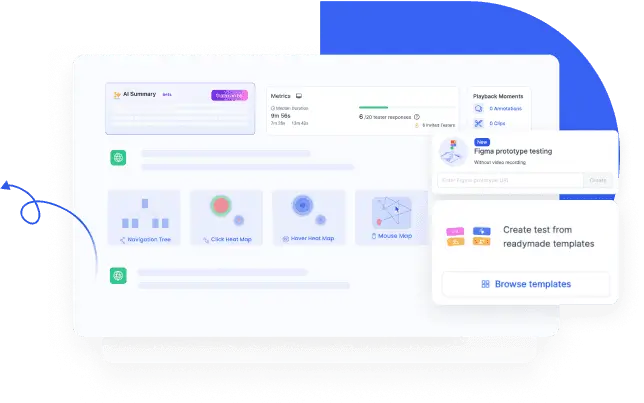
What can I do with Lyssna?
Lyssna (formerly UsabilityHub) is a remote research platform designed for quick, lightweight studies best suited for early design validation. Teams can run unmoderated usability tests, surveys, card sorting, tree testing, and interviews. Unmoderated testing on mobile devices has limitations, and native mobile app testing is not supported at all. It’s widely praised for ease of use, and its global panel of 690,000+ participants. Panel usage costs extra on every plan.
Lyssna used to be the preferred tool for researchers and teams that run short, iterative tests up until late 2025. However, the new online pricing model introduced in November 2025 now makes that use case uneconomical with the constraint of 1 study per month. (More on this in price vs value section below)

What can I do with UXArmy?
UXArmy is a powerful remote user research platform designed to get actionable user insights throughout the entire development cycle.
It’s suitable for short iterative tests and surveys, as well as for longer think-aloud tests with recordings that aim to understand the whys. Teams can run unmoderated usability tests, surveys, card sorting, tree testing, interviews and focus groups. Suitable for testing native mobile apps, live websites, prototypes, images, copies and videos.
What sets UXArmy apart from most other remote user research platforms out there is recording of the “full testing experience” across both desktop and mobile devices, strong native mobile app testing, wider range of research methodologies and pricing model that minimizes the upfront payment yet gives the flexibility to scale.
As compared to Lyssna specifically, UXArmy is strong in Mobile experience, offers more features to optimize self-recruited tests, has a stronger panel in Asia, offers advanced AI features that save time to insight, and less constraint when it comes to different features modern researchers and global teams look for. Like Lyssna, UXArmy has a global panel which is also separately charged and supports multi-languages.
Key Differences Between Lyssna vs UXArmy
1. AI capabilities at a glance
Lyssna offers simple AI features for higher tiers with limited deliverables
UXArmy offers richer AI features with AI-powered summaries, sentiment analysis, highlights with auto-tags, follow-up questions, unlimited transcriptions, and translations making it easier to get key insights fast, and figuring out which recording and response to deep dive into.
2. Mobile App Testing fully supported vs. not at all
Lyssna does not support native mobile app testing. Lyssna primarily supports web and prototype testing, but its mobile experience is limited. Its documentation emphasizes “device frames” rather than true mobile app usability flows and it does not support screen recording on mobile devices, even for website and prototype tests. This makes it hard to evaluate real-world mobile user journeys.
UXArmy, on the other hand, supports fully native unmoderated mobile app testing out of the box. Teams can run real app usability studies with screen and audio recordings, transcripts, and AI insights. This makes UXArmy a better fit for usability testing of products where the mobile experience drives customer adoption. UXArmy supports user testing on both iOS & Android smart phones and tablets.

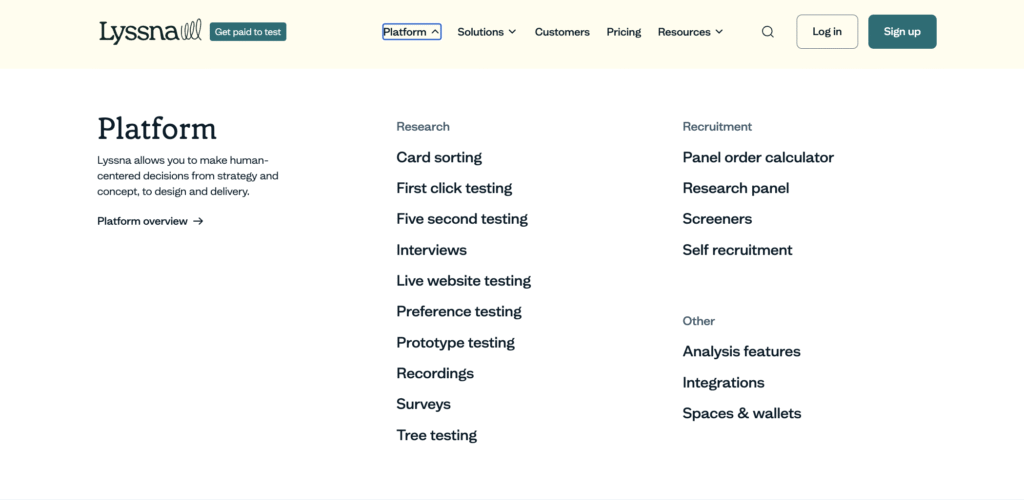
3. Live Website Testing without Device Constraints
With Lyssna website testing, you can test your marketing website, web app, or a competitor’s. No downloads nor code installation required.
Sounds great, but test results for website testing are limited.
- Lyssna does NOT provide path analysis for websites
- Lyssna does NOT support screen recording on mobile devices
- Lyssna provides ONLY first-click/static screen heatmaps instead of full-journey heatmaps across multiple pages, suboptimal when you want to study user journeys
UXArmy also supports testing of your marketing website, web app, or a competitor’s with no code (or snippet) installation. And, you get in-depth results, such as
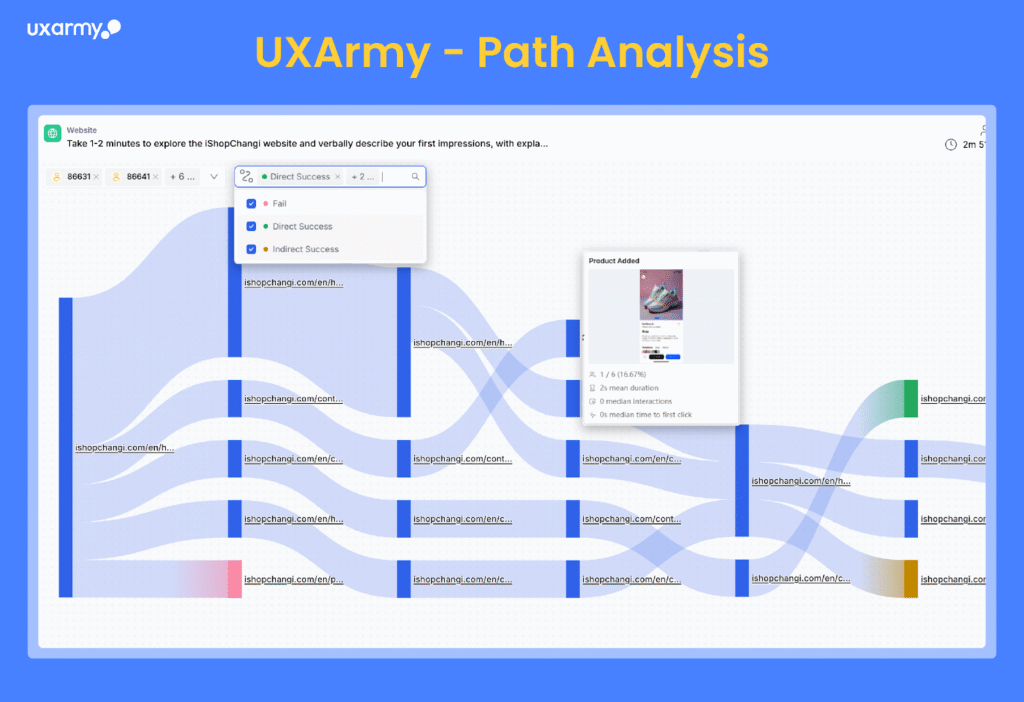
- Full path analysis with direct/indirect success and failures
- Screen and audio recording on both mobile devices and desktop
- Full-journey heatmap across multiple screens/pages for richer behavioral analysis
- AI summaries, sentiment analysis, auto-tagging and highlights for all paid plans
4. Surveys
You can run surveys on both Lyssna and UXArmy, including image surveys.
However, UXArmy provides more flexibility and control with more question types (like matrix question, add images to a question or as answer options), advanced logic and ordering control, integration with googlesheets.
You can even choose to run recorded customer satisfaction surveys using UXArmy’s advanced usability testing platform, which includes all the question types available in the survey tool – single/multi-select, matrix, rating scale, ranking questions, open feedback – on top of navigation, speaking tasks.
5. Powerful Research Design, Logic & Workflow
Lyssna is easy to set up for simple studies, but reviewers often flag limitations with logic, types of questions available and, reporting depth.
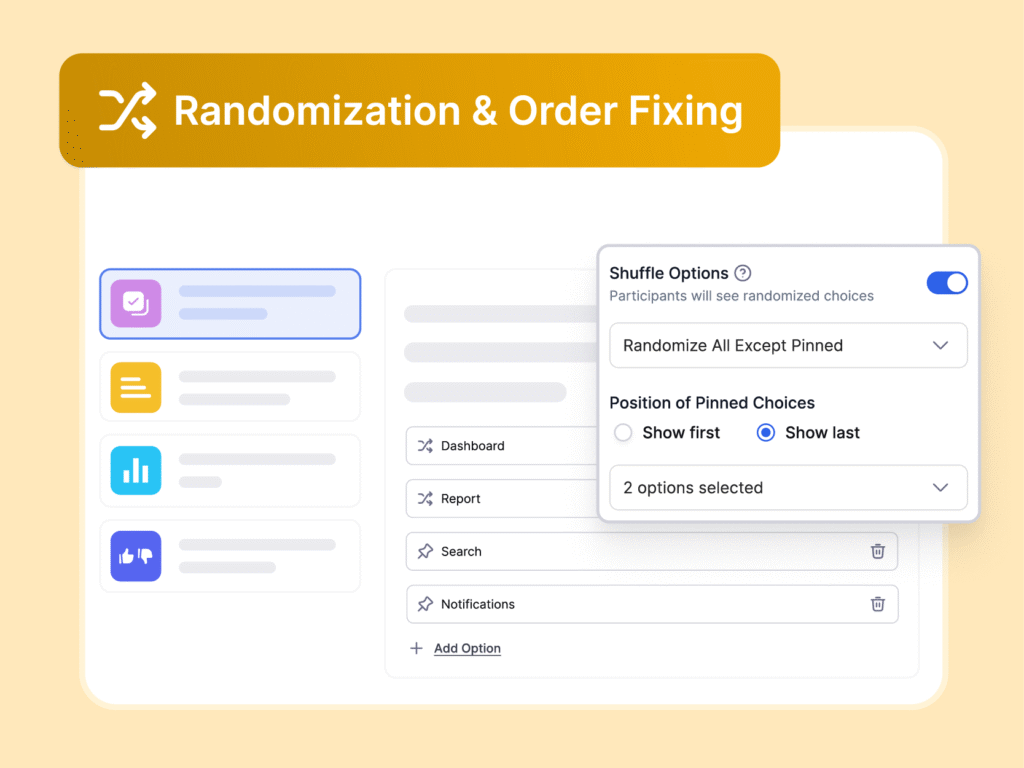
UXArmy, on the other hand, provides advanced task logic with branching flows, success criteria (by intended path or end screen), and redirect urls with dynamic parameters. To reduce bias, UXArmy provides Randomization & Order Fixing, letting you shuffle answer options while keeping key ones fixed. Such capabilities give researchers maximum control and test setups that can scale from simple to complex studies.
6. Recordings of Full Test vs Limited to Select Tasks
Lyssna supports recording for select tasks and screen recording is NOT possible on mobile devices.
UXArmy provides continuous screen and audio recording from the first task to the end of the tests, and is available for desktop, phones and tablet (both iOS & Android). No device constraint. The recording option is not available for card sorting, tree testing and you can choose to run Figma prototype testing without recording. Camera recording is optional for desktop.
User testing platforms will often ask you to insert a few lines of codes into your website and prototype – this is to enable recording. UXArmy does NOT require you to install ‘a few lines of code’, ‘sdk’ or ‘snippets’ for any testing. Lyssna also offers no code implementation, but recording is limited.
Naturally, the maximum recording length is longer for UXArmy than Lyssna. For unmoderated testing, recording times out at 50 minutes on mobile devices and 60minutes on desktop for UXArmy.
7. Deeper Behavioral Analytics
Both Lyssna and UXArmy provide path analysis and heatmaps, but devil’s in the details.
Unlike Lyssna, UXArmy offers richer path analysis that shows user flows and deviations for websites and prototypes unconstrained by device type plus multi-step heatmaps to track attention across the entire journey
8. Moderated Research
Lyssna and UXArmy both offer user interviews. But Lyssna does not support live interviews. You will need additional subscription to a third party video conferencing tool like zoom to use Lyssna’s user interview features.
UXArmy’s moderated research platform DeepDive®, offers built-in “live” video conferencing with hidden observers, consolidated note-taking, transcriptions time-stamped to video and tagged for easy reference and video clipping. You can also upload user interview recordings from third party VC tools to get transcriptions, AI highlights and tags, and utilize analysis space
Interviewees can join calls on DeepDive® without signing-ins. Each call can last 3 hours, screen+audio+camera recording is available for you to choose from.
Only UXArmy supports focus group discussions, dyad, triad interviews with hidden observers, consolidated note taking.
9. Multiple languages – test interface, transcriptions, translations
Both Lyssna and UXArmy support testing in multiple languages with language selections for tester interface, and transcriptions. Both cover major European languages. UXArmy has better coverage of Asian languages.
UXArmy offers richer “in-platform” translation features as compared to Lyssna. UXArmy currently provides full in-platform automatic translation of transcriptions, and in-platform translation of tasks during test creation.
Check out the latest list of available languages for UXArmy and Lyssna.
Features Comparison Table
| Category | Lyssna | UXArmy |
|---|---|---|
| Assets Supported for Testing | Prototype, live website, images, copies | Mobile app (live & beta), prototype, live website, images |
| No code implementation | No code implementation | No code implementation |
| Screen + Audio Recordings | Screen recording not supported on mobile devices; limited to select tasks | Full test recordings from first task to submission across devices, with option to turn off for Figma. |
| Mobile App Testing | Not available | Native mobile app testing available for both iOS & Android |
| Mobile Experience | No screen recording on mobile devices for website, prototypes | Screen + audio recording of full test supported on phones, tablets for all assets. Both iOS & Android.Only card sorting is not supported on mobile devices. |
| Desktop Experience | No downloads required | No download applies to only tests without recordings. Chrome extension needed for recording on desktop. |
| Path Analysis | Available for prototypes & tree testing only (not live websites) | Available for live websites, prototypes, and tree testing with rich analysis |
| Heatmaps | First-click/static screen heatmaps only | Full-journey heatmaps across multiple screens/pages for richer behavioral analysis in addition to first-click/static screen |
| AI-Powered Insights | Limited AI summaries, follow-up questions, auto-transcription, translation | Richer AI: auto-summaries, sentiment analysis, smart tagging, highlight-reel clips, transcription & translation |
| Question Types | Open text, single/multiple choice, linear scale, ranking | Advanced types including Matrix, SUS, branching logic, speaking tasks, plus Disqualification Logic and Randomization/Order Fixing |
| Templates | Yes | Yes |
| Moderated Research | User interviewsNeed to use a third-party video conferencing tool like Zoom and upload recording into Lyssna | User interviews, Focus Group discussionsHas built-in live video conferencing for live conversations. Interviewees can join calls without sign-ins. Recording upload is also possible. |
| Multiple language | 30 languages for local tester UI, transcriptionsIn-platform translation is limited Translation of task during test creation is not available | Local tester UI in 17 languages, 17 languages for in-platform translation of tasks, 23 languages for auto-transcription, 67 languages for in-platform translation of transcriptionsBest platform for Asian languages. |
Pricing Model Comparison (2026 update)
UXArmy and Lyssna differ mainly in how their usage limits are applied in online plans, which affects how easily teams can scale their research.
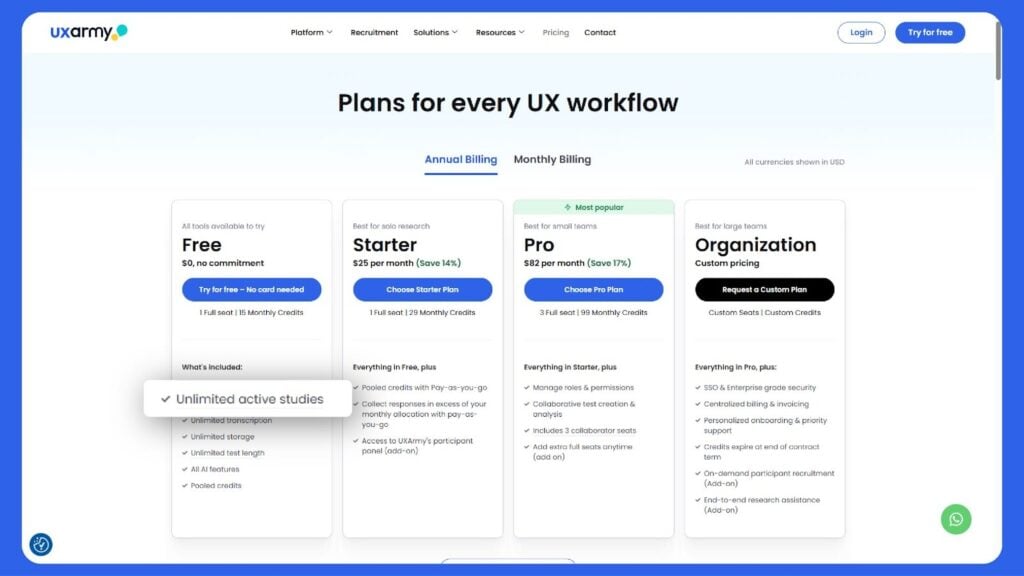
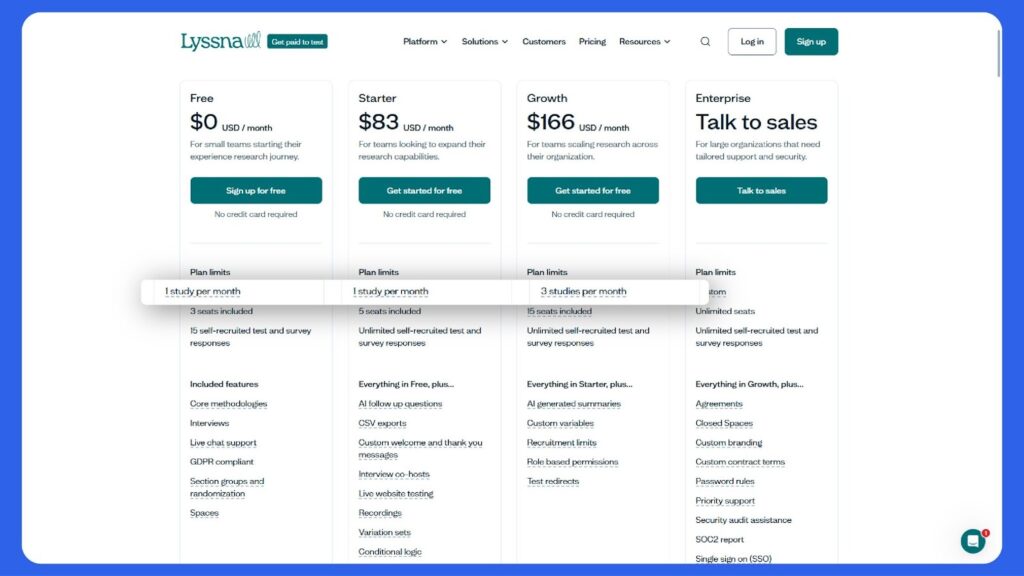
Lyssna’s one-study cap per month vs UXArmy’s unlimited studies
Lyssna restricts customers to one study per month for Starter Plan ($99/month), and 3 studies per month for Growth Plan ($199/month). As a result, its claim of “Unlimited self-recruited tests and survey responses” is meaningless. Usage is effectively constrained by the monthly study cap, limiting how freely teams can run iterative or parallel research. Already there are complaints on Reddit from users who practice short, frequent tests.
UXArmy takes a more field-friendly approach. Customers can run an unlimited number of studies. Monthly constraint applies only to the number of responses collected, not the number of tests created. The monthly response limits for UXArmy are comparable or generous as compared to Lyssna when you consider the typical sample size of a study. Importantly, additional responses can be purchased for any study as needed, without waiting for the next billing cycle.
In addition, UXArmy also uses a “pooled credit” system, giving teams the flexibility to choose among any (or a mix) of the diverse research methods available from unmoderated and moderated usability tests, information architecture testing, to surveys. This allows research activity to scale and adapt based on evolving business priorities, rather than being locked into rigid monthly structures.
Easier to Scale with UXArmyvs Lyssna(pricing model allows for flexibility)
In a nutshell, UXArmy offers access to ALL key features across ALL paid plans, constrained only by the number of responses you can collect in a month which varies by plan. This makes it very easy for your to scale your research to meet your business needs with minimum upfront financial commitment:
- Try out the features you need yourself with the Free Plan,
- Upgrade with minimum commitment to $25/month Starter Plan which gives you higher monthly cap and the flexibility to add-on more responses to any study when you need it
- Upgrade to Pro plan or Enterprise plan for team management features
The only exceptions are team management features (not available in solo plans – Free, Starter), ability to collect responses beyond your monthly cap (available for paid plans only), and access to UXArmy’s participant panel (a separate add-ons just like Lyssna, not available for Free Plan).
Lyssna, on the other hand, applies tiered access to features like AI summaries, apply limits to self recruitment links, redirect url for self-recruited participants which forces you to upgrade.
UXArmy’s free plan lets you try everything
Even Free plan for UXArmy is more generous.
UXArmy Free Plan was designed to let you try out everything, so you can decide whether to go for a paid plan. Access includes mobile app, live website and prototype usability tests with recordings, screeners, conditional logic, card sorting, tree testing, surveys, comparative tests – everything in Lyssna and more.
On the other hand, Lyssna Free plan gives you access to only what Lyssna calls ‘Core Methodologies’ – prototype test, surveys, first click tests, preference tests, card sorting, tree testing, 5 second tests. NO recording. NO conditional logic to try out.
Learn more details on UXArmy pricing plans in FAQ of pricing page
What Users Say About Lyssna
The good:
- Easy to set up
- Responsive support
- Great for fast prototype validation
The challenges:
- Limited for mobile experience testing
- Reports & logic are limited compared to alternatives
- Not ideal for complex moderated research
Example feedback:
- “Pricing is quite steep… order took 5–6 days in total.” (G2)
- “Similar tools pricing differences are the key.” (Reddit)
- “What you’re looking for is called a matrix select question type.” Reddit
- “Lyssna does all of these, but I don’t think you can use it for moderated testing.” (Reddit)
💬 “UXArmy is easy to start with, but what surprised us is how powerful it really is. Beyond fast setup and great support, the platform gives us depth with mobile testing, path analysis, and AI-powered insights that other tools don’t.”
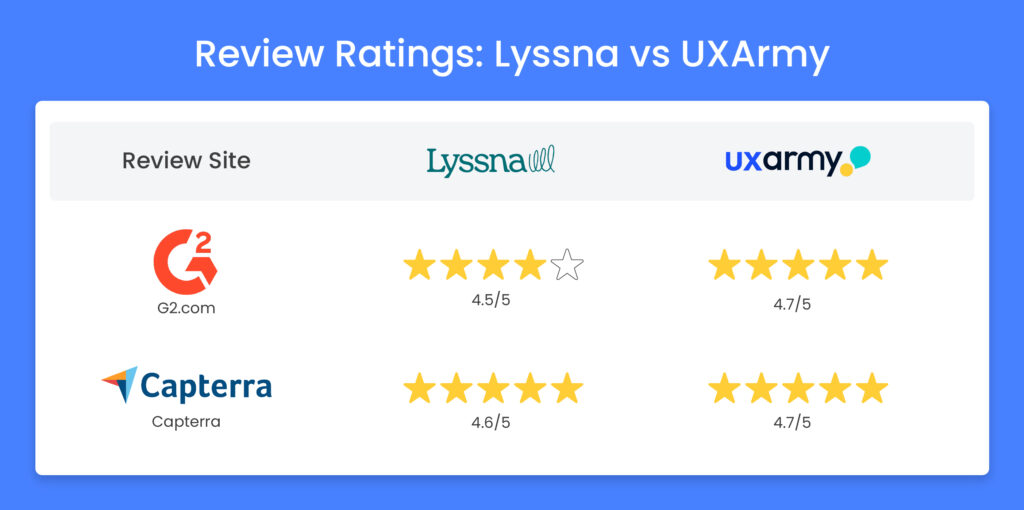
Lyssna vs. UXArmy:The Summary
For a team evaluating both platforms, UXArmy offers broader capability at a lower cost of entry, and is the better option for those who need mobile testing and deeper analysis as part of their workflow.
Lyssna is a good fit for a small team of designers needing to do quick validation studies and early-stage prototype or survey feedback. Its interface is simple, setup is fast, and it’s reliable for running short unmoderated tests. However, its current structure is better suited for desktop and web experiences. Mobile testing is limited to simulated device frames rather than actual app interactions, and analytics stop at first-click heatmaps and completion rates. This works well for design teams validating screens, but less so for product teams studying real user behavior across devices.
Lyssna may NOT be suitable for teams that do iterative, parallel research due to the introduction of the monthly limit on the number of studies allowed.
UXArmy is better suited for teams that want to use insights at various stages of the product lifecycle, practice iterative or parallel testing, and may have diverse research goals. UXArmy can meet the needs of UX researchers, designers, product managers, and CX managers. It supports website, prototype, and true native mobile app testing with screen and audio recordings. Researchers can design complex studies with branching logic, randomization, and disqualification rules to minimize bias and improve data reliability. Beyond collecting feedback, it helps teams interpret behavior through path analysis, multi-screen heatmaps, and usability metrics like task success, time on task, SUS.
In the end, the decision comes down to focus: Lyssna for fast, lightweight tests and UXArmy for in-depth research that scales with both the product and the team’s needs.
Frequently asked questions
Can I run tree testing with UXArmy and Lyssna?
Yes both tools support tree testing. Lyssna provides a straightforward tree-testing workflow for validating information architecture, while UXArmy provides a more advanced tree-testing environment with rich analytics and reporting.
Does UXArmy or Lyssna allow remote unmoderated user testing from home users?
Both tools support remote unmoderated testing. Lyssna is well-suited for lightweight remote studies. UXArmy, however, offers both remote unmoderated and moderated testing (including live interviews/focus groups) and supports full recordings (screen + audio + optional camera) for deeper insight.
Which platform is better for card sorting and information-architecture research?
Lyssna includes card-sorting tools (open and closed). UXArmy extends this with hybrid card sorting (allowing open, closed, and mixed formats) plus built-in tools for tree testing, making it more versatile for IA research.
As a usability testing firm or internal UX team, how do I pick between Lyssna and UXArmy?
IIt depends on the scope and depth of your research needs and the languages.. If you mainly run quick prototype or webpage tests and need fast setup, Lyssna is viable. If you require full cycle research (mobile apps + web + complex workflows + collaborative analysis) then UXArmy provides broader capabilities and stronger analytics. Both offer non-English testing options, with UXArmy richer in ‘in-platform’ language features.
What about surveys and general research tools – are they supported?
Yes. Both platforms support surveys as part of their broader research toolkits.u003cbru003eu003cstrongu003eLyssnau003c/strongu003e provides unmoderated surveys and quick feedback tests for gathering opinions or validating ideas at scale.u003cbru003eu003cstrongu003eUXArmyu003c/strongu003e offers a more advanced survey builder with branching logic, rating scales, matrix and speaking questions, and can combine survey responses with usability session data from the same participants for richer insights.
Can I test native mobile apps with these platforms?
Lyssna currently does not support native mobile app testing.. UXArmy offers native app testing for iOS and Android with full recordings, making it a stronger option if mobile UX is part of your research scope.
How large are the panels and what are the recruitment options?
Lyssna provides access to its panel and also allows self-recruited participants. UXArmy allows self-recruited respondents and also has a global participant network (stands out for Asia-Pacific) and supports participant recruitment or your own users, depending on your plan.
Do either tools work well for global/localization research?
u003cstrongu003eUXArmyu003c/strongu003e offers comprehensive multilingual support with u003cstrongu003elocal tester UI available in 17 languagesu003c/strongu003e, u003cstrongu003ein-platform task translation in 17 languagesu003c/strongu003e, u003cstrongu003eauto-transcription in 23 languagesu003c/strongu003e, and u003cstrongu003etranslation of transcriptions in 67 languagesu003c/strongu003e. It is widely recognized as one of the u003cstrongu003ebest UX research platforms for Asian languages and regional studiesu003c/strongu003e.u003cbru003eu003cstrongu003eLyssnau003c/strongu003e, on the other hand, supports multi-language testing but provides fewer built-in localization and translation features compared to UXArmy’s strong global and Asia-Pacific focus.
Which tool is better for conducting userinterviews Lyssna or UXArmy?
Lyssna supports userinterviews, but it requires third-party tools like Zoom for live conversations. UXArmy offers a more complete approach with built-in moderated research, live interviews, focus groups, and automatic transcription with AI highlights. If your research relies heavily on real-time user conversations and deeper insights, UXArmy is a more efficient option for userinterviews end-to-end.
What should I look for when choosing a usability testing tool for website research?
Look beyond just task-based testing ensure the platform supports u003cstrongu003efull-screen recordings, path analysis, multi-step heatmaps, and mobile compatibilityu003c/strongu003e. Lyssna works well for quick prototype or first-click tests, while UXArmy provides a more detailed understanding of user journeys with richer path analysis, full-journey heatmaps, and deeper AI insights across both desktop and mobile.