


Imagine building a beautiful house, but the doors and hallways make no sense. Tree testing is your blueprint check, ensuring your digital pathways are intuitive ideally before the costly construction begins. This guide will walk you through what tree testing is, why it’s crucial for any digital product, how it works, and how a tool like UXArmy can help you build truly user-friendly navigation. (UXArmy currently has generous free tree testing among their plans!)
What Exactly is Tree Testing?
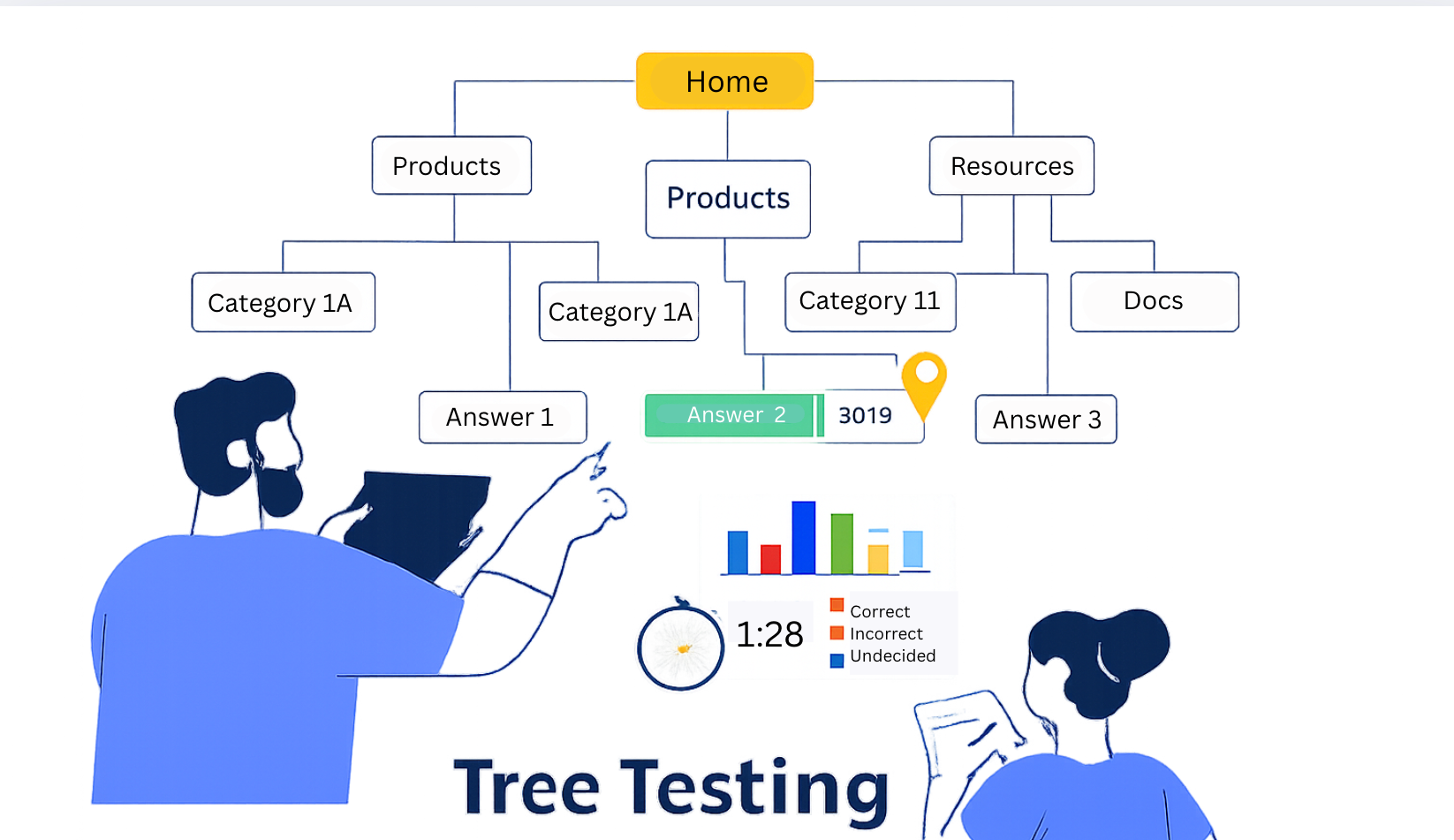
At its core, tree testing is a simple yet powerful way to check if your website or app’s navigation structure makes sense to real users. Think of it as sending users into a “naked” version of your menu – just the text labels, no colors, no buttons, no fancy design.
Here’s how it works: We give users a specific task, like “Find where you would expect to see the return policy for a product.” Then, they click through your text-only menu categories (your “tree”) to try and find the answer. We watch where they click and if they succeed. It’s like a treasure hunt, but you’re trying to figure out if your map makes sense.
When and Why You Need Tree Testing
So, when is the best time to pull out this powerful tool, and what burning questions can it answer?
When Should I Use Tree Testing?
- During Early Design: This is its superpower! Run tree tests before you even create wireframes or visual designs. It’s far cheaper to adjust text labels on a spreadsheet than to rework finished designs.
- Before a Major Redesign: Planning to revamp your entire website or app? Use tree testing to validate your proposed new structure before committing to a costly, large-scale overhaul.
- After Card Sorting: Once you’ve used card sorting to help create your structure, tree testing is the perfect follow-up to test if that user-centric structure actually works in practice.
What Metrics Signal a Need for Tree Testing for My Asset?
Your existing analytics data can shout out loud that your navigation is broken. Look out for these red flags:
- High Bounce Rate on Key Landing Pages: Users arrive, can’t find their way, and immediately leave.
- High Search Bar Usage: If a large percentage of your users immediately head for the search bar, it’s a clear sign your main navigation is failing them. They’re searching because they can’t browse effectively.
- Low Conversion Rate: Users are visiting but aren’t completing critical actions like signing up, making a purchase, or booking a service. Confusing navigation can be a major blocker.
- High Exit Rate on Internal Navigation Pages: Users hit a category page but then leave, indicating they didn’t find clear pathways to deeper content
Is Tree Testing Only for Websites or Also for Mobile Apps?
This simple test is incredibly versatile! Since tree testing strips away all visual design, it’s equally effective for both websites and mobile applications. Any digital asset that relies on a hierarchical text-based menu (like main navigation, tab bars, or a robust footer) can benefit from a tree test. It’s all about testing the underlying structure, not the shiny buttons.
What Kind of Questions can Tree Testing Answer?
Tree testing dives deep into your users’ minds to answer critical questions about your navigation:
- Discoverability: “Can people find specific features or content within my proposed menu structure, or are they getting lost?”
- Clarity of Labels: Instead of asking, “Are my category names clear?” Tree Testing helps you answer: “Do our menu labels match the words our users are thinking?”
- Logical Grouping: “Are similar items grouped together in a way that feels natural and intuitive to my target users?”
- Overall Structure Validity: “Is the navigation of my website or app strong and easy to understand, even without any visual cues?”
Information Architecture Testing: Card Sorting vs Tree Testing
At this point you might ask, wait, isn’t card sorting for checking whether my labels and grouping match the mental models of the target audience? You’re right to connect them! While both are crucial for optimizing how you organize content, they play different roles in your design journey. Think of it as designing versus validating:
| Feature | Card Sorting | Tree Testing |
|---|---|---|
| Primary Goal | Design/Create: To discover the ideal categories and labels based on how users think content should be grouped. | Test/Validate: To check if your designed structure and labels actually help users find what they’re looking for. |
| User Action | Grouping: Users take content items (like “FAQ,” “Contact Us”) and put them into groups that make sense, often naming the groups themselves. | Finding: Users are given a task (“Where would you find the warranty information?”) and click through your existing (or proposed) menu to find the answer. |
| Questions Answered | “How should we group our content?” “What should we call these groups?” | “Can users find this content efficiently?” “Do our menu labels match the words our users are thinking?” |
| Stage Used | Early in the design process (Discovery Phase). | Mid-design process (Validation Phase), before visual design. |
The Ideal Use Case: A Two-Step IA Process
To build the most intuitive navigation, researchers often use both in sequence:
- Card Sorting (Step 1): You let users help you design your menu structure. They tell you how they’d group your content and what they’d call those groups. This ensures your initial labels and groupings align with their natural thought process.
- Tree Testing (Step 2): Once you have a proposed structure (from card sorting or an existing site), you use tree testing to validate its usability. You see if users can actually find items efficiently using those new labels and groupings. If the tree test reveals high user struggle, it signals that your seemingly “perfect” structure needs refinement.
How to do Tree Testing
Running a tree test is simpler than it sounds. There is the typical process of an online tree test.
- Define Your Goal & Tasks: What exactly do you want to learn? Craft clear, unambiguous tasks (e.g., “Imagine you’ve misplaced your order, where would you go to track it?”). Aim for 10-15 tasks.
- Build Your “Tree”: This is your menu structure, usually as a simple text outline. Find a tool that lets you upload your tree structure.
- Recruit Participants: Find users who represent your target audience. For reliable data, aim for 50-150 participants.
- Launch Your Test: Participants will see your tasks and click through your text-only menu.
Tree testing Core Metrics & Insights
Key Metrics: What Does the Data Tell You?
This is where the magic happens! A good tree testing tool will give you powerful insights:
- Success Rate (Completion Rate): The percentage of users who successfully found the correct destination for a given task. This is your most fundamental metric.
- Directness: How many users reached the correct destination without backtracking or taking unnecessary detours. A high success rate with low directness means they eventually found it, but struggled.
![[Directness by Task on UXArmy Tree Testing]](https://uxarmy.com/wp-content/uploads/2025/12/Tree-test-05-1024x628.avif)
- First Click: Where did users click first? This is incredibly powerful for understanding if your top-level labels immediately guide them correctly.
![First Click and Destinations on UXArmy Tree Testing]](https://uxarmy.com/wp-content/uploads/2025/12/Tree-test-07-1024x628.jpg)
- Path Analysis: Visualize the actual routes users took – where they went right, where they got lost, and common “detours.”
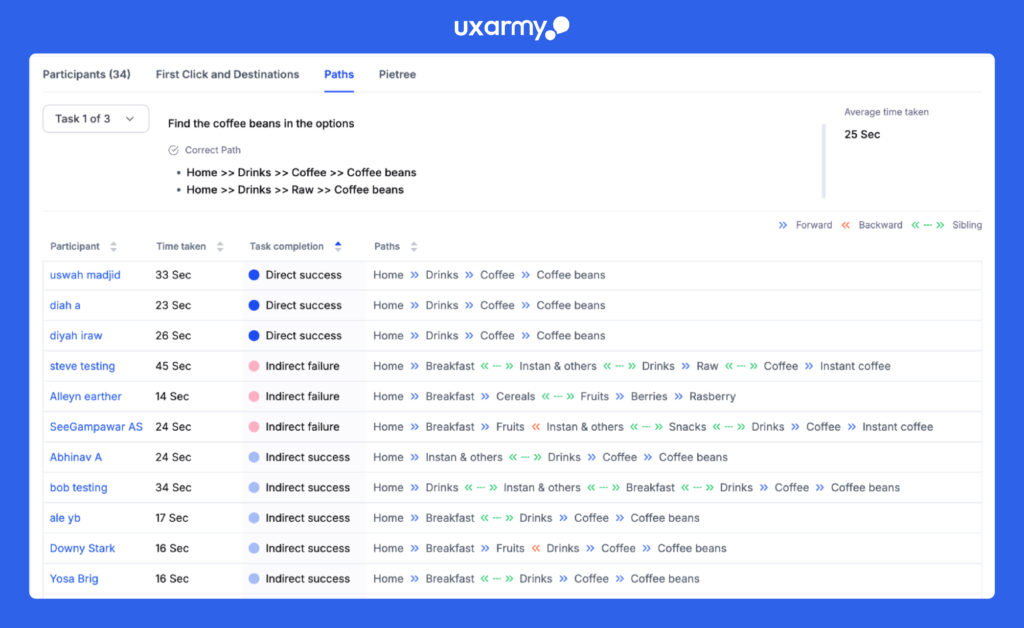
When you see low success rates, low directness scores, or surprising first clicks, it’s a clear signal that your menu labels or the way content is grouped isn’t aligning with what your users expect.
Tools and Implementation: Start with UXArmy’s Free Tree Testing tool
While the concept of tree testing is simple, running it efficiently and getting robust, actionable analytics requires a dedicated platform. Many tools exist, but for a powerful and intuitive experience that streamlines every step, look no further than UXArmy.
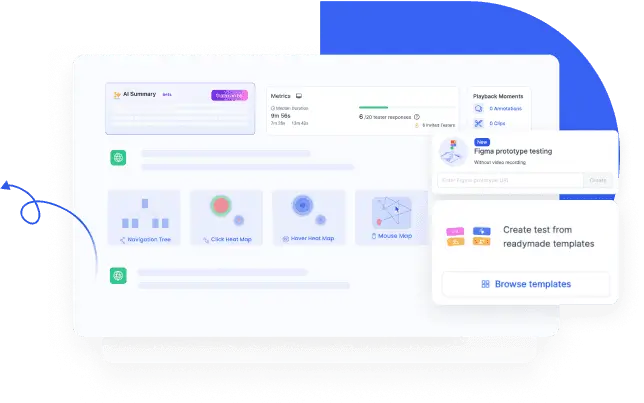
UXArmy provides a comprehensive solution for tree testing, handling the complexities of setup and analysis so you can focus on insights. You get:
- Easy tree building: Quickly upload or construct your navigation tree.
- Robust analytics: Leverage auto-generated analytics to pinpoint exactly where users struggle. Analytics includes,
- Success Rates
- Directness vs. Indirectness Metrics
- First Click Data
- Path Analysis & “Pietree” Visualizationon
- Screening Logic
- Pre & Post survey questions: Add survey style question with images to your tree test
- The ability to run other types of research to complement tree testing, giving you a holistic view of your users. Think card sorting, surveys, usability testing, user interviews.
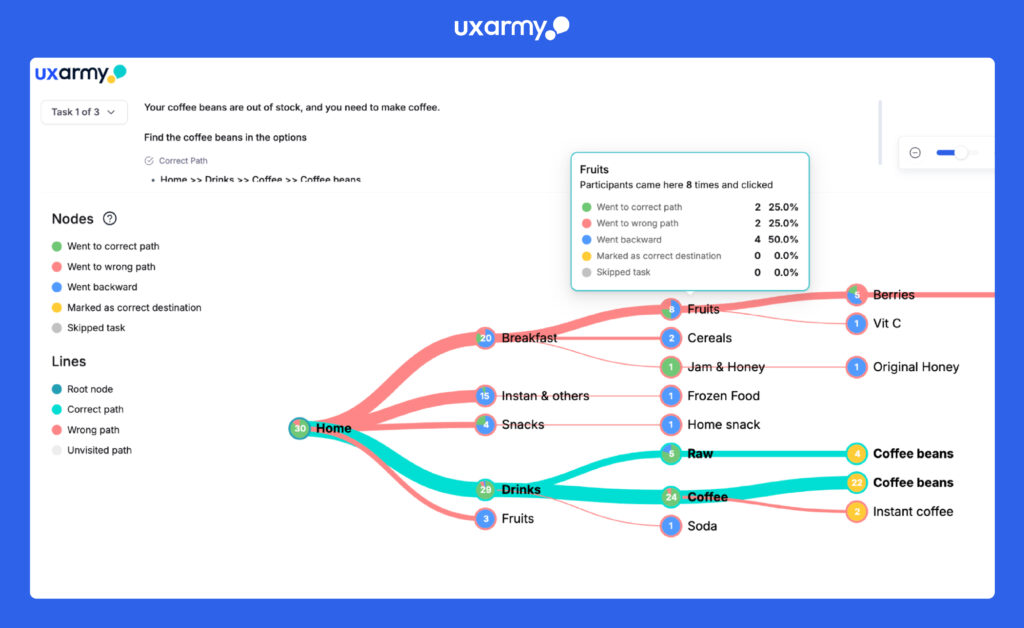
The great part is that it’s affordable yet a powerful tree testing tool. UXArmy’s Free Plan lets you collect up to a total of 1,500 self-sourced responses across any number of Tree Tests you want to run in a month.
The best part, access to other complimentary UX research tools. With UXArmy, you can even run Card Sorting, Usability testing, Surveys as they have a pooled credit system which gives you access to all their research tools; credit consumption rate varies based on research methodology.
Discover Top Free Tree Testing Tools for 2026
UXArmy’s free plan leads with 1,500 self-sourced responses/month across unlimited tree tests Pietree paths, success rates, directness scores included. Maze offers basic free navigation testing (prototype-limited), Optimal Workshop provides 3-task/10-participant trials, while UXtweak limits free studies to 10 participants. For full IA validation without costs, UXArmy + card sorting pooled credits wins. Check out full comparision blog for top 6 free tree testing tools online
Conclusion: Stop Guessing, Start Testing
Building a truly intuitive website or app navigation isn’t about guesswork; it’s about understanding how your users think. Tree testing is your essential tool for validating your Information Architecture, ensuring your labels make sense, and confirming that users can effortlessly find what they need. By investing in tree testing, you’re not just improving your UX; you’re boosting your bottom line.
Ready to move past guesswork and build a truly intuitive site? Discover the power and simplicity of UXArmy’s Tree Testing tool today!
Frequently asked questions
What is Tree Testing and How Does UXArmy Make It Easy?
Tree testing evaluates website navigation structure and ability to find information, products, etc. by testing “text-only” menu hierarchies without final hi-fidelity design being ready.. u003cstrongu003eUXArmy’s tree testing toolu003c/strongu003e brings this u0022naked menuu0022 hunt to life with task analysis, path visualization, backtracking highlights, and key metrics like success rates, time-on-task, and directness scores to build confusion-free navigation that actually makes it easy for users to find information, features or product..
When to Use Tree Testing
u003cstrongu003eDuring Early Design:u003c/strongu003e This is its superpower! Run tree tests u003cstrongu003ebeforeu003c/strongu003e you even create wireframes or visual designs. It’s far cheaper to adjust text labels on a spreadsheet than to rework finished designs.u003cbru003eu003cstrongu003eBefore a Major Redesign:u003c/strongu003e Planning to revamp your entire website or app? Use tree testing to validate your u003cemu003eproposed new structureu003c/emu003e before committing to a costly, large-scale overhaul.u003cbru003eu003cstrongu003eAfter Card Sorting:u003c/strongu003e Once you’ve used card sorting to help u003cemu003ecreateu003c/emu003e your structure, tree testing is the perfect follow-up to u003cemu003etestu003c/emu003e if that user-centric structure actually works in practice.
How many tasks for a tree test?
If we ask a participant to do u003cstrongu003e8–10u003c/strongu003e tasks in a tree test, that typically works very well – they try a small number of tasks (each one a bit different), they see the tree a few times (but not too often), and they finish in 5 minutes or so, so they’re not tired, bored, or grumpy at the end.
Tree Testing vs Card Sorting: When to Use Each with UXArmy?
Tree testing validates existing hierarchies (findability in menus); card sorting optimizes content grouping (user mental models) and thereby helps you design the menu. UXArmy supports both as usability tools run tree tests for navigation audits, card sorting for IA redesigns, all in one platform vs separate testing tools websites.