
Tree Testing – Menu categorisation and structuring
Make It Easy for Users to Find Products with Tree Testing
Highly Efficient
Upload excel or csv file with your menu tree or create a tree manually.
Validate locations
Check the ability of finding the products in menu hierarchy or just in a sub-tree.
Validate Labels
Let your users tell you what label they prefer for each of your menu items.
Evaluate Success
Let users perform defined tasks while the tree testing software identifies success, failure, and navigation issues.
Tree Testing Helps You Design Confusion-Free Menus
Reporting and Analysis
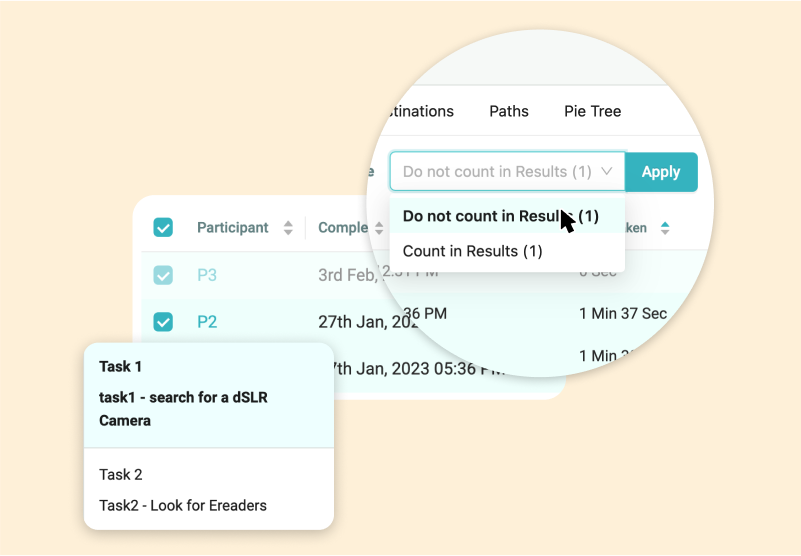
Task analysis
For each Task and every Tester, the detailed path is shown. Backtracking and Direct finds are highlighted. Watch where your users struggle most to find something.
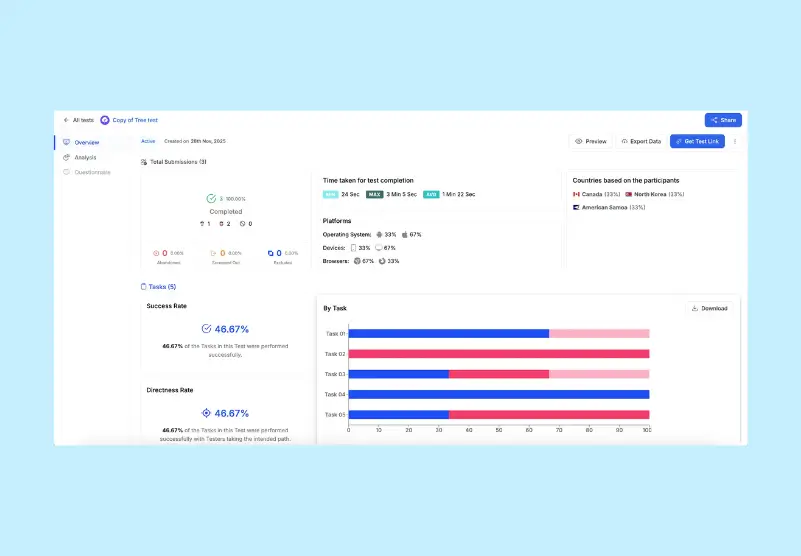
Usability Metrics
Review Success or Failure of Tasks meant to find your products. Other metrics like time taken, confidence level of success or failure along with directness weightage helps you to make informed decision.
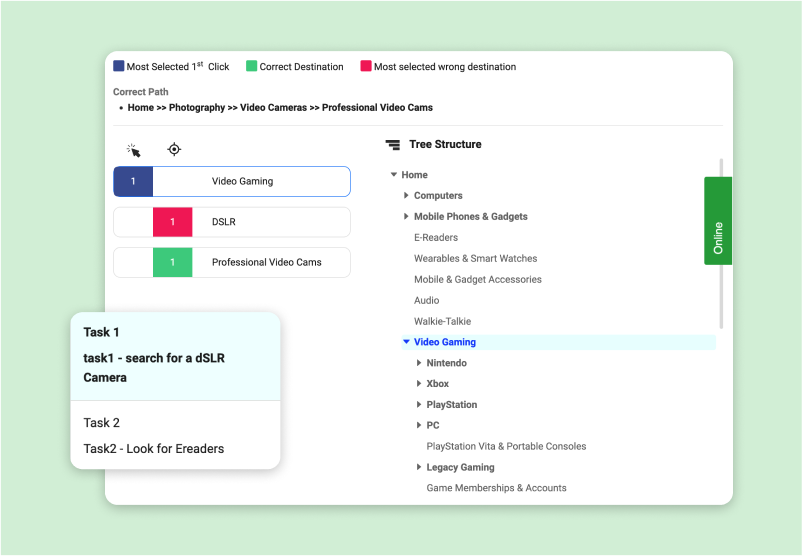
Destination matrix
Tabulated tree testing results help you focus on the metrics that matter. Color coding and numbers make it easier to quantify the effectiveness of your menu structure and variations.
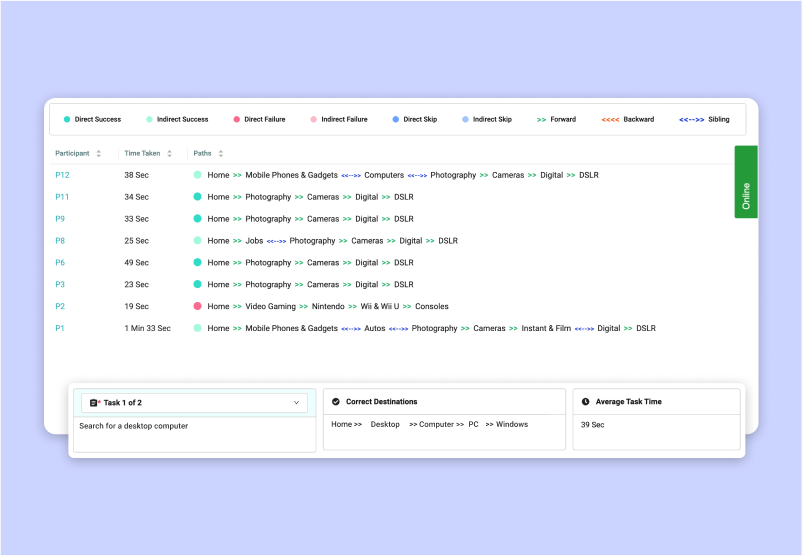
Path Analysis
The intended Paths are highlighted to help in analysis of results. You may consider several Testers to have a quantitative feel, so we continue to build more efficiency in your analysis.


Trusted by UX Research and Product Teams













Outsource Usability Testing
Receive user Insights and design recommendations from our UX experts based on your user testing project Brief

UXArmy Panel
Recruit participants for tree testing UX studies from UXArmy’s organically built panel. Screen your target audience using dozens of demographic and psychographic attributes.
Tech savviness
House type
Languages spoken
Home appliance ownership
Role in profession
Role in household
Travel habits
Job level
Internet consumption
Industry
Smartphone usage
and many more!
Start Your Free Tree Testing Trial
Create a tree testing study for your website or app. No credit card needed.
Frequently Asked Questions
Here are answers to common questions you might have.
What is Tree Testing and How Does UXArmy Make It Easy?
Tree testing evaluates website navigation structure and ability to find information, products, etc. by testing “text-only” menu hierarchies without final hi-fidelity design being ready. UXArmy’s tree testing tool brings this “naked menu” hunt to life with task analysis, path visualization, backtracking highlights, and key metrics like success rates, time-on-task, and directness scores to build confusion-free navigation that actually makes it easy for users to find information, features or product.
Is UXArmy Tree Testing Tool Free to Try?
Yes, UXArmy provides a generous free trial with no credit card required, including sample tree templates for ecommerce / beauty shop tree tests. We are the only platform that offers access to full features like destination matrix, path analysis, and other quantitative metrics such as Task success, time on task and directness. UXArmy Panel recruitment is an optional paid add-on for instant global testers.
Tree Testing vs Card Sorting: When to Use Each with UXArmy?
Recommended to use after Card-Sort to define the content arrangement and testing the users’ ability to find. Tree testing validates existing hierarchies (findability in menus); card sorting optimizes content grouping (user mental models) and thereby helps you design the menus even before visual design is finalized. UXArmy supports Tree testing as well as Card sorting, all in one platform.
What Usability Metrics Does UXArmy Tree Testing Provide?
UXArmy tree test delivers comprehensive quantitative metrics: task success/failure rates, time taken, directness weightage, destination matrices, and path analysis with color-coded backtracking. Perfect for quantifying menu, feature and product placement thus building efficiency and effectiveness in product usage..
How Does UXArmy Tree Testing Compare to Other Online Usability Study Tools?
While the core idea and goals of all tree testing tools is the same, UXArmy integrates tree testing seamlessly into usability testing workflows and offers flexibility unlike designer focused tools like Maze (prototype-first unmoderated) or Lyssna. Run tree tests alongside DeepDive® moderated user interviews, unmoderated tasks, surveys, and card sorting in one platform. Plus, an organic UXArmy Panel which is specialized in usability testing ensures availability of your targeted participants.
Can UX Research Agencies Use UXArmy for Client Tree Testing Projects?
Absolutely. Several UX Research, Design and digital agencies use UXArmy tree testing. UXArmy offers affordable monthly plans without limiting the number of tests or responses. Your test results are not locked even after the plan expires. Combine tree testing with heatmaps, first-click tests, and global recruitment (targeted demographics & market segments). for client deliverables that outperform other usability testing tools.
How Do You Analyze Tree Test Results in UXArmy?
UXArmy’s Tree test dashboard reveals per-task success rates, directness scores, first-click data, path analysis, and Pietree visualizations, highlighting backtracking and user struggles. Deeper analysis is available and all data can be exported CSV/PDF and analyzed in your favorite statistics tool.
Does UXArmy Support Importing Trees for Quick Website Testing?
Yes whether you are testing website or app menus, easy upload of CSV/Excel menu structures can be uploaded. A tree can also be built manually. Popular use cases are ecommerce, cosmetics stores which go online. UXArmy tree testing gets you instantly started with sample templates, making it the best tree testing tool free for rapid online usability studies.
Tree Testing Best Practices for UXArmy Users in 2026?
Create 5 – 7 realistic tasks (e.g., “Track your order”), recruit 50-150 target users via self-sourced links (free plan: 1,500 responses/month), upload tree via Excel/CSV, add pre/post surveys + screening logic, analyze success rates/directness/first-clicks/Pietree paths, then iterate labels. Pair with card sorting you did earlier (same pooled credits) for complete IA validation.
Why Choose UXArmy Over Maze or UserTesting for Tree Testing?
UXArmy’s payment plans are flexible and available monthly. UXArmy Free plan includes sufficient number of self-sourced tree test responses/month (no credit card needed), and Asia-focused recruitment (EMEA expansion).UXArmy wins for budget constrained- teams or solo researchers needing IA testing + complementary methods without typing them to expensive annual plans or other constraints
Have more questions?
If you have any other questions that are not covered here, please don’t hesitate to reach out. We’re here to provide the information you need and ensure your experience with us is smooth and enjoyable.
Our User Testing Tools
Unmoderated Usability Testing
Iterate your Design based on Usability evaluations and automated recruitment of matching Test participants
Moderated Research
In-depth interviews with LIVE conversations and note taking to generate detailed Insights remotely
Card Sorting
Design your information architecture, menus and navigation flows
Tree Testing
Evaluate the Menu labels and Categories in your product Design
