


For many UX teams, Lookback is the first dedicated user research tool they consider when moving beyond Zoom for moderated user research. It offers a usability lab in the cloud and is widely recognized in the industry.
But teams today – especially fast paced, distributed, or global organizations – often need more than a simple interview tool. They want a platform that helps them reach insights faster through built-in analysis and collaborative synthesis features, and gives them the flexibility to run other research methods when business priorities shift.
This is where UXArmy enters the conversation.
Introducing UXArmy 
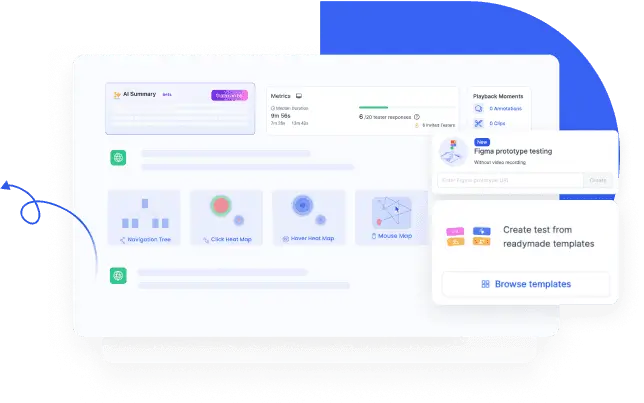
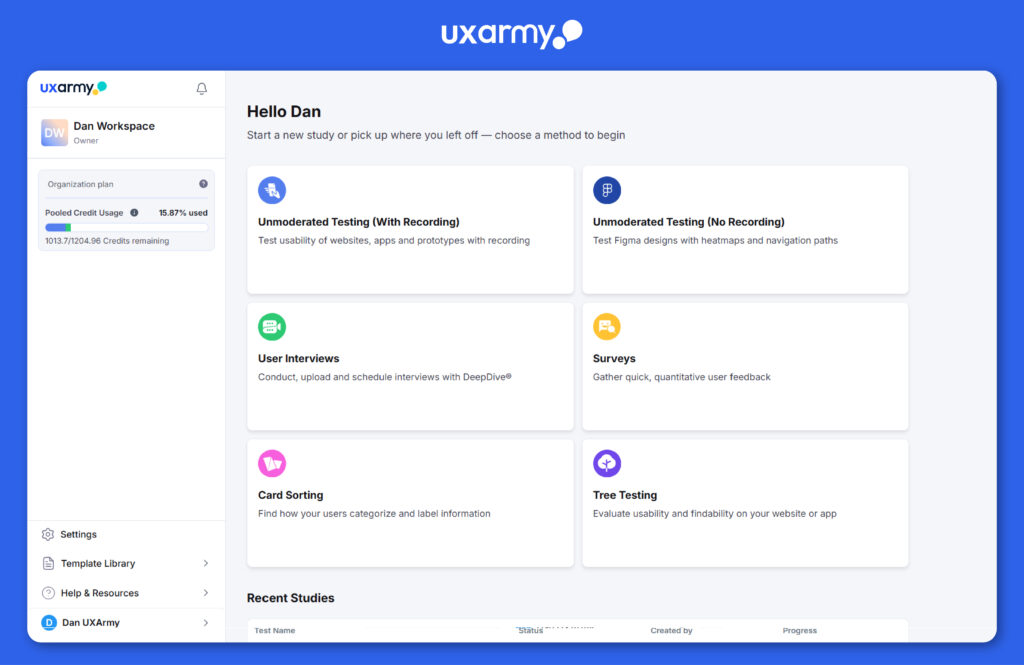
UXArmy is a complete UX research platform for both moderated and unmoderated studies, supported by an integrated Analysis Space for fast insight generation. Its moderated tool, DeepDive®, matches Lookback’s core capabilities while adding smoother workflows, global research support, and greater methodological flexibility – covering interviews, unmoderated usability testing, surveys, card sorting, and tree testing.
At-a-Glance Comparison of Lookback vs UXArmy
| Research Method | Lookback | UXArmy |
|---|---|---|
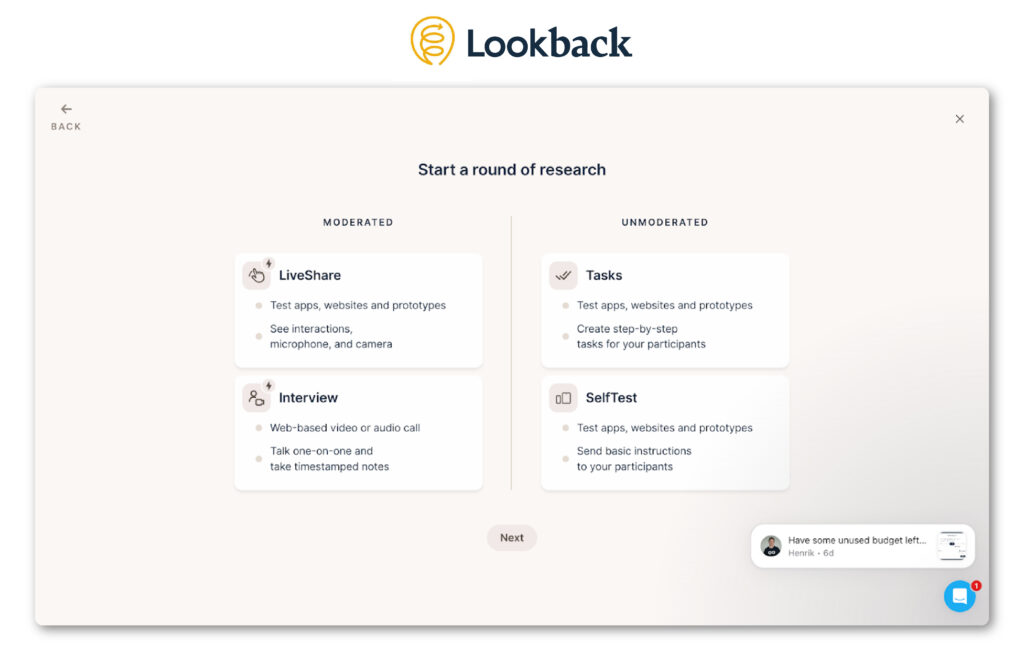
| Moderated User interviews | LiveShare For moderated usability testing where screen sharing and recording is required. | DeepDive®For user interviews and focus group discussions with hidden observers, note-taking. Option to turn on/off screen, audio, camera, recording for both desktop and mobile devices. Share assets during call. Focus group discussions are supported. |
| Interview Focus on verbal feedbackDoes not support mobile screen recording | ||
| Focus Groups Discussions | Not supported | |
| Unmoderated Usability Testing | Tasks Offers only 1 type of task, single, multiple select questions. No logic. No metrics | Unmoderated Testing Wide range of usability tasks and survey style questions with/without screen, audio, camera recording. Conditional logic, usability metrics, transcription available. |
| Self-Test | ||
| Surveys | Not supported | Surveys |
| Card Sorting | Not supported | Card Sorting |
| Tree Testing | Not supported | Tree Testing |
In this in-depth comparison blog, we start where it matters most for Lookback’s audience:
moderated research. Then we’ll move to unmoderate and see how well Lookback compares.
Moderated Research: Similarities Between Lookback and UXArmy
Both Lookback and UXArmy are strong platforms for running live user interviews. Regardless of which one you choose, you will find a familiar set of fundamental capabilities that support research teams during moderated sessions, such as:
- Hidden observers: your team members and stakeholders can join sessions discreetly without being seen or heard by participants which helps participants open up more.
- Hidden chat facilitates communication between moderator and observers during a call
- Consolidated note-taking for shared insights
- Bookmark moments you want to revisit post call
- Sharing assets during call – prototypes, website or mobile app – via screenshare or url
- Screen+audio+face recording
- Time-stamped transcriptions
In short: Both Lookback and UXArmy offer a strong foundation for moderated research. Where the real differences appear – and where teams often make a decision – is in the convenience, international , and downstream analysis experience.
Moderated Research: Key Differences Between Lookback and UXArmy
Below are the most important differences, each written in short, focused sections for clarity and depth.
Difference #1: No Sign-In Required of Participants and Observers
UXArmy does not require email ID submission nor creation of accounts for Participants and Observers to join a call. Participants and Observers just click on an invite link.
Lookback requires submission of Email ID for Participants and Observers to join calls.
Difference #2: UXArmy Supports Switching Devices Mid-Session
This difference matters more than many teams initially expect.
UXArmy allows participants to switch between desktop and mobile during a single session. If your research requires both devices (e.g., sharing initial ideas on desktop and then validating how the same concept might feel on mobile), the transition is easy, and only one recording is produced, only one session is consumed.
On the other hand, Lookback creates a completely new session if the participant switches devices. This results in 2 separate recordings, 2 separate transcripts, 2 separate entries in your study dashboard for what is essentially one session with a single participant.
This creates unnecessary constraint and consumes extra sessions which has cost consequences for Lookback users.
Difference #3: Managing Sensitive Content – Post-Session Redaction vs Live Recording Controls
Lookback does NOT support stopping and resuming recording during a session. Once a live session begins, recording runs continuously until the session ends. To handle sensitive moments, researchers must rely on Lookback’s post-session redaction tools to permanently delete portions of the recording afterward.
UXArmy takes a more proactive approach. During a live session, researchers can use the Stop Recording control to temporarily halt recording and then start it again when appropriate. Both the participant and the moderator can toggle screen share, camera, and audio on or off – allowing teams to avoid capturing sensitive content in the first place rather than cleaning it up later.
Difference #4: One Unified Moderated UX Research Tool vs. Choosing Between Two Modes
Lookback requires researchers to choose between LiveShare and Interview, depending on whether screen recording is required, the device the participant will be using, and whether you want to observe interactions or focus on just conversation. This can be confusing for new or infrequent moderators.
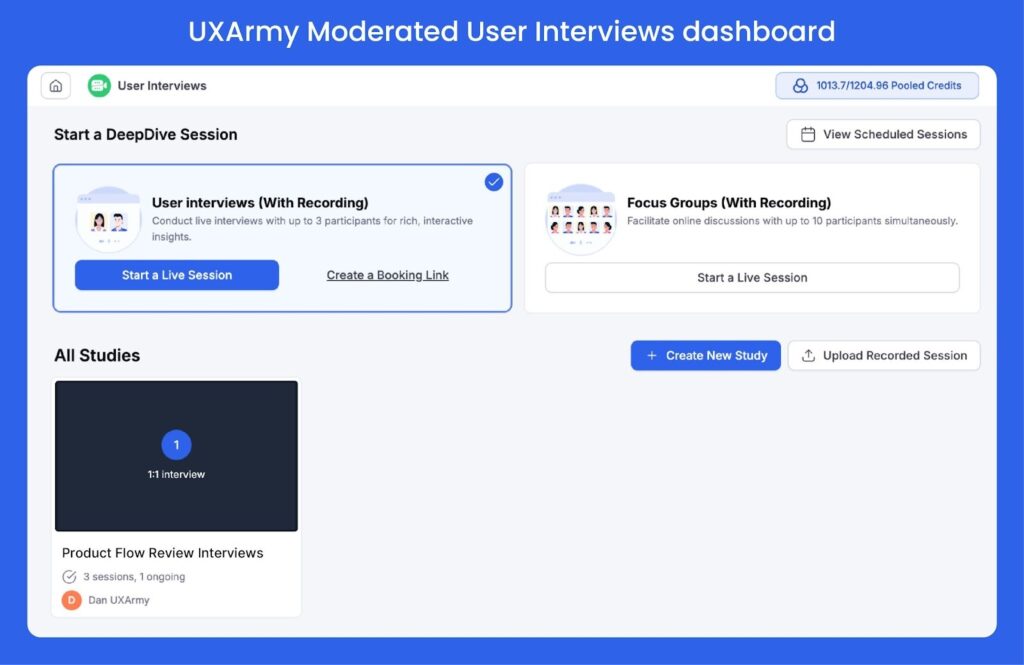
With UXArmy, all moderated research happens in one unified tool DeepDive® regardless of the device the participant will be using. In all sessions, you can
- Turn screen sharing on or off
- Enable or disable face recording
- Turn Audio on or off
- Works consistently across mobile and desktop
The simplicity matters, especially for large teams or fast-moving product groups where moderators rotate frequently.
Difference #5: Focus Group Discussions in UXArmy
Lookback‘s moderated tools are designed specifically for 1:1 sessions between the Moderator (researcher) and the Participant (interviewee).
UXArmy offers a flexible range of qualitative research, from in-depth 1:1 user interviews to multi-participant setups like Focus Group Discussions, Dyads, and Triads. Hidden observers and collaborative note-taking supported in all sessions.
Difference #6: Analysis Space for in-platform Synthesis
Lookback supports Reels, Findings. But it does not support tagging or structured synthesis workflows. So,teams who need organization still rely on third-party tools such as Dovetail or Condens.
UXArmy includes features beyond clipping and highlights for analysis and synthesis where teams can:
- Tag Highlights, Reels
- Organize insights
- Collaborate asynchronously for analysis & synthesis
For many teams, this eliminates the need for a separate repository or synthesis tool.
Both UXArmy and Lookback have AI features to support fast time to insights.
Difference #7: Global Research Support – Interpreter Channels & Translations of Transcriptions
Lookback supports observers, but it does not support dedicated interpreter audio channels or built-in language workflows. This can be a challenge if you are doing international research, or have stakeholders (observers) who are fluent in another language.
UXArmy, on the other hand, is well equipped to handle international moderated research:
- Dedicated interpreter audio channel so simultaneous interpretation does not interrupt the call
- Transcription in 23 languages, tuned for regional accents
- In-platform translation of transcriptions in 67 languages
- Observers and interpreters join instantly via link, no login required
This makes UXArmy especially strong for cross-country teams, multilingual studies, or sessions involving stakeholders from different markets. For a full list of UXArmy’s available languages and features, check out the numerous languages and language-features available in UXArmy.
Difference #8: User interview with Usability Metrics
Unlike Lookback, UXArmy lets you run a user interview and collect real usability metrics at the same time. Because UXArmy includes both a moderated interview tool and a full unmoderated testing platform, researchers can create an unmoderated test beforehand and share the link during a call on DeepDive® without worrying about compatibility issues.
As participants interact with your Figma prototype, UXArmy can automatically captures:
- Navigation path / path analysis
- Heatmaps
- Time on task
- Task success rates
This hybrid workflow gives you richer, more structured insights than interview-only tools – combining user narratives with measurable interaction data.
Why UXArmy Delivers More Powerful Unmoderated Testing Than Lookback
In a nutshell, Lookback’s unmoderated mode is a repurposed interview tool rather than a purpose-built unmoderated testing platform like Maze, Lyssna – or a full research platform like UXArmy that includes unmoderated testing among many other capabilities.
As a pure qualitative research tool, Lookback does not provide automated aggregation or consolidation of results. This means Lookback is missing several core features researchers typically rely on, such as:
- No heatmaps
- No navigation path analysis
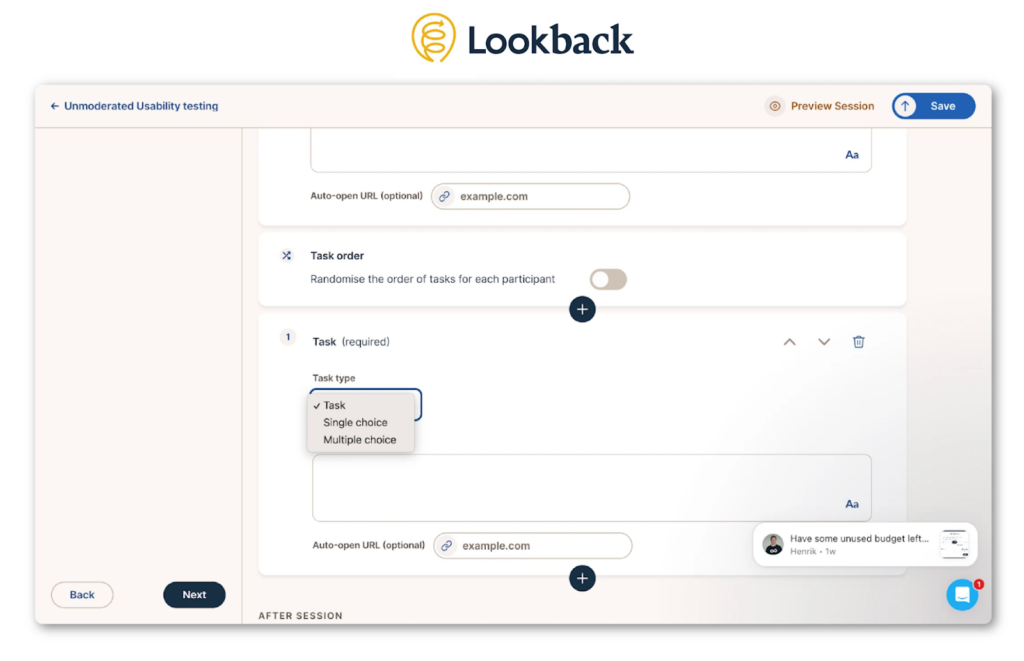
- No automatic aggregation of survey-style question results; responses to Lookback’s single and multiple select questions are recorded only as qualitative text in the session transcript
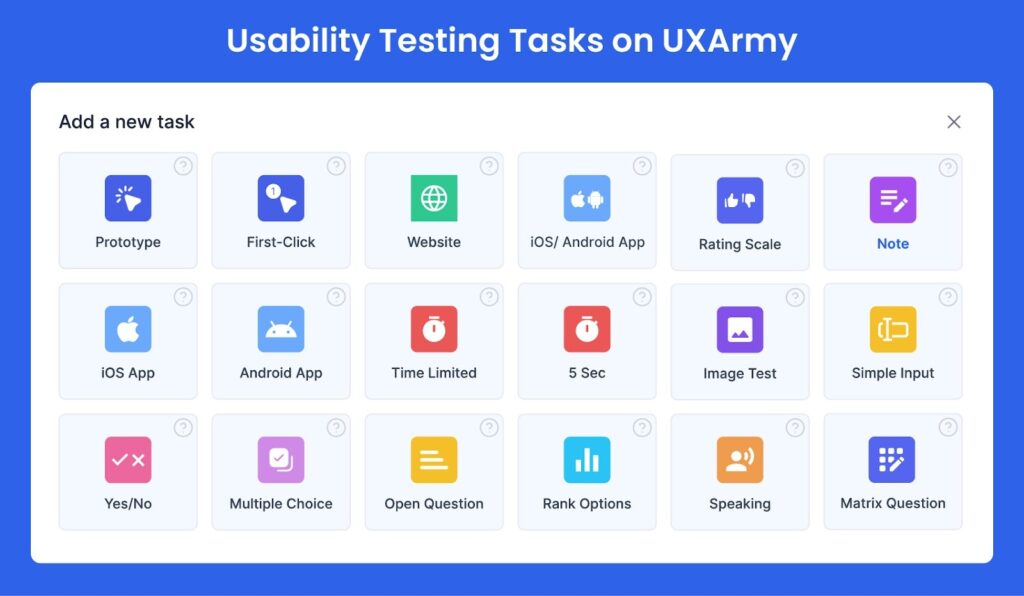
Looback’s task variety is also limited – Lookback offers only one type of task plus basic single- and multiple-select question. (UXArmy offers 18 task types)
UXArmy, on the other hand, gives teams the best of both worlds.
You get full qualitative depth – screen, audio, camera, and transcription – and quantitative analytics across a wide range of tasks and question types. Everything is consolidated in one place, making analysis & synthesis faster and more complete.
Below is a comprehensive side-by-side comparison of Lookback and UXArmy, highlighting the key features for both usability testing and moderated interviews.
[In-depth Comparison of Lookback vs UXArmy]
| MODERATED | Lookback | UXArmy |
|---|---|---|
| 1:1 User interview | Yes | Yes |
| Focus Groups | No | Yes |
| Hidden Observers | Yes | Yes |
| Hidden Group chat | Yes | Yes |
| Note-taking | Yes | Yes |
| Bookmark key moments | Yes – use Eureka | Yes – use Bookmark |
| Require Sign-in to join live sessions | Required. Participant and Observers must provide email ID to join calls | NOT Required – Participant and Observers can join calls without providing emails |
| Switching devices mid-session | No. Switching devices will end the call for the participant. | Yes.Participant can switch devices during a call (Desktop to/from Mobile Device) |
| Screen+audio+face recording on mobile & desktop | Yes – choose LiveShare or Interview based on device, screenshare needs | Yes – single tool DeepDive® for both Mobile and Desktop |
| Interpreter Audio channel | No | Yes |
| Share Assets During Call | Yes – via auto link | Yes – via chat with participant |
| Transcriptions | Yes | Yes |
| Translation of Transcriptions | No | Yes |
| Analysis & Synthesis | Limited. Reels, Findings | Richer. Reels, Highlights, Tagging, Analysis Space for organization of insights. |
| AI features | Limited. Eureka for AI summaries | RIcher. AI Summaries, AI highlights & auto-tag. Translations of transcriptions in 67 languages |
| Redact | Yes – permanent redacting sections of recording post-session | ‘Stop recording’ to pause, ‘screen share on/off’ during call instead of post-session redacting |
| Upload recording | Yes | Yes |
| UNMODERATED | LookBack | UXArmy |
| Task Based Usability Testing | Yes | Yes |
| Task types (or question formats) Available | One type of taskSingle & Multiple Select Question | Website TestingPrototype TestingNative Mobile App TestingSingle & Multiple Select QuestionOpen-Ended QuestionRating Scale QuestionMatrix QuestionSimple Input Task with validationRank Options TaskNote (for transitions)Speaking TaskImage Test TaskFirst Click TestTime-Limited Task (e.g., 5 Second Test)Yes/No Question |
| Recordings & Transcriptions | screen, audio, face recording transcriptions available. | screen, audio, face recording transcriptions available. |
| Quantitative Usability Metrics | None.Lookback does not aggregate results from single/multiple-choice questions | Yes.Heatmap, SUS, Success rates, Time to task completion, Navigation Path Analysis. Aggregated results of survey style questions. |
| Surveys | No | Yes |
| Card Sorting | No | Yes |
| Tree Testing | No | Yes |
| No recording option | None | Available for Figma prototype testing, card sorting, tree testing, surveys |
Pricing & Value Comparison: UXArmy vs Lookback
When comparing UXArmy vs Lookback (online) pricing, two things stand out:
- Per moderated session price on UXArmy is more affordable
- The biggest difference is flexibility
UXArmy offers monthly plans and pay-as-you-go session credits, while Lookback requires annual billing and sells additional sessions only in fixed packs of 10.
UXArmy gives you access to diverse research methods – user interviews, focus groups, unmoderated testing, surveys, information architecture testing. Lookback offers limited interview sessions and unlimited unmoderated sessions. However, the value of unlimited unmoderated sessions is questionable as Lookback’s functionality in unmoderated testing is very limited unlike that of UXArmy, or even other industry players like Maze, Lyssna, UXtweak.
One important pricing nuance is the meaning of “Collaborator.”
- In Lookback, a collaborator functions as a full seat equivalent to an Editor/Owner in UXArmy.
- In UXArmy, a collaborator is NOT a full seat. Collaborators cannot create, launch studies or be the Moderator; they can only analyze studies they are invited to. Collaborators are available in Pro Plan, Organization Plans.
This distinction enables significant cost efficiency in UXArmy, letting teams involve more analysts without paying for extra full-seats. Moderators need full seats.
Another point of possible confusion is “Guests.”
- Lookback clearly states “Unlimited guests” in their pricing plan. Guests are Observers for Lookback, and are required to sign-in (provide email).
- UXArmy also offers ‘Unlimited guests’, but the Guests here are Observers and Interpreters. UXArmy does NOT require guests to sign-in and therefore did not specifically mention ‘unlimited guests’ on their pricing page.
Another point of distinction specific to online plans is that Lookback includes a limited number of participants per plan. UXArmy treats participants as an add-on.
Customer Experience: What Users Say
Lookback Feedback
Common reviewer highlights include:
- Excellent live interview and observation features
- Participants struggle with plugin/app installation
- Session crashes or visibility issues in group sessions
- Limited support response times
- No tools for unmoderated or mixed-method research
UXArmy Feedback
Researchers frequently mention:
- Smooth onboarding and fast support
- Easy setup for usability tests and interviews
- Strong APAC-focused participant panel
- Powerful analytics with AI assistance
- Affordable and flexible pricing
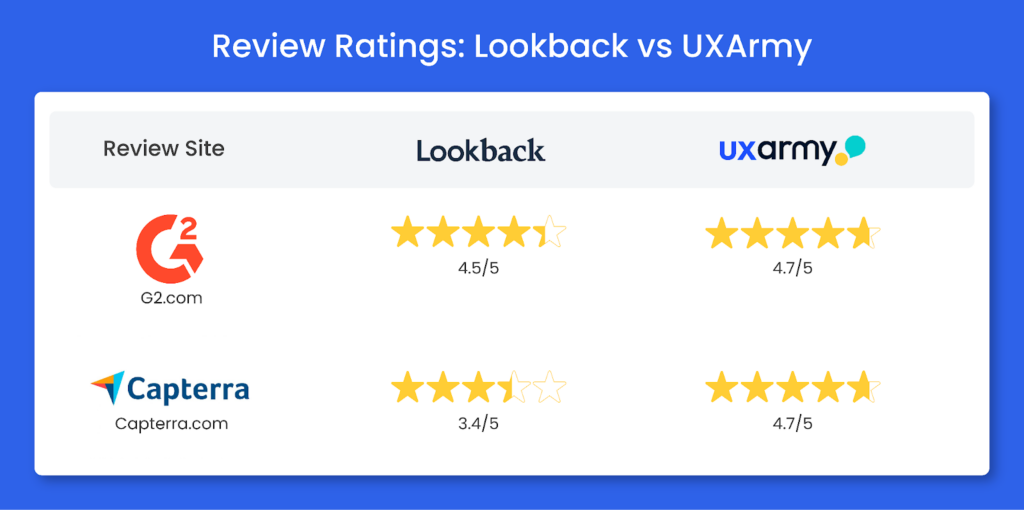
Review Ratings lookback vs UXArmy
Conclusion
Lookback is a strong tool for moderated research, but its limitations and unmoderated testing, no surveys, no card sorting nor tree testing make it less suitable for teams running continuous or mixed-method UX research. Plus its limited analysis and synthesis capabilities require researchers to download data and use third party tools like Excel to Condens..
UXArmy offers a broader, more flexible research ecosystem with a wide set of research methodologies, AI features and Analysis Space. For teams seeking scalability, speed, and full-cycle UX research workflows, UXArmy is the more complete and cost-effective choice in 2026.
Frequently asked questions
How does Lookback differ from other website testing tools?
Lookback excels in moderated interviews but lacks unmoderated heatmaps, path analysis, and 18+ task types offered by UXArmy. Its single-task unmoderated mode records responses only as qualitative text, without quantitative metrics aggregation.
Can I recruit participants directly in Lookback?
No, Lookback does not include an in-platform participant panel. Teams must use external partners like User Interviews, while UXArmy offers global recruitment as an integrated add-on. u003ca href=u0022https://www.lookback.com/pricingu0022 target=u0022_blanku0022 rel=u0022noreferrer noopeneru0022u003eLookback Pricingu003c/au003e
What features should I expect in a user interview research tool?
Expect hidden observers, note-taking, screen/audio/face recording, transcriptions, and asset sharing. UXArmy adds focus groups, device switching mid-session, interpreter channels, and AI tagging features absent in Lookback’s 1:1-only LiveShare/Interview modes.
How do I choose between Lookback and a more complete UX research platform?
Lookback suits pure qualitative 1:1 interviews. Choose UXArmy for mixed-methods teams needing surveys, card sorting, tree testing, unmoderated analytics, and Analysis Space eliminating third-party tools like Dovetail.
Are there alternatives to Lookback for deeper UX research workflows?
Yes, Maze, UXArmy,Lyssna, and UXtweak offer stronger unmoderated testing. u003cstrongu003eUXArmy stands outu003c/strongu003e for teams needing moderated interviews + unmoderated analytics + IA testing in one platform, eliminating tool-switching. Lookback’s unmoderated is limited to single-task qualitative recording without metrics.
Which platform offers deeper website testing capabilities: Lookback or UXArmy?
UXArmy dominates with heatmaps, navigation path analysis, SUS scores, time-on-task, and 18 task types (first-click, 5-second tests). Lookback’s unmoderated lacks metrics aggregation and offers only single/multiple-select questions as text transcripts.