
Remote User Testing for your Prototypes, Website and Apps
Why Choose UXArmy’s Remote Usability Testing Tools?
Prototypes & Websites
Test yours and competitor websites, Figma prototypes on Smartphone and Computer without software changes
iOS and Android apps
Run user testing on iOS and Android apps. Benchmark competitor apps or compare live app experiences with Figma prototypes.
Reporting and Analysis
Analyse usability metrics and visual reports, including heatmaps and navigation paths, to identify friction and make user feedback easier to act on.
Recruit User Testers
Invite your own participants or recruit users who match your target audience through the UXArmy panel.
Figma Testing Just Got Easier
Test Figma prototypes directly in the browser - no downloads or app installations required - while retaining heatmaps and usability metrics.
Run Usability Tests on Figma, Websites and Apps





Remote User Testing Features
Video Recording
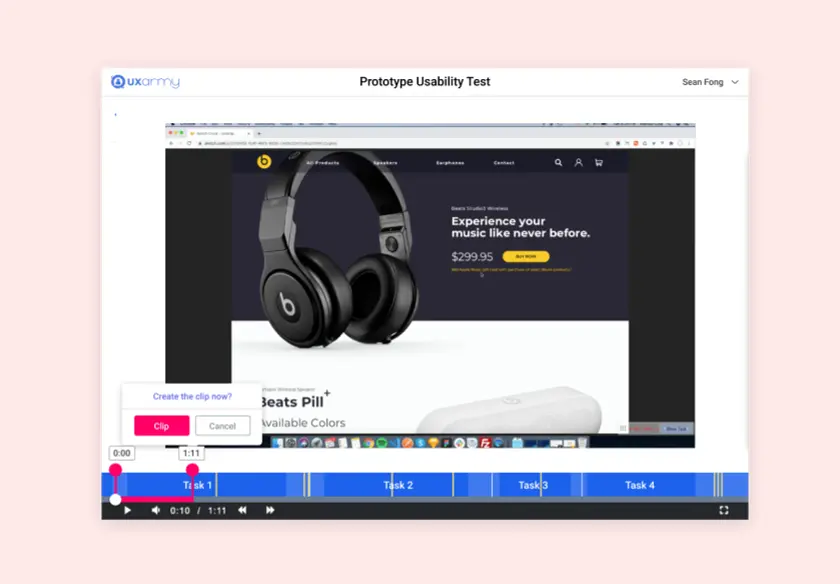
Screen Playback and recorded voice of the testers helps you to understand the detailed reasoning behind the way your testers go about doing their tasks on your product. Whether you are testing a Website or Mobile App, the UXArmy platform records the screen and interactions for each of the testers and uploads them on the cloud. The recordings are available for your analysis, download, editing and sharing.
Task Logic
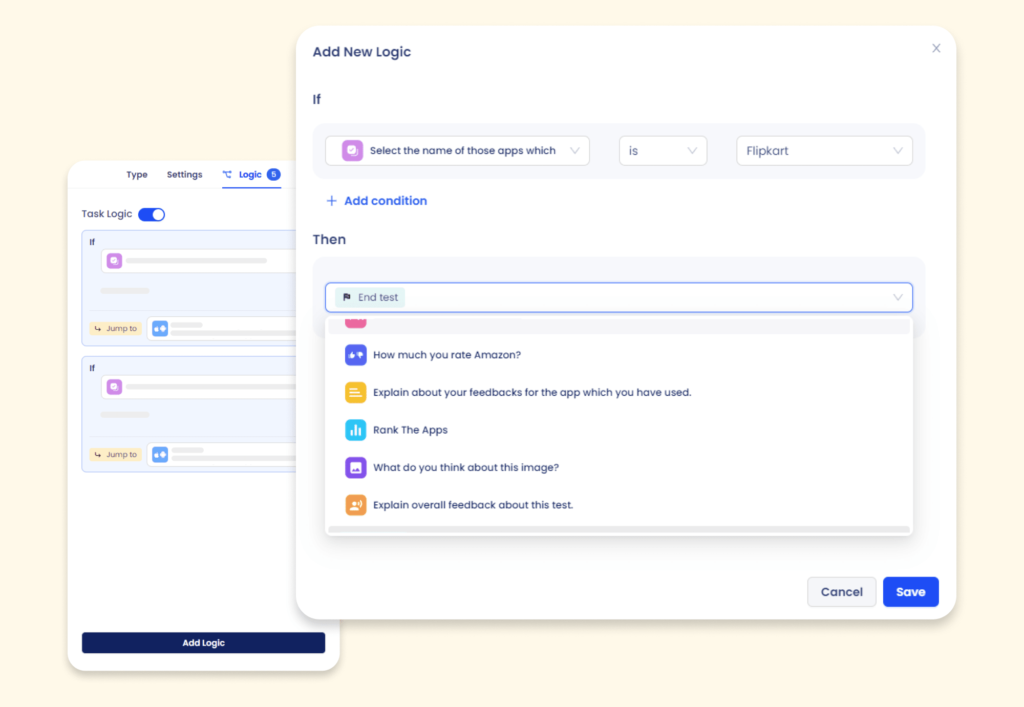
Conveniently send your research participants on different paths based on the individual responses they provided to certain questions. Use Task Logic to build in conditions to your usability test and see how different segments of your target users behave and respond.
Multilingual Transcription & Translation
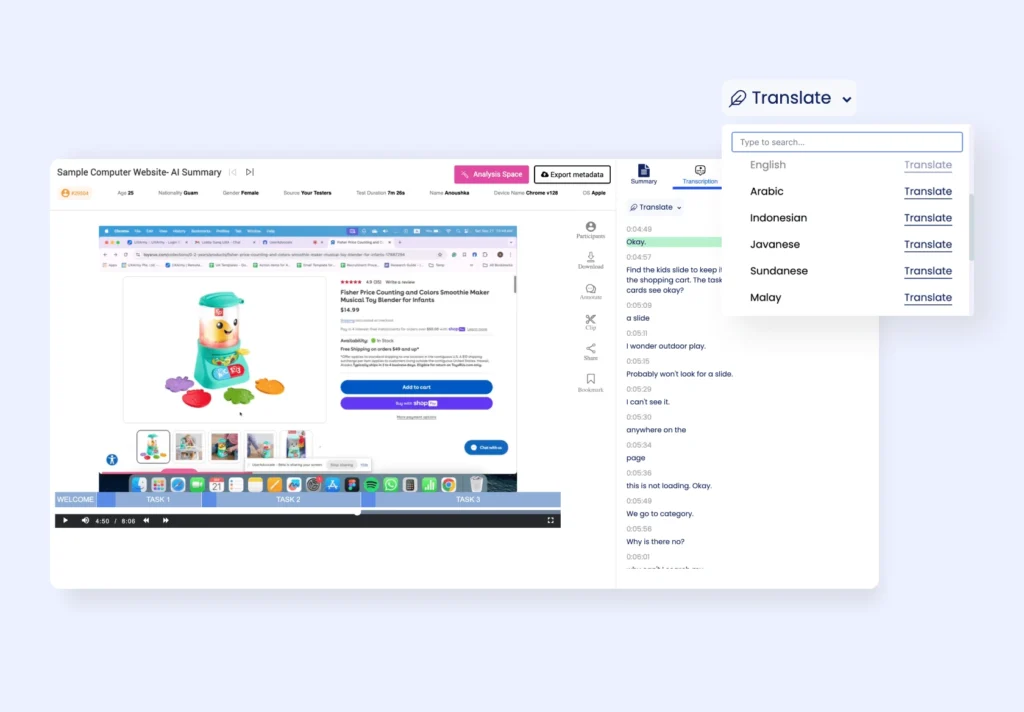
Instantly transcribe and translate user feedback in over 25 languages with timestamps. Language selection is available for all unmoderated testing on mobile and desktop—request any additional languages you need. Check available languages here.
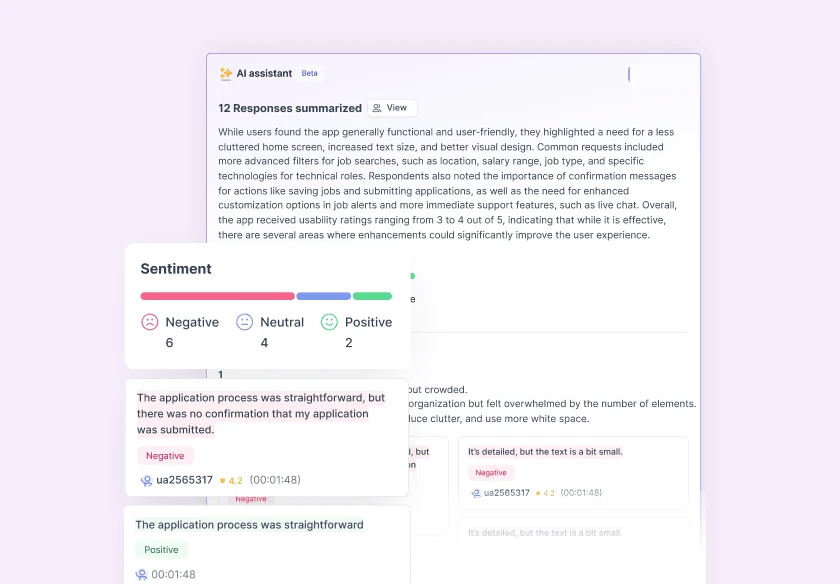
AI Summary with Sentiments
Generate AI summaries for unmoderated usability tests conducted in english. Get UX Insight with sentiment analysis in feedback buckets, along with supporting verbatims with time stamp for easy reference – available at test overview and respondent level.

Usability Metrics
Using UXArmy remote usability testing tools, you can measure efficiency and effectiveness of your digital properties. The tools provide you with task success, failure and completion rates, and task completion times. Detailed metrics such as number of clicks or taps per page and per task, mouse hovers, time to first click are also captured. Open feedback helps to gather subjective satisfaction and overall experience that your website or App makes on your testers.

Interactive Heatmaps
Per-task heatmaps show how participants interact with websites and mobile apps. Compare consolidated and individual heatmaps to identify popular elements, hesitation points and missed clicks or taps on each page or screen. The heat maps are created for every web-page or screen. The tools allow you to see the number of clicks above or below any point on any webpage for each task.
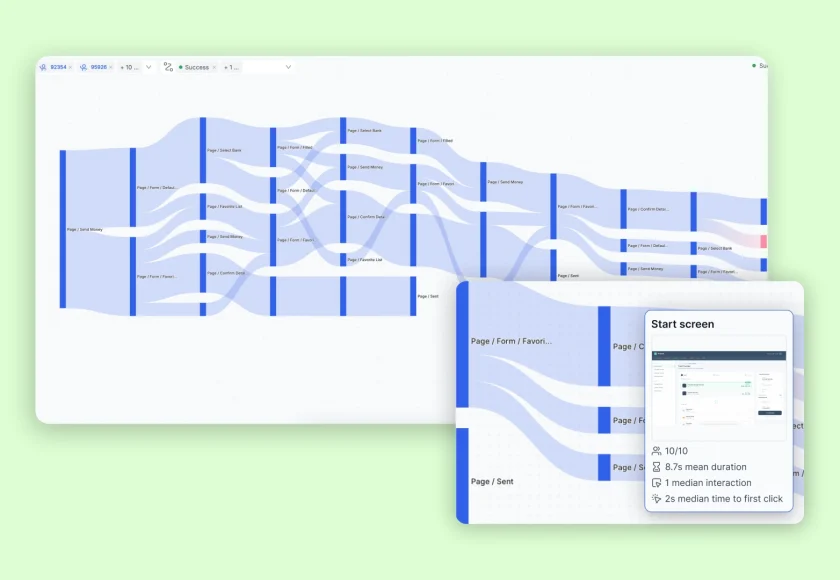
Navigation paths
At the heart of a user-friendly website or app is an easy and clear navigation. With visual representation of navigation paths of your testers shown next to one another, it is easy to derive the pattern of navigation and identify problematic navigation that might have been introduced during design or implementation. UXArmy recommends testing of interactive prototypes in early stages of defining the information architecture for your website or app.

Mouse paths
Mouse action graphs visualize the exact mouse movement and click / hover actions on every web-page, revealing how people went about achieving their goals on every page of your website. The attention span and actions on specific elements of the webpage vary among people, providing a deeper understanding of interaction for a specific user segment or a tester.
User tests recorded with UXArmy
Screen Recording Excerpt from a Live Website Usability Test

Screen Recording Excerpt from a Live Mobile App Usability Test
Screen Recording Excerpt from a Live Prototype Usability Test
You are in great company













Outsource Usability Testing
Get user insights and practical design recommendations from UX experts based on your user testing project brief.

UXArmy Panel
This pool of people has been built organically over a period spanning more than five years. Be sure to get participants from your target audience instantly. Dozens of psychographics attributes along with option to screen participants
Technology savviness
House type
Languages spoken
Home appliance ownership
Role in profession
Role in household
Travel habits
Job level
Internet consumption
Industry
Smartphone usage
and many more!
Start Your Free Remote User Testing Trial
Create your first remote user test for a prototype, website or app. No credit card required.
FAQs on User Testing
Here are answers to common questions you might have.
What is remote user testing, and how does it work?
Remote user testing lets participants complete tasks on a website, app or prototype from their own location. In an unmoderated test, participants complete tasks independently while the platform records their screen, voice and interactions for later analysis.
Can I test Figma prototypes, websites and mobile apps with UXArmy?
Yes. With UXArmy, you can test interactive prototypes, yours and competitor websites on mobile devices and computers without any software changes.
UXArmy also supports iPhone and Android app testing, including apps on TestFlight and Google Play beta. You can also benchmark competitor apps and compare live apps with design prototypes within one usability test.
Can I run mobile usability testing on iOS and Android apps?
Yes, UXArmy fully supports running mobile usability tests on both iOS and Android apps, allowing you to test prototypes along with live and beta versions (via TestFlight/Play Store), in field environments. The UXArmy platform captures the “complete user experience,” including screen recordings and users’ voice, for authentic insights.
Does UXArmy support Figma prototype testing without downloads?
Yes, UXArmy allows you to integrate and test Figma prototypes directly in the browser as well. No downloads or app installations are required. You retain access to heatmaps, navigation paths, and usability metrics during prototype testing.
What usability metrics and heatmaps does UXArmy provide?
UXArmy provides a comprehensive set of usability metrics to measure how effectively users complete tasks on your website, app, or prototype. This includes task success, failure, and completion rates, task completion time, time to first click, as well as detailed interaction data such as clicks or taps per page and per task and mouse hovers on Computers. Survey questions and other open-ended feedback is also captured to gather user satisfaction scores and overall experience.
How does AI-powered usability testing work in UXArmy?
UXArmy uses AI to generate automated summaries, sentiment analysis, and structured insight buckets from unmoderated usability tests. Feedback is grouped into sentiment-based buckets, with supporting user verbatims and timestamps available at both the test overview and individual respondent level. This helps teams quickly identify key behavioural patterns, understand user emotions, and reduce effort to do manual analysis while keeping insights easy to reference and act on.
How can I recruit participants for usability testing?
You can invite your own users or recruit participants through UXArmy’s in-house user panel, which has been built organically over ten years. The panel allows you to instantly reach your target audience using detailed demographic and psychographic screening, including tech savviness, job level, industry, smartphone usage, internet consumption, languages spoken, household role, travel habits, and more. This ensures you recruit the right participants for accurate and relevant usability insights, with coverage in global markets.
Is UXArmy a good alternative to UserTesting for remote usability testing?
Yes. UXArmy is a strong alternative to UserTesting, especially for teams needing multilingual testing, AI-powered insights, and flexibility across moderated and unmoderated studies. UXArmy offers features like AI summaries, heatmaps, navigation paths, and voice/screen recordings, with strong coverage in APAC and global markets. While UserTesting is known for its large, US-centric panel, UXArmy is a more cost-effective option for teams looking for broader geographic reach.
How can navigation and mouse path insights reduce user drop-offs?
UXArmy is the stronger choice for in-depth Figma prototype testing, especially when mobile experience and realistic user behavior matter. UXArmy supports recording of end-to-end user experience for mobile usability testing on iOS and Android, and AI-powered insights, without any code or SDK setup.
Lyssna is suitable for quick, lightweight Figma validations, but it lacks mobile screen recording and native mobile app testing. Lyssna has limited recording capabilities. For teams testing mobile-first products or needing deeper behavioral analysis, UXArmy provides a more complete user research solution.
UXArmy vs Lyssna: which platform is better for prototype testing?
Navigation paths reveal where users get lost or take inefficient routes, helping teams identify unclear flows and navigation issues early. Mouse paths show where users hesitate, hover, or miss key elements, revealing attention and friction points. Together, these insights help teams simplify journeys, fix usability issues, and guide users more clearly, reducing drop-offs and improving task success.
Have more questions?
If you have any other questions that are not covered here, please don’t hesitate to reach out. We’re here to provide the information you need and ensure your experience with us is smooth and enjoyable.
Our User Testing Tools
Unmoderated Usability Testing
Iterate your Design based on Usability evaluations and automated recruitment of matching Test participants
Moderated Research
In-depth interviews with LIVE conversations and note taking to generate detailed Insights remotely
Card Sorting
Design your information architecture, menus and navigation flows
Tree Testing
Evaluate the Menu labels and Categories in your product Design
