
In UX research, the quality of your insights depends not only on the method you choose, but just as much on how you ask the question. If you’ve ever looked at user research and thought, “Why is this data so shallow?”, the culprit is often the question design, not your users.
Open-ended and closed-ended questions each serve different purposes, but using the wrong type – or phrasing it poorly- can introduce bias, flatten nuance, and lead teams to the wrong conclusions. This guide shows you when to use open-ended vs. closed-ended questions, and more importantly, how to ask better questions. Along the way, you’ll find a practical library of example questions you can adapt to different stages of research, user journeys, and product contexts whether you’re running surveys, moderated interviews, or unmoderated usability tests.
Common Mistakes with Closed-Ended Questions (and How to Fix Them)
Closed-ended questions constrain answers to predefined options (Yes/No, multiple choice, rating scales, Likert, frequency). They’re ideal when you need comparable, quantifiable data – tracking trends, benchmarking, segmenting.
Strengths
- Fast to answer, fast to analyze.
- Great for measuring adoption, satisfaction, frequency.
- Easy to visualize and share (dashboards, KPI reviews).
Risks
- Can oversimplify complex experiences.
- Poor options lead to forced choices and misleading results.
- Wording and scale design can bias answers.
Examples of Bias in Closed-Ended Questions (with Better Alternatives)
1) Binary oversimplification
- Bad: “Do you like our product? (Yes/No)”
- Why it fails: “Like” is vague; no gradient; no clue why.
- Better: “Overall, how satisfied are you with the product today? (1 – 5 scale)”
- Add context: “What most influenced your rating?” (open follow-up)
2) Double-barreled trap
- Bad: “How satisfied are you with our price and features?”
- Why it fails: Two variables => one answer; unusable.
- Better:
- “How satisfied are you with the price?”
- “How satisfied are you with the features?”
- “How satisfied are you with the price?”
3) Leading scale anchors
- Bad: “How excellent was the support? (Excellent / Very Good / Good / Fair)”
- Why it fails: Skews positive; no true negative.
- Better:5-point balanced scale with neutral midpoint and clear negatives.
4) Ambiguous time windows
- Bad: “Do you use the dashboard regularly? (Yes/No)”
- Why it fails: “Regularly” varies by person.
- Better: “How many times did you use the dashboard in the past 7 days? (0 / 1 – 2 / 3 – 5 / 6+)”
5) Missing escape hatches
- Bad: “Which channel did you use to contact support? (Email / Chat / Phone)”
- Why it fails: No “Other” or “I didn’t contact support.”
- Better: Include “Other (please specify)” and “I didn’t contact support.”
6) Unclear item wording in matrices
- Bad:
“Rate each: Discoverability / Affordances / Architecture / Density” - Why it fails: Jargon; users won’t share your internal vocabulary.
- Better:
“Rate each: Finding features / Buttons look tappable / Menus make sense / Screens don’t feel crowded”
7) Over-using NPS as a catch-all
- Bad: “How likely are you to recommend us? (NPS)” (for every scenario)
- Why it fails: NPS ≠ task ease, UX, or feature value.
- Better: Use NPS sparingly; for UX, use CSAT/effort scales or task-specific ratings.
Common Mistakes with Open-Ended Questions (and How to Fix Them)
Open-ended questions let people answer in their own words. They’re powerful for uncovering reasons, emotions, unmet needs, and edge cases you didn’t anticipate.
Strengths
- Rich context and nuance.
- Surfaces unexpected insights and language.
- Great for diagnosing low scores or early discovery.
Risks
- Higher effort to answer (fatigue risk).
- Harder to analyze at scale without a plan.
- Vague prompts invite off-topic responses.
Examples of Bias in Open-Ended Questions (with Better Alternatives)
1) Negative priming
- Bad: “What don’t you like about our product?”
- Why it fails: Assumes there is something to dislike; invites ranting.
- Better: “What could we improve to make the product more useful for you?”
2) Overly broad prompts
- Bad: “Tell us about your experience.”
- Why it fails: No boundaries => blank, generic, or skipped.
- Better: “What was the most frustrating part of your experience today?”
3) Hypothetical speculation
- Bad: “If we added AI, how much would you use it?”
- Why it fails: Users are poor predictors; results are noisy.
- Better: “What tasks do you spend the most time on that feel repetitive?” (then prototype, then survey)
4) Double-barreled why
- Bad: “Why do you like the speed and design?”
- Why it fails: Two topics => one answer; muddy.
- Better:
“What do you like about the speed?”
“What do you like about the design?”
5) Jargon-heavy prompts
- Bad: “Describe your issues with information architecture.”
- Why it fails: Not everyone speaks Information Architecture (IA).
- Better: “Which menu labels felt unclear or hard to find?”
6) “Other (please specify)” overload
- Bad: Making “Other” the only path to the right answer.
- Why it fails: Shifts labor to the respondent; reduces response quality.
- Better: Keep updating options based on prior “Other” text; make “Other” truly a catch-all.
The Psychology of Responses (Why This All Works)
Closed questions trigger fast, intuitive System-1 judgments (quick ratings, choices). Open questions require slower, reflective System-2 thinking (effortful recall, articulation). Too many open prompts cause fatigue and drop-offs; too many closed prompts flatten nuance. Balanced surveys respect cognitive load and maintain response quality and quantity.
A Practical Decision Framework: Closed, Open, or Both?
Use this lightweight flow when choosing question types:
- Are you measuring or exploring?
- Measuring a known concept (adoption, satisfaction, frequency) => Closed, with one targeted open follow-up.
- Exploring unknowns (needs, language, friction) => Open, possibly preceded by a simple screener.
- Measuring a known concept (adoption, satisfaction, frequency) => Closed, with one targeted open follow-up.
- Do you need to compare results over time or between different user cohorts?
- Yes => Closed scales with consistent wording and anchors.
- No / early discovery => Open prompts with scope (e.g., “most frustrating” vs. “tell us everything”).
- Yes => Closed scales with consistent wording and anchors.
- Will you act on the result, and how?
- If you need a KPI => Closed.
- If you need direction for design/discovery => Open (coded later).
- If you need a KPI => Closed.
Scenario-Based Examples
Adoption tracking
- Closed: “How many times did you use Feature X in the past 7 days?”
- Open: “What task do you usually use Feature X for?”
Onboarding drop-off
- Closed: “At which step did you stop? (Account / Profile / First Task / Other)”
- Open: “What made that step difficult?”
Message testing
- Closed: “Which headline is clearer? (A/B/C)”
- Open: “What makes that headline clearer to you?”
Support improvement
- Closed: “How satisfied are you with your last support interaction? (1 – 5)”
- Open: “What could we have done better?”
How to Improve User Research Questions: 10 Golden Rules in Practice
1) Write to the respondent’s vocabulary
- Bad: “Rate the quality of our IA.”
- Better: “How easy was it to find what you needed?”
2) Anchor scales with real behavior
- Bad: “Do you regularly use the dashboard?”
- Better: “How many times did you use the dashboard in the past 7 days?”
3) Don’t bury the lede in multi-select questions
- Bad: 15 options in random order.
- Better: Group by theme, limit to top 6 – 8, add “Other.”
4) Keep matrix questions short and plain-language
- Bad: 10+ items with jargon.
- Better: 4 – 6 items; replace jargon with lay terms.
5) Use one neutral open prompt after a key closed item
- Bad: Only scales => pretty charts, no direction.
- Better: “What most influenced your rating?”
6) Avoid absolutes
- Bad: “Do you always use filters?”
- Better: “How often do you use filters? (Never / Sometimes / Often / Always)”
7) Specify the time frame
- Bad: “How often do you encounter bugs?”
- Better: “In the past 30 days, how often did you encounter bugs? (Never / Once / 2 – 3 times / 4+ times)”
8) Separate satisfaction from importance
- Bad: “How satisfied are you with reporting?”
- Better: Ask both:
- “How important is reporting to your work?”
- “How satisfied are you with reporting?”
- “How important is reporting to your work?”
9) Don’t assume usage
- Bad: “What do you like most about Feature Y?”
- Better:
- “Have you used Feature Y in the last 14 days? (Yes/No)”
- If No => “What prevented you from trying it?”
- If Yes => then ask what they like most.
- “Have you used Feature Y in the last 14 days? (Yes/No)”
10) Pilot your survey
- Bad: Launch to 5,000 users; discover a logic loop.
- Better: Pilot with 5 – 10 people; fix wording and logic; then go wide.
How to Analyze Open-Ended Answers Without Drowning
Open prompts are gold – if you analyze them well:
1) Create a quick codebook
Start with 8 – 12 themes you expect (navigation, speed, clarity, trust, price, support, bugs, content). Add new codes when you see them in responses.
2) Tag consistently
Have two reviewers tag a sample of answers and compare. Align on definitions so coding remains consistent.
3) Quantify the qualitative
Count mentions by theme, segment by persona or plan, cross-tab with closed scores. “Speed complaints are 3× higher among mobile users” is actionable.
4) Use your survey platform’s AI/helpful features
Many survey platforms / customer survey toolsnow cluster themes and extract sentiment to jump-start analysis. Treat AI suggestions as a first pass, not gospel.
Using software to boost your efficiency
You can implement everything in this guide using any survey software / survey tool. The trade-offs to keep in mind:
- Generalist tools (e.g., Google Forms, Typeform, Tally)
- Pros: Fast, inexpensive, good for simple studies and quick pulses.
- Cons: Limited logic, weaker analytics; you’ll export to Sheets/BI.
- Pros: Fast, inexpensive, good for simple studies and quick pulses.
- User-research-focused platforms (e.g., Maze, UXArmy)
- Pros: Attach surveys to tasks/sessions, mix open + closed, analyze alongside behavioral data.
- Cons: Less suited to massive market-research studies.
- Pros: Attach surveys to tasks/sessions, mix open + closed, analyze alongside behavioral data.
- Enterprise platforms (e.g., Qualtrics, Alchemer, Forsta)
- Pros: Advanced logic, segmentation, compliance, multi-language, AI analysis.
- Cons: Cost and setup; best when you truly need enterprise scale.
- Pros: Advanced logic, segmentation, compliance, multi-language, AI analysis.
“Best survey tools” depend on your goals, budget, sample size, and team skills. Start lean; scale when analysis pain becomes the bottleneck.
Accessibility, Inclusivity, and Ethics (Don’t Skip This)
- Plain language: Write for a 6th – 8th grade reading level. Avoid jargon and idioms.
- Mobile-first: Most responses happen on phones. Keep items short; avoid huge grids.
- Localization: Don’t direct-translate idioms; use culturally relevant examples.
- Optional sensitive questions: Make demographics optional; explain why you’re asking.
- Privacy: State data use, storage, and how respondents can opt out. Respect local regulations (GDPR, etc.).
- Diversity of voices: Don’t let one segment dominate. Recruit broadly to avoid biased conclusions.
Response-Rate Playbook (Small Tweaks, Big Gains)
- Timing: Mid-week, mid-day in the respondent’s time zone usually performs best.
- Length promise: Set expectations: “This survey takes ~3 minutes.”
- Incentives: Small, immediate incentives drive completion (credit, raffle, charity).
- Reminders: One gentle reminder (not three) is enough.
- Subject lines: Specific and honest (“Help improve checkout – 3 min survey”).
- Thank-you + feedback loop: Share what changed because of their input => builds trust and future response rates.
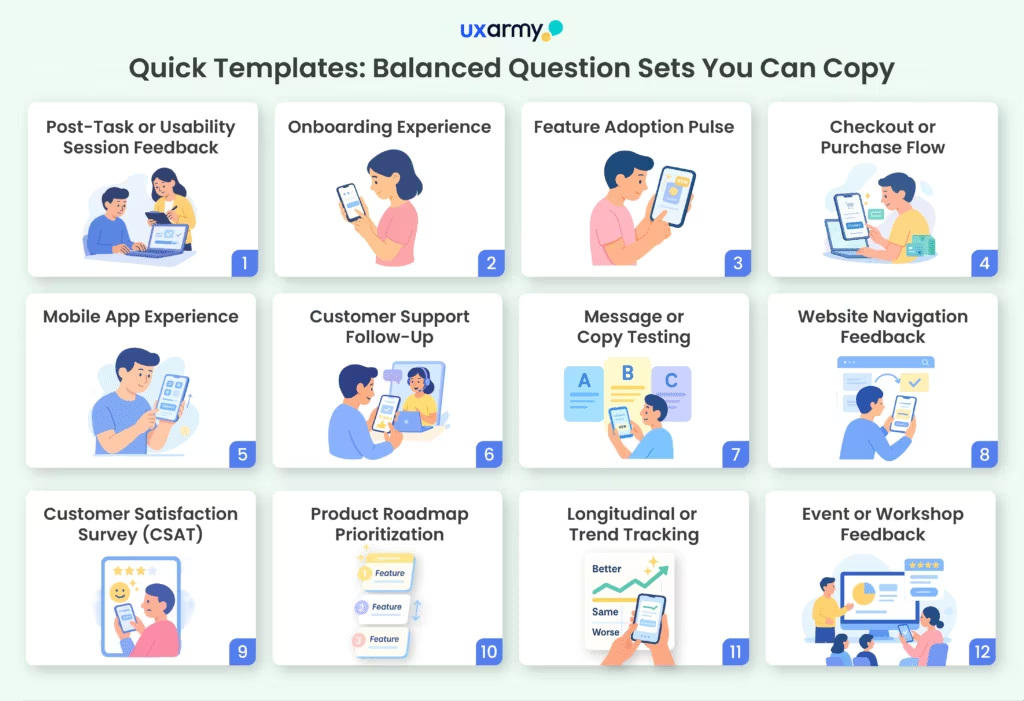
Quick Templates: Balanced Question Sets You Can Copy
Here’s a library of templates you can adapt depending on the stage of research, user journey, or product focus. Each is short enough for real-world use but balanced between closed questions (for quantifiable benchmarks) and open prompts (for context and discovery).
1. Post-Task or Usability Session Feedback
Great after moderated/unmoderated usability tests.
Task-Level Questions
- “How easy was it to complete this task? (1 = Very Difficult => 5 = Very Easy)”
- “How confident do you feel repeating this task on your own? (1 – 5)”
- “Did you need to use any workarounds to complete the task? (Yes/No)”
- “If yes, please describe the workaround you used.” (open)
- “How long did it feel like this task took to complete? (Very quick / About right / Too long)”
- “Were you able to complete the task successfully? (Yes/No/Partially)”
Perception of Effort
- “How much effort did it take to complete the task? (1 = No effort => 5 = A lot of effort)”
- “What part of the task required the most effort?” (open)
Clarity and Navigation
- “How clear were the instructions or cues on screen? (1 – 5)”
- “Did you encounter any steps that felt confusing or unnecessary? (Yes/No)”
- “If yes, which step(s) felt confusing or unnecessary?” (open)
Overall Session Impressions
- “How satisfied are you with this part of the product overall? (1 – 5)”
- “Would you want to use this feature again in the future? (Yes/No/Not sure)”
- “What one thing would you change to make this experience better?” (open)
- “What, if anything, did you particularly like about this task flow?” (open)
2. Onboarding Experience
- “How easy was the signup process? (1 – 5)”
- “At which step, if any, did you feel stuck? (Select step list)”
- “What would have made onboarding easier for you?” (open)
3. Feature Adoption Pulse
- “How often did you use Feature X in the past 7 days? (0 / 1 – 2 / 3 – 5 / 6+)”
- “How valuable is Feature X to your work? (1 – 5)”
- “What do you primarily use Feature X for?” (open)
- “What could make Feature X more useful?” (open)
4. Checkout or Purchase Flow
- “How satisfied are you with the checkout process? (1 – 5)”
- “How long did it take you to complete the checkout? (Under 2 min / 2 – 5 / 6+ min)”
- “Did you encounter any errors? (Yes/No)”
- “If yes, please describe the issue.” (open)
5. Mobile App Experience
- “How easy is it to navigate the app? (1 – 5)”
- “How often does the app feel slow or laggy? (Never / Rarely / Sometimes / Often)”
- “Which feature do you use most often? (List)”
- “What’s the one thing you wish this app did better?” (open)
6. Customer Support Follow-Up
- “How satisfied are you with the resolution you received? (1 – 5)”
- “How many contacts did it take to resolve your issue? (1 / 2 / 3+)”
- “Did the agent explain things clearly? (Yes/No)”
- “What could we have done to improve your support experience?” (open)
7. Message or Copy Testing
- “Which of the following headlines do you find clearest? (A/B/C)”
- “Which headline would make you most likely to try the product? (A/B/C)”
- “What made that headline clearer or more persuasive for you?” (open)
8. Website Navigation Feedback
- “How easy was it to find the information you needed? (1 – 5)”
- “Where did you start your search? (Homepage / Search bar / Menu / Other)”
- “Were you able to complete your task? (Yes/No)”
- “If no, what prevented you from completing it?” (open)
9. Customer Satisfaction Survey (CSAT)
- “Overall, how satisfied are you with [Product/Service]? (1 – 5)”
- “How likely are you to continue using it? (Very unlikely => Very likely)”
- “What’s the primary reason for your rating?” (open)
10. Product Roadmap Prioritization
- “Which of these potential features would be most useful to you? (Rank)”
- “Which feature is least useful to you? (Select one)”
- “What’s a problem we’re not solving for you today?” (open)
11. Longitudinal / Trend Tracking
Best for quarterly surveys.
- “How has your satisfaction with [Product] changed in the last 3 months? (Better / Same / Worse)”
- “How often do you use it compared to 3 months ago? (More / Same / Less)”
- “What’s the biggest change you’ve noticed?” (open)
Brand Health Tracking Survey Questions
Overall Brand Perception
- “How familiar are you with [Brand]? (Not at all familiar => Very familiar)”
- “What is your overall impression of [Brand]? (Very negative => Very positive)”
- (Open): “What is the first word or phrase that comes to mind when you think of [Brand]?”
Brand Awareness & Recall
- “When you think of [category/product type], which brands come to mind first? (Unaided awareness)” (open)
- “Have you heard of [Brand]? (Yes/No)”
- “How did you first hear about [Brand]? (Friends/Ads/Social/Other)”
Brand Consideration & Preference
- “If you were to purchase [product/service], how likely are you to consider [Brand]? (1 – 5)”
- “Which of these brands would you most likely choose? (Brand A / Brand B / [Brand])”
- (Open): “Why would you choose [Brand] or another brand instead?”
Brand Trust & Reputation
- “How much do you trust [Brand] to deliver on its promises? (1 – 5)”
- “How well does [Brand] live up to its reputation? (Poorly => Very well)”
- (Open): “What could [Brand] do to increase your trust?”
Brand Differentiation & Relevance
- “How unique do you think [Brand] is compared to competitors? (Not unique => Very unique)”
- “How relevant is [Brand] to your needs today? (1 – 5)”
- (Open): “What makes [Brand] stand out – or not stand out – compared to others?”
Advocacy & Loyalty
- “How likely are you to recommend [Brand] to a friend or colleague? (NPS 0 – 10)”
- “Have you recommended [Brand] to anyone in the past 6 months? (Yes/No)”
- (Open): “Why would you recommend – or not recommend – [Brand]?”
Emotional Connection
- “How strongly do you feel connected to [Brand]? (Not at all => Very strongly)”
- “Which emotions best describe how you feel about [Brand]? (Proud, Excited, Indifferent, Frustrated, etc.)”
- (Open): “Can you describe an experience that shaped your feelings about [Brand]?”
12. Event or Workshop Feedback
- “How useful did you find this event? (1 – 5)”
- “How relevant was the content to your work? (1 – 5)”
- “Would you recommend this event to a colleague? (Yes/No)”
- “What was the most valuable part for you?” (open)
- “What could we improve for next time?” (open)
Conclusion: Pair Precision with Discovery
Closed questions give you precision – counts, rates, trends you can defend in a roadmap review. Open questions give you discovery – the reasons and language that make design and messaging sharper. The most effective user researchers don’t “pick a side”; they pair them.
Before you launch your next survey, run each item through this checklist: Is it neutral? Is it specific (with a clear time window, if needed)? Is it the right type for the goal? Do you have one open prompt to capture what your options might miss?
Do that consistently – in any survey tool, whether a lightweight form or an enterprise survey platform – and your surveys stop being guesswork. They become a reliable engine for product clarity, customer empathy, and confident decision-making.
Try UXArmy for free.
Frequently asked questions
1) How many open-ended questions should I include?
Usually u003cstrongu003e1 – 3u003c/strongu003e. Enough for depth without fatiguing respondents.
2) Can I run a survey with only closed questions?
Yes, for tracking KPIs. But add at least one neutral “What most influenced your rating?” to catch context and surprises.
3) How do I avoid biased closed questions?
Use balanced scales, neutral wording, and include “Other”/“None” where applicable. Pilot test to catch leading language.
4) What’s the best way to analyze a lot of open text?
Create a codebook, tag consistently, quantify themes, and use your u003cstrongu003esurvey platform’su003c/strongu003e text analytics as a u003cstrongu003efirst passu003c/strongu003e – then review manually for accuracy.
5) How do I improve mobile completion rates?
Short surveys (≤10 questions), no giant grids, large tap targets, and clear progress indicators.
6) Which survey software should I choose?
Early teams: simple tools (Forms/Tally/Typeform). User-research-heavy teams: tools that mix surveys with usability/behavioral data. Large CX/UX orgs: enterprise u003cstrongu003esurvey platformsu003c/strongu003e with governance, multi-language, and deep analytics.
7) How do I keep results comparable over time?
Lock wording, anchors, and time windows. Don’t tweak scale labels mid-stream; if you must, note the break in your trend lines.
8) Should I translate surveys?
If you have non-native speakers, yes. Use human review (not just automated translation) and test for cultural clarity.
9) How long should a survey be?
Post-task: 3 – 5 questions. Pulses: 5 – 8. Deep dives: 10 – 15 (max). If you need more, split it up.
10) What’s the biggest mistake researchers make?
Designing surveys that u003cstrongu003emirror internal assumptionsu003c/strongu003e, not user language. Always pilot and re-write with respondents’ vocabulary.