
DeepDive® Moderated-Research
Run Live Interviews with Your Team. Scale Your Research with 'AI Moderator'.
Flexible Formats for Every Study
Conduct 1:1s, Dyads, Triads, or Focus groups and gather real-time feedback.
Consolidated Timestamped Notes
Combine all timestamped notes from everyone in your research in one place for easy access.
Chat Privately with internal team
Carry out in-session hidden chats without interrupting your participants.
AI Moderator to Scale Interviews
Lean on AI to gather rapid qualitative feedback scaling language & time-zone barriers.
Specialised UX Research Platform for User Interviews

Run Up to 3-Hour Sessions for Deeper Insights
Allow enough time to test complex journeys, explore participant responses and ask meaningful follow-up questions during sessions of up to three hours.

Observe Cross-Device Experiences with Multi-Screen Sharing
View up to three shared screens during user interviews to observe desktop and mobile experiences in real time.

Centralise Notes, Transcripts and Highlights
Review notes, transcripts, recordings and highlights in one analysis space to simplify research synthesis.

Run Multilingual Moderated Research
Transcribe sessions and translate research findings across supported languages to make global user research easier to review and share. See available languages

Let Hidden Observers be your Silent Co-pilots
Invite stakeholders as Hidden Observers to watch, take notes & suggest follow-up questions—without disrupting the session

Coordinate Effortlessly with One Click Access
Easily share secure links with participants and stakeholders—each with one-click access. Focus on insights, not logistics

Run User Interviews Without a Human Moderator
AI Moderator on DeepDive conducts 1:1 interviews; asking questions from your discussion guide and probing responses with dynamic follow-ups. Available on the Enterprise Plan.

Run Moderated Mobile Usability Testing with DeepDive®
Let participants share and test mobile experiences in real time while moderators and observers join remotely from other devices.
You are in great company












Need Help Running Moderated User Research?
Get research insights and practical design recommendations from UX experts based on your moderated usability testing brief.
Recruit Participants for Moderated User Research
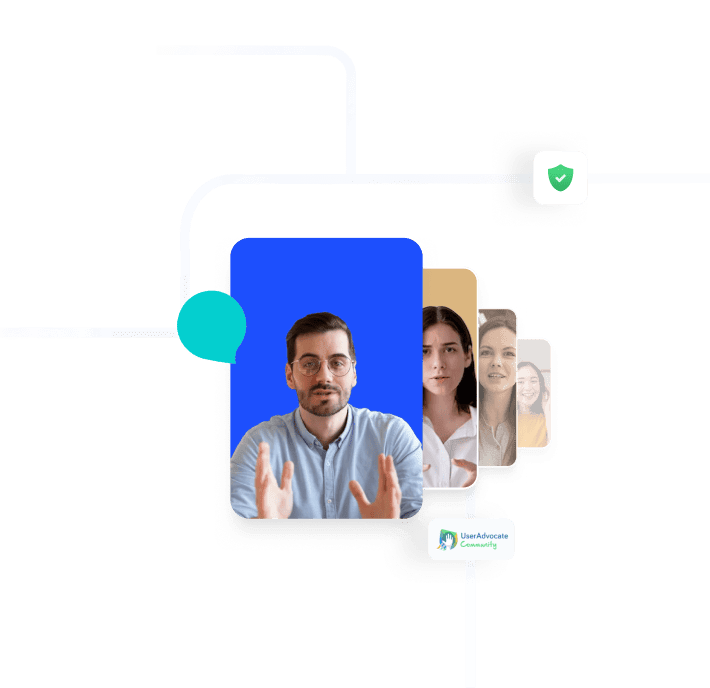
Recruit participants who match your moderated research audience using demographic, professional and behavioural screening criteria. Select participants based on attributes such as industry, job level, technology usage, language and household profile.
Technology savviness
House type
Languages spoken
Home appliance ownership
Role in profession
Role in household
Travel habits
Job level
Internet consumption
Industry
Smartphone usage
and many more!
Start Your Free Moderated Research Trial
Run your first moderated research session, invite participants and record live user feedback. No credit card required.
FAQs on Moderated Usability Testing
Here are answers to common questions you might have.
What is DeepDive® by UXArmy?
DeepDive® is UXArmy’s unified moderated research platform for conducting online 1:1 user interviews, Dyads (up to 2 participants), Triads (up to 3 participants), and Focus Group Discussions. The proprietary video calling platform is built for User Research and supports session recordings of up to 3 – hour in duration. Other important features include observation room, hidden internal chat, live controls (pause/resume/toggles), timestamped note-taking and up to 2 Translator / Interpreter audio channels.
Besides running video calls, DeepDive also supports import of video and audio files from User interviews conducted on other software like ZOOM, MS Teams or Google Meet.
Does UXArmy DeepDive® support Focus Group Discussions (FGD)?
Yes, UXArmy DeepDive® supports Focus Group Discussions with up to 10 participants, 2 moderators, 2 translators, and up to 25 observers. Includes hidden observers, group chat, and collaborative notes with AI transcription/highlights.
What languages does DeepDive® support for transcription and translation?
23-language instant transcription + 67-language translations with AI highlights / auto-tagging in Analysis Space ideal for global research.
Do participants and observers need accounts for DeepDive®?
No signups needed. Secure links are created for participants and observers. The links stay the same for all sessions within a project / Study until the moderator resets it. Participants can join via Computer or the DeepDive mobile app.
What are UXArmy DeepDive® mobile research capabilities?
UXArmy DeepDive® allows researchers to run moderated mobile studies on iOS and Android apps. Participants can join using the DeepDive® mobile app, sharing their mobile screens live for authentic, real-time feedback. Researchers can conduct 1:1 interviews, dyads, triads, or focus groups (up to 10 participants), and sessions can include both mobile and desktop experiences, with participants able to easily switch between mobile and desktop during the user interview.
How much does UXArmy DeepDive® cost? Is a Free trial available?
UXArmy DeepDive is available in both a free plan (no credit card required) and paid plans, giving access to all UXArmy tools. DeepDive uses pooled platform credits, which are consumed based on session duration.
- Free Plan: 1 seat, 15 monthly credits, access to all tools, unlimited studies, transcription, storage, AI features, and the ability to run live user interviews and live focus group sessions on DeepDive with recording, as well as upload interview recordings for transcription and analysis.
- Paid Plans (Starter, Pro, Organization): Include everything in the free plan plus additional pooled credits with pay-as-you-go, collaborative features, access to UXArmy’s participant panel (optional), multiple seats, and enterprise-grade features for Organization plans.
Pay-as-you-go allows collecting responses beyond monthly credits, and panel credits are optional for recruiting participants.
UXArmy DeepDive® vs UserTesting Live Conversation,which is better for focus groups?
UXArmy DeepDive® offers more direct support for group dynamics (up to 10 people) with features like consolidated notes and in-session chat, ideal for brainstorming, while UserTesting Live Conversation excels at (1:1) real-time feedback, making it better for deep individual insights but requiring more setup for true group interaction
UXArmy DeepDive® vs Lookback,which has device switching?
UXArmy DeepDive® supports switching devices mid‑session (e.g., a participant can move from desktop to mobile within the same session without ending the call), making it easier to test cross‑device experiences seamlessly. Lookback does not support this if a participant switches devices during a session, it effectively ends the session and requires starting a new one.
Have more questions?
If you have any other questions that are not covered here, please don’t hesitate to reach out. We’re here to provide the information you need and ensure your experience with us is smooth and enjoyable.
Our User Testing Tools
Unmoderated Usability Testing
Iterate your Design based on Usability evaluations and automated recruitment of matching Test participants
Moderated Research
In-depth interviews with LIVE conversations and note taking to generate detailed Insights remotely
Card Sorting
Design your information architecture, menus and navigation flows
Tree Testing
Evaluate the Menu labels and Categories in your product Design
