You’ve finished your prototype and handed it over to the product team. Then come the inevitable questions: “How confident are you that this solution will work? Are we ready to build?”
For most designers, that moment brings both pride and apprehension. A prototype represents hours of work, but saying “yes” means betting that it will actually meet user needs and align with your business goals. The way you earn that confidence is by testing with users. Prototype testing lets you move from feeling confident to being confident, backed by evidence rather than assumption.
In this guide, we’ll cover when to test a prototype, which testing methods to use, how to run a prototype test, what metrics to track, and how to choose the right toolsincluding how to test Figma or AI-generated prototypes with real users.
- Prototype testing puts an early version of your product in front of real users to validate it before you build.
- You can test at any stage from early concept validation to refining an existing feature.
- Moderated testing gives deeper qualitative insight; unmoderated testing gives faster, scalable feedback.
- Small, iterative rounds with well-matched participants beat large studies – quality matters more than number of participants per iteration.
- Match prototype fidelity to your goal: low-fidelity for user testing of concepts and flows, high-fidelity for realistic interactions.
- Track a few metrics (task success, time on task, error rate, SUS) to move from “feels right” to proven.
What is prototype testing?
Prototype testing is the process of evaluating an early version of a product or feature with real users to gather feedback before development begins. A prototype can range from a simple wireframe or clickable mockup to a highly realistic, functional experience.
The purpose of testing it is to learn whether the underlying idea, flow, interaction, or design direction works for the people who will use it. By iterating on those insights, you make sure that when you say “we’re ready to build,” the decision is backed by evidence rather than opinion.
Typically in studies with prototype testing, participants are given realistic tasks or scenarios and asked to interact with the prototype, while thinking aloud their thoughts. Researchers observe what they do, and their facial expressions or body language, apart from also listening to what they say. Their feedback can be collected qualitatively or quantitatively to inform the next design iteration.
When should you prototype?
Prototype when there is a question that can be answered more reliably by letting someone experience an idea than by discussing it.
| If you need to know… | Consider… |
|---|---|
| Does the information structure make sense? | Sketch or wireframe |
| Does the flow make sense? | Interactive prototype |
| Does the visual hierarchy work? | High-fidelity prototype |
| Does the interaction behave realistically? | Functional HTML prototype |
💡Pro tip: Build the cheapest realistic artifact that can answer your highest-risk question.
Why does prototype testing matter?
- Validate ideas early so concepts align with real user needs.
- Catch usability issues like confusing navigation or awkward flows before they become expensive to fix.
- Save time and cost by resolving problems before software implementation.
- Increase satisfaction by shipping a solution that’s already been pressure-tested.
- Support evidence-driven design and a stronger user-centered culture.
Real-world impact: enhancing UX through testing
While working at PebbleRoad, a design team led a redesign of a complex government website. The goal was to make the experience easier to understand and more efficient for people trying to complete important tasks.
Rather than treating the redesign as a purely visual exercise, the team used user research and testing before and after the redesign to understand where people struggled and validate the proposed changes.
The process helped the team identify key usability challenges, test design decisions, and iterate based on evidence. The redesigned experience improved usability and accessibility and contributed to a reduction in contact volume and an increase in user satisfaction.
💡Pro tip: Testing before and after a redesign turns a visual refresh into an evidence-based improvement you can actually measure.
When should you test a prototype? (Hint: not just once)
You should test a prototype whenever you need evidence about whether a design direction, interaction, or product idea works for users. That can be during early product discovery, before development, or as part of an ongoing product improvement cycle.
Testing during new product discovery
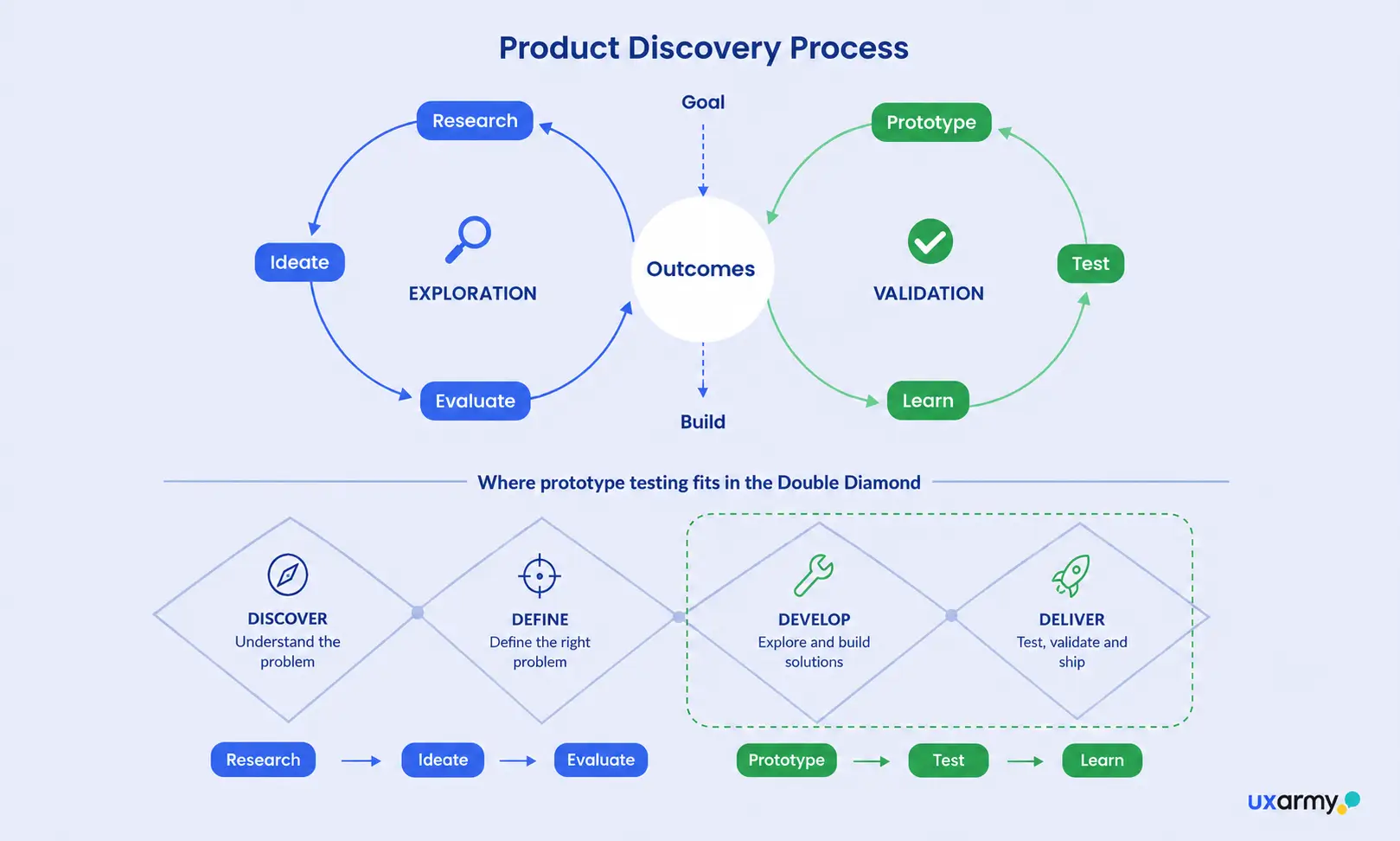
During product discovery, test when you’re still deciding whether you’re solving the right problem. At this stage, prototype testing uncovers real user needs and exposes flawed assumptions before they’re baked into a build.
- Objective: Validate concepts, gather user needs, and clarify design direction
- Best methods: User interviews, Prototype testing, Preference testing
This is also where AI-assisted prototyping, a.k.a vibe-coded prototyping, changes the tempo of research. Instead of testing a static mockup, you can prompt an AI tool to generate a working, clickable prototype, deploy it to a live URL, and put a real task in front of users the same day. If you’re mapping where testing fits across the wider product design workflow, see our Complete Guide to the Product Design Process
Testing an existing product during continuous improvement
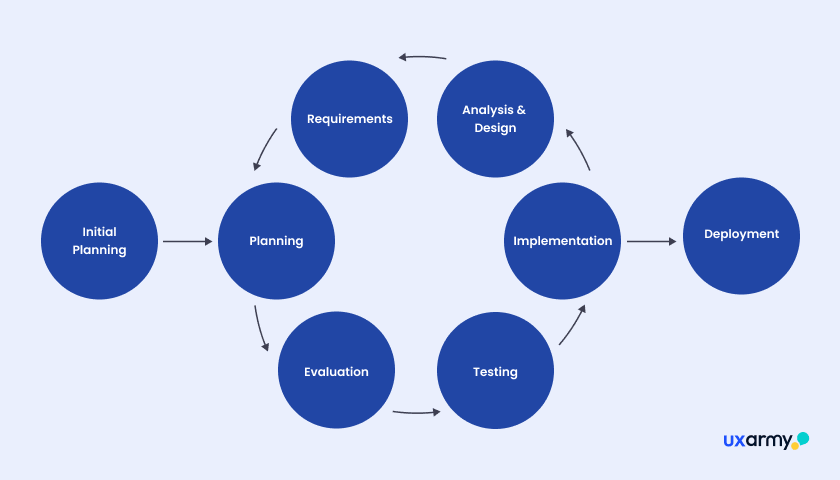
When you’re improving an existing product or feature, test to understand what’s working, identify friction points, and compare the current experience with a proposed solution.
- Objective: identify usability issues and prioritise areas to improve.
- Best methods: Usability testing, Websites or Mobile app testing, Heuristic evaluation or secondary research.
💡Pro tip: Existing products offer a useful advantage: you can often benchmark the current experience before introducing a change.
Methods of prototype testing
There isn’t one universal prototype testing method. The right approach depends on what you need to learn, how much depth you need, and how many participants you need to reach.
Two useful ways to think about your options are:
- How will the test be conducted? Moderated or unmoderated?
- What type of evidence do you need? Qualitative or quantitative?
Moderated vs unmoderated method
| Moderated | Unmoderated | |
|---|---|---|
| How it works | A researcher or an AI moderator guides participants through tasks or questions and observes in real time | Participants complete tasks independently, without a researcher present |
| Best for | Exploring behaviour, motivations and unexpected issues | Testing specific tasks or quick validation at scale |
| Pros | Deeper insight via follow-up questions, real-time help, and non-verbal cues | Broader reach, faster and cheaper, more natural behaviour, quick to analyze |
| Cons | Time- and resource-intensive, fewer participants, risk of moderator influence | No follow-ups, tasks can be misread, technical issues go unresolved |
Many platforms support both, so you can pair the depth of moderated sessions with the throughput of unmoderated ones.
Qualitative vs. quantitative prototype testing
| Qualitative | Quantitative | |
|---|---|---|
| What it answers | Why users hesitate or get stuck in the prototype: Expectations, confusion, motivations | How well the prototype performs: Measurable task behaviour and outcomes |
| Methods in prototype testing | Moderated think-aloud sessions, in-test user interviews, open-ended follow-up questions, observing where people struggle | Task success rate, misclick rate, time on task, SEQ, SUS, first-click tests |
| Best for | Diagnosing why users struggle and exploring early or novel flows | Benchmarking design prototypes vs. competitor products, comparing design versions, and validating at scale |
| Pros | Deep insight into the reasons behind behaviour; works well with small samples | Objective, comparable across design versions, scales to larger samples |
| Cons | Time and effort-intensive, harder to quantify, interpretation can be biased | Shows what happened but not why; needs enough participants to be reliable |
A mixed-method approach, a few numbers plus the stories behind them, usually leads to the most confident decisions. See our guide on qualitative vs quantitative research for more.
How to run a prototype test: Step by step
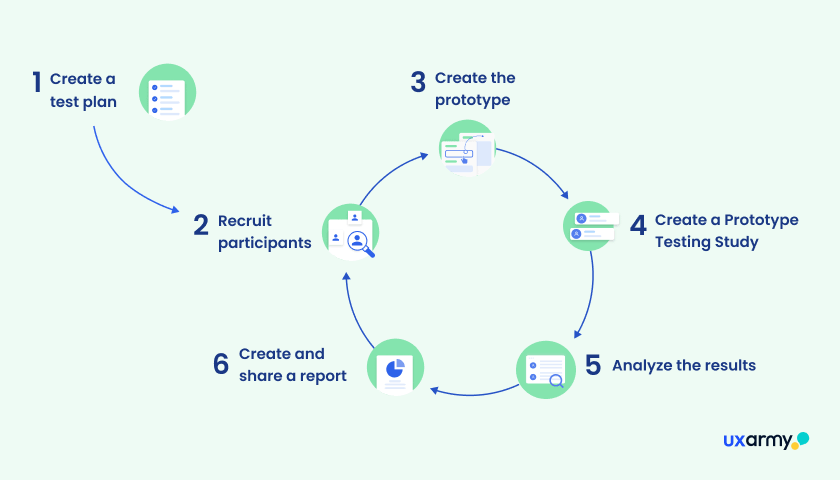
Step 1: Plan your research
Start by writing down exactly what you want to learn. A clear goal keeps the whole test focused.
- Purpose: What question are you answering, whether it’s a full flow, one feature, or the overall experience?
A useful research objective is specific enough to guide the study.
Instead of: “Test our new checkout.”
Try: “Understand whether first-time customers can find and apply a discount code during checkout without assistance.” - Target audience: Who are the real users, and what do they need?
A short written test plan keeps you organized and aligns your team, participants, and stakeholders.
💡Pro tip: Use this planning template and our guidelines to build yours.
Step 2: Recruit participants

Recruit people who represent the users whose behaviour and needs you are trying to understand.
How many testers are enough? The right participants are more important than simply getting a large number of responses.
As a reference, the Nielsen Norman Group suggests that testing with 5 users can identify around 85% of usability problems. For reach beyond your own network, including specific markets or languages, external panels help. UXArmy also supports localization testing across 30+ languages.
If recruiting the right participants is slowing your research down, services such as UXArmy Managed ResearchOps can handle sourcing, screening, scheduling, coordination, and other research logistics.
Step 3: Create your prototype
Create the simplest prototype that can answer your research question reliably. Your prototype does not need to represent the entire product. E.g. If you are testing checkout, you may only need the checkout journey. If you are evaluating navigation, you may need the relevant navigation structure and a handful of realistic destinations.
Click-through or vibe-coded?
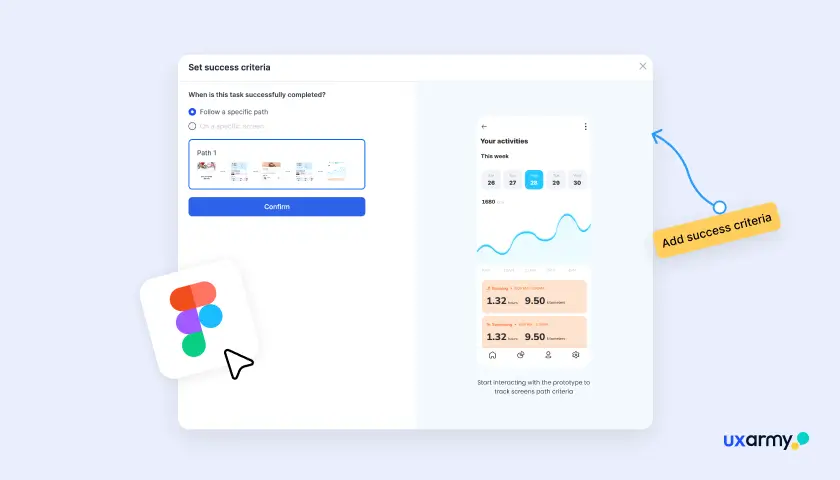
The type of prototype you choose should depend on what you need to learn. Figma prototypes are well suited to testing flows and interactions without building production code, while vibe-coded prototypes can help you test more realistic or dynamic behaviours.
Testing Figma prototypes
When to use
Navigation, task flows, information hierarchy, interactions, content and labels, design variations, and first-click behaviour
Examples
Testing whether users can find a setting, complete a checkout flow, or understand a new navigation structure
Best Practices
- Use realistic flows rather than isolated screens where possible.
- Make sure all interactions required for the task are clickable and connected.
- Don’t rely on visual polish as evidence that the experience works.
- Keep the prototype focused on the research question.
UXArmy supports testing Figma prototypes directly, allowing teams to evaluate user behaviour through measures such as task success, navigation paths, heatmaps, and other usability data. Test your Figma prototype with UXArmy →
Testing vibe-coded prototypes
When to use
Realistic, dynamic, or end-to-end experiences that are difficult to reproduce in a conventional design tool
Examples
Testing multi-step workflows, responsive behaviour, dynamic interactions, AI interactions, real data or state changes
Best practices
- Test realistic end-to-end flows to take advantage of their functional nature.
- Test dynamic states, error states, loading states, and edge cases where relevant.
- Don’t confuse technical functionality with usability a prototype can work perfectly and still confuse users.
- Keep the prototype intentionally scoped; don’t let faster development become an excuse to build the whole product before testing.
💡Pro tip: Always test early, observe real user behaviour, and iterate based on evidence rather than assumptions.
What should you include in your prototype?
Regardless of how you build your prototype, include only what participants need to complete the task you’re testing.
| ✅ Do | 🚫 Avoid |
|---|---|
| Build the screens, interactions, and content needed to complete the task. | Building the entire product when only one flow needs to be tested. |
| Make the prototype realistic enough to support the behaviour you’re researching. | Adding detail that participants won’t see or interact with. |
| Test the riskiest or most important assumptions first. | Spending weeks polishing a prototype before getting user feedback. |
| Keep the version being tested consistent across participants. | Changing the prototype between participants and making results difficult to compare. |
Step 4: Plan your test session
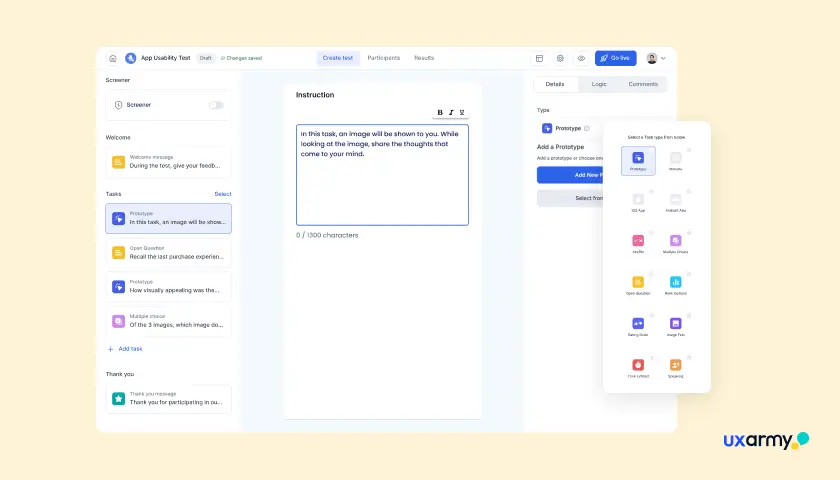
- Frame a scenario, not an instruction. “You want to book a table for four this Friday” beats “Click the Reservations button.”
- Don’t lead. Avoid interface words that give away the path, like “tap the blue plus icon.”
- One goal per task. Keep each task focused so you know exactly what failed.
- Define success up front. Decide what “done” looks like so you can score task success consistently.
Step 5: Conduct your test
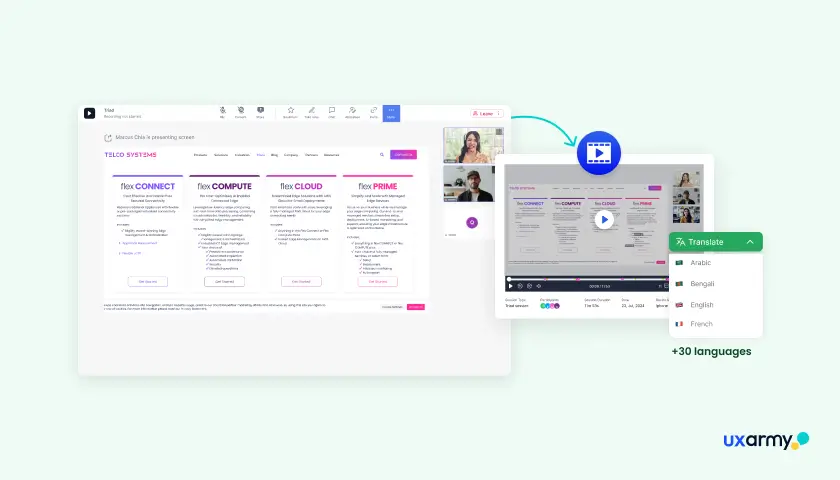
Pilot the test with one person first, then run your sessions. A pilot catches broken links, confusing wording, and timing problems before they cost you real participants.
- Let participants think aloud, and resist the urge to help or explain.
- Watch behaviour, not just opinions. Where people hesitate matters more than what they say they like.
- Capture recordings, notes, and your chosen metrics as you go.
Step 6: Analyze results and iterate
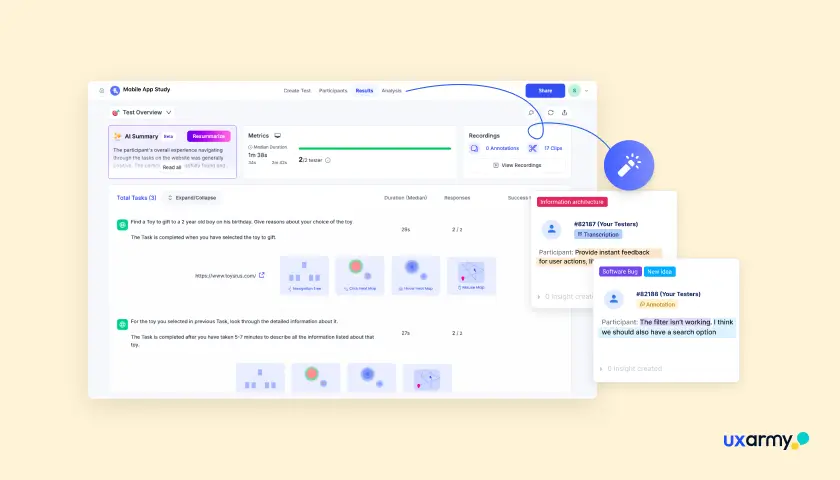
Look for patterns across sessions, prioritize by impact, then fix and retest. For example, only one person struggling might be noisy data while three people failing the same step is a finding.
- Group observations into themes and rank them by severity and frequency.
- Turn the top issues into specific design changes.
- Re-test after you make changes. Testing is a cycle, not a one-off.
What are some key post-launch UX metrics you can track?
You don’t need a big dashboard. A handful of well-chosen metrics moves you from “feels good” to “proven.” Pair these numbers with your qualitative notes.
| Key metric | What it measures | Type | When to use |
|---|---|---|---|
| Task success rate | Whether users can complete a task (direct = unaided; indirect = completed with hesitation or help) | Quantitative | Almost always, as the core outcome |
| Time on task | How long a task takes | Quantitative | Comparing experiences or spotting friction |
| Error rate | How often users make mistakes, such as wrong inputs or missteps | Quantitative | User flows with high error potential |
| Misclick rate | How often users click the wrong element or dead space | Quantitative | Click-through and navigation tests |
| SEQ (Single Ease Question) | Perceived difficulty, right after a task | Quantitative + Qualitative | A quick per-task read on effort |
| SUS (System Usability Scale) | Overall perceived usability (0 to 100) | Quantitative | Benchmarking a design over time |
These are the metrics most teams track during prototype testing. For a fuller picture of what to measure and when, explore more UX metrics for designers.
Common prototype testing mistakes to avoid
Most prototype testing mistakes happen when teams test the wrong thing or the wrong people. They can also happen when the test itself isn’t set up well or the findings aren’t acted on.
- Testing too late, once you’re already committed to the design and can’t easily change course.
- Writing leading tasks that tell users exactly what to click.For example, adding a task like “Click the blue Sign Up button in the top-right corner” hands them the answer, so you never learn whether they could find it on their own.
- Recruiting whoever’s convenient instead of people who match your real users.
- Cramming too much into one session, so you can’t tell what caused what. For example, asking someone to complete onboarding, checkout, and account settings in 20 minutes, may lead to being unable to pin down which flow caused the confusion.
- Trusting opinions over behaviour. “I’d use this” is not evidence that they can.
- Skipping the retest after making changes.
- Assuming a fast-built prototype is validated because it works for you. It reflects your mental model, not your users’.
Tips for recruiting the right participants for prototype testing
The single biggest lever on test quality is who you test with. A few well-matched users beat a large, generic group every time.
- Define a clear participant profile and use screening criteria tied to real user characteristics and behaviours, not just demographics.
- Screen out poor fits. Professional testers and people who don’t match your audience skew results.
- Use external panels for reach when you need scale, specific segments, or particular markets.
- Recruit a couple of extras to cover no-shows.
- Offer fair incentives to respect participants’ time and improve show rates.
UXArmy’s participant recruitment options include both its UserAdvocate panel and managed recruitment services, with sourcing across multiple regions and support for screening and localization.
Top prototype testing tools
The best prototype testing tool depends on what you need to do: test Figma flows, run moderated sessions, recruit participants, collect quantitative metrics, capture recordings, or manage research across an organization.
The comparison below reflects publicly available product information* checked in August 2026.
*Pricing changes frequently, and participant recruitment is often priced separately, so treat the pricing column as a directional reference rather than a permanent quote.
| Tool | Fidelity supported | Moderated / Unmoderated | Figma import | Pricing | Standout & best for |
|---|---|---|---|---|---|
| Maze | Low to high | Both | Yes | Free & Starter from $99/mo | Fast unmoderated prototype and usability testing; good for teams wanting quick quantitative reads |
| Lyssna | Low to high | Primarily unmoderated; interviews available | Yes | Free & Growth from $165/mo annually | Quick design validation and unmoderated research |
| UserTesting | Low to high | Both | Yes | Custom pricing | Enterprise research and broad participant reach |
| UXArmy | Low to high | Both | Yes | Free & paid from $25/month annually | End-to-end testing prototypes, live mobile apps or websites, recruit-to-report in one place |
| Lookback | High | Both | Via prototype links/integrations | From $299/year | Live moderated sessions and recordings; interview-style research |
| Useberry | Low to high | Both | Yes | Free; Growth from €83/month annually | Figma/prototype testing, website testing and quantitative analysis |
| Ballpark | Low to high | Both | Yes | Custom pricing | Self-guided and live research with flexible participant options |
How to test a prototype on UXArmy
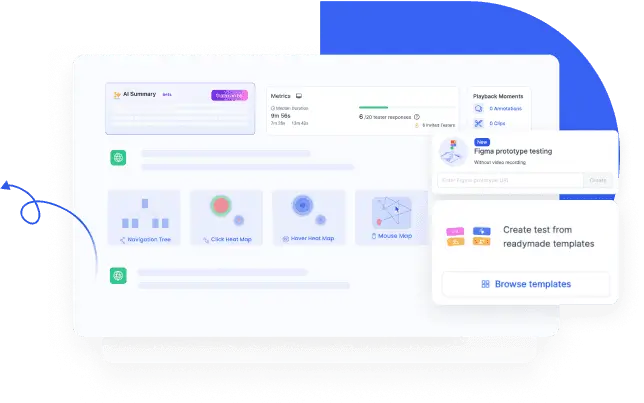
UXArmy supports direct testing of Figma prototypes or vibe-coded HTML prototypes without requiring you to rebuild the prototype in a separate testing tool. Depending on the test setup, you can capture task success, navigation paths, heatmaps, clicks, responses, recordings, and other usability evidence.
A typical workflow to launch an unmoderated test would look like this:
- Import your Figma prototype or URL link for your vibe-coded prototype into UXArmy.
- Define your screeners, tasks and any follow-up questions, framing each as a realistic scenario.
- Recruit from UXArmy’s global panel or invite your own users & launch the study.
- Review session recordings and metrics, as soon as participants submit their responses. Identify patterns, and iterate.
You can run a Figma usability test on the free plan, without recordings. For testing Figma prototypes or URLs with recording, you need to be on a paid plan.
Frequently asked questions
What’s the difference between prototype testing and usability testing?
Usability testing measures how easily people can use an interface, often on a near-finished product. Prototype testing applies the same methods earlier, to an unfinished prototype. The difference is the stage you test at, not the technique.
What usability questionnaires can you use to evaluate a prototype?
Common usability questionnaires include:
SUS (System Usability Scale): measures the overall usability of a product or experience as a single score out of 100.
SEQ (Single Ease Question): a one-question rating of how easy or difficult a specific task felt.
UMUX-Lite: a short questionnaire for measuring perceived usability when you want something quicker than SUS.
To use them, ask the SEQ right after each task to spot which steps feel hard, and run the SUS at the end to gauge the overall experience. That pairing is a reliable default for most prototype tests. See NNGroup’s guide to measuring perceived usability for more.
When should you test a prototype?
You should test a prototype whenever you need evidence about whether a design direction, concept, interaction, or workflow works for users. This can happen during early product discovery, before development, during a redesign, or as part of continuous product improvement.
How many participants do you need for prototype testing?
The right sample size depends on the research method, user groups, and research goal.
The right sample size depends on the research method, user groups, and research goal.
For qualitative usability testing, small iterative rounds are often effective. Nielsen Norman Group recommends around five users for a distinct user group in its classic guidance and recommends 5–8 participants for qualitative usability testing. Quantitative studies that require statistically reliable measurements generally need larger samples.
What’s the difference between moderated and unmoderated prototype testing?
Moderated testing has a researcher guiding and observing in real time, which adds depth through follow-up questions and non-verbal cues. Unmoderated testing lets participants work independently, which scales faster, costs less, and reduces observer effects. Many platforms support both.
Should you use qualitative or quantitative testing for a prototype?
Use qualitative testing when you need to understand why users behave a certain way, and quantitative testing when you need to measure task performance or compare outcomes.
For many prototype tests, combining both provides the strongest evidence.
What’s the difference between low- and high-fidelity prototypes?
Low-fidelity prototypes such as sketches and wireframes are fast and cheap, and they are best for testing direction and flow early. High-fidelity prototypes such as interactive mockups look and behave closer to the real product, and they are best for testing specific interactions and visual design.
What is a vibe-coded prototype, and can you test it?
A vibe-coded prototype is an interactive prototype built by prompting an AI tool such as Lovable, Bolt, Cursor, Replit, or Figma Make in natural language, rather than coding or designing it manually. Yes, you can and should test it. Because these prototypes usually deploy to a live URL, you can run standard moderated or unmoderated tests. Set one core task, recruit target users, and watch where they succeed or get stuck. Treat the output as a concept for validation, not a finished design.
What metrics should I track in prototype testing?
Pair qualitative observations with a few quantitative metrics. The ones most teams track in prototype testing are task success rate, time on task, error rate, misclick rate, SEQ (single ease question), and SUS (system usability scale). Anchor each to clear task scenarios so the numbers are meaningful, and explore more UX metrics for designers for the fuller picture.
Which tools are best for testing Figma prototypes with real users?
Platforms that support Figma prototype flows plus recordings and metrics include UXArmy, Maze, Lyssna, Useberry, and others. Choose based on whether you need moderated or unmoderated studies and whether you bring your own users or need a recruited panel.