A user opens your product, tries to do the one thing they came to do, and can’t figure out how. They don’t file a bug report. They don’t email support. They just leave, and you find out weeks later when a churn number moves or a support queue fills up with the same point of confusion.
These moments are difficult to spot from analytics or internal reviews alone. Usability testing puts your product in front of real users and shows you where the experience breaks down and why.
This guide covers what usability testing is, how it differs from related terms you’ll often see used loosely, how to run a usability test end to end, which method fits which situation, and where AI genuinely helps versus where it doesn’t.
- Usability testing can uncover usability problems, unmet expectations, navigation issues, errors, and opportunities for improvement.
- A typical usability test involves participants, realistic tasks, and a facilitator or testing setup for observing behavior and collecting feedback.
- Every test follows the same sequence: define objectives, write realistic tasks, dry-run, recruit, conduct, then analyze patterns.
- Testing formats span across moderated, unmoderated, remote, in-person, lab-based, and guerrilla methods depending on budget, product fidelity, and research goals.
- AI speeds up the work around usability testing (drafting, transcribing, summarizing) but doesn’t replace human judgment on what to fix.
What is Usability Testing?
Usability testing is a UX research method in which representative users attempt realistic tasks with a product or interface while researchers observe usage behavior and collect feedback to identify usability problems and opportunities for improvement.
The goal is not simply to find out whether users like a design. It is to understand whether they can use it effectively, efficiently, and with an appropriate level of satisfaction.
A usability test may involve asking someone to:
- Find and purchase a particular product on an ecommerce website.
- Complete an onboarding process.
- Find information in a knowledge base.
- Book an appointment through a mobile app.
- Transfer money using a banking prototype.
- Locate a particular feature in a SaaS application.
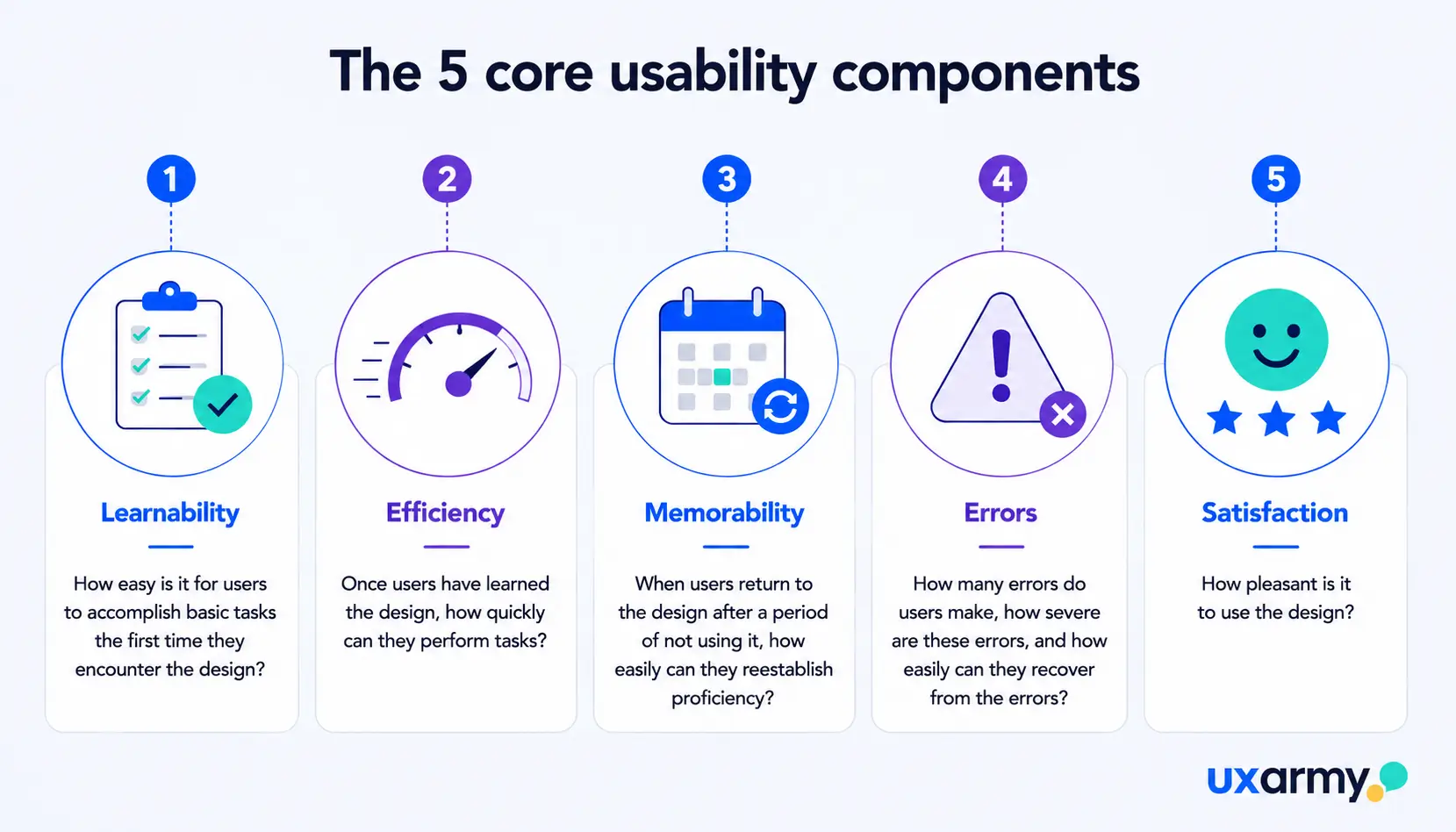
The researcher then observes how the participant approaches the task, where they hesitate or make errors, whether they complete it successfully, and what they say about the experience. The usability test evaluates five core usability components established by the Nielsen Norman Group.
Why is usability testing important?
Usability testing is important because it shows teams how real users interact with a product, helping them identify problems, improve the experience, and reduce the cost of fixing issues later.
Testing interfaces with real users delivers measurable commercial and developmental returns:
- Direct Cost Reduction: Correcting user flow flaws during the wireframing or prototype phase is significantly cheaper than refactoring live software.
- Elimination of Internal Bias: Teams build blind spots around their own workflows; usability testing replaces internal assumptions with observed evidence.
- Higher Conversion & Retention: Streamlining checkout funnels, onboarding sequences, and primary actions reduces drop-offs and drives lifetime value.
To explore how testing directly impacts roadmaps, read our breakdown of the importance of usability testing in product development.
How to conduct usability testing?
Executing an impactful usability test follows six sequential stages:
- Defining Objectives: Establish precise questions your team needs answered. Target critical touchpoints, such as a drop-off in a sign-up flow or friction within navigation architecture.
- Preparing Tasks: Write realistic, goal-oriented scenarios that prompt natural user behavior without leading the witness. Review our framework on how to write effective usability test scenarios and best practices for writing tasks in unmoderated usability testing.
- Dry Runs: Run internal pilot sessions with team members to verify prototype permissions, test link routing, screen-recording fidelity, and task comprehension.
- Participant Recruitment: Source participants who precisely match your demographic and psychographic profiles. Sourcing the wrong participants produces misleading conclusions; utilize dedicated recruitment pools like the UXArmy Participant Panel to reach vetted target audiences.
- Conducting Sessions: Gather behavioral data using either moderated usability testing for deep contextual probing or asynchronous unmoderated usability testing for rapid, scaled validation.
- Analysis & Synthesis: Analyze and code qualitative observations alongside quantitative engagement metrics to identify patterns and root causes behind what you observed.
AI can speed up this last step by drafting task scenarios, transcribing sessions, tagging recurring themes, and summarizing findings across a large number of participants.
AI is less reliable at moderating a live session or deciding which problem matters most in your context, so treat its output the way you’d treat a junior analyst’s first pass: useful, but reviewed by a person before it drives a decision. For a closer look at where AI fits into the research process, see how to use AI for ux research. - Reporting: Translate the synthesized findings into a prioritized list of issues, ranked by severity and effort to fix, so stakeholders get clear recommendations to act on rather than raw notes to sift through.
🌎 Expanding into new markets? Localization is more than translation. As Nielsen Norman Group notes, real cross-cultural design means testing with users in that market to catch context-driven friction. In India, for example, that gap shows up as something as simple as a cheaper non-AC ride option alongside the standard AC service, a distinction no language review would surface. Learn more about localization testing.
What does usability testing measure?
Usability testing can produce both qualitative and quantitative data. The right metrics depend on your research objectives and testing method. Common metrics to measure usability are:
| Usability metric | What it tells you |
|---|---|
| Task Success rate | Whether participants can successfully accomplish the task |
| Time on task | How long users take to complete a task, useful for spotting friction points or comparing experiences |
| System Usability Scale (SUS) score | A standardized score for overall usability, useful for comparing designs or tracking change over time |
| Navigation patterns & heatmaps | Where users go, backtrack, get lost, or concentrate their attention within the product |
| Qualitative feedback | What users say about their experience, in their own words, during or after the task |
For deeper guidance on tracking task success rates, SUS scores, and error data together, see key metrics every product team should track.
Don’t treat every metric as necessary for every study. Choose measurements that directly answer your research questions.
For example: if your goal is to understand why users abandon checkout, task success and qualitative observation may be more useful than simply collecting an overall usability score.
Usability Testing Methods: When to Use What
There’s no single “right” method. The best approach depends on what you need to learn, how big is the business risk, how much control you need, how quickly you need results, and how much depth or scale you need.
| Evaluation Method | What is it? | Best for | Trade-off | How to conduct? |
|---|---|---|---|---|
| Quantitative usability testing | Measures outcomes like task completion rate, time on task, and error count across participants | Comparing experiences, benchmarking usability or tracking usability over time | Needs a larger sample to produce reliable results; doesn’t explain reasons behind the numbers on its own | Usually unmoderated |
| Qualitative usability testing | Observes behavior, emotion, and reasoning as participants attempt a task, usually with follow-up questions | Understanding the “why” behind a problem | Smaller samples provide depth but aren’t intended to produce statistically reliable results. | Usually moderated but can be unmoderated |
| Guerrilla usability testing | Informal sessions with people found in public spaces or online, than carefully recruited users | Quick, low-cost gut checks early in design | Participants may not represent your actual users, so findings should be treated as directional | Usually moderated |
| Expert review (manual) | A trained reviewer evaluates a product against established usability principles without involving real users | Catching common issues quickly, before or alongside user testing | Relies on the expert’s judgment and does not show how real users actually behave | N/A |
| Automated expert review (AI-assisted) | AI scans a design or flow against usability heuristics and flags likely problem areas | Quickly reviewing designs, identifying obvious issues, and supporting researchers during early-stage evaluation | AI can surface potential problems quickly but may miss context, intent, and nuanced usability issues that human experts or users can identify | N/A |
Most teams don’t pick one row and stay there. A common pattern is moderated, qualitative sessions early in design to understand problems, followed by unmoderated, quantitative checks closer to launch to confirm a fix worked at scale.
Moderated and unmoderated usability testing describe how a test is conducted, rather than what the study is measuring. For a detailed comparison of these approaches, see our guide to moderated vs. unmoderated usability testing.
Common Myths About Usability Testing
Many teams avoid usability testing because of assumptions about its cost, complexity, or required expertise.
Here are the most common misconceptions:
| Myth | Reality |
|---|---|
| “It’s too expensive.” | Low-fidelity prototype tests or asynchronous unmoderated studies can be executed on lean startup budgets with minimal overhead. |
| “It takes too long.” | Unmoderated remote tests deliver actionable results within 24 to 48 hours, fitting into standard sprint cycles. |
| “It has to happen in a lab.” | Remote testing on personal devices reveals more authentic behavior than simulated lab setups. |
| “You need dozens of participants.” | 5 representative users will reveal roughly 85% of core usability flaws in a qualitative usability study. |
| “Only a trained UX professional can run one.” | Product managers, designers, and founders can run effective lightweight tests with solid task-writing guidelines. |
| “Usability testing is the same as UAT.” | User Acceptance Testing (UAT) checks technical software compliance; usability testing measures user experience and friction. |
| “It’s sufficient to test only pre-launch” | Usability testing should happen throughout the product lifecycle. Test early to catch problems before launch and later to uncover real-world issues and validate improvements. |
Explore our full breakdown of misconceptions in debunking usability testing myths.
How to pick the right usability testing platform
A usability testing platform combines participant recruitment, session tools, and analysis in one place, so you can run a study without stitching several tools together. The right one for you depends on the same variables covered above: the method you need (moderated vs. unmoderated), the devices and formats you’re testing, your budget, and how much of the analysis you want automated versus done by hand.
For a full breakdown of what to weigh (participant panels, pricing models, integrations, and analysis features) see how to choose a usability testing platform.
Frequently asked questions
When should I run a usability test?
As early as you have something a user can interact with, even a low-fidelity prototype, and again at each major stage after: mid-design, pre-launch, and post-launch to validate that fixes worked.
What are some usability testing tools?
Usability testing platforms include UXArmy for comprehensive moderated and unmoderated studies, Figma for interactive prototyping, and supplementary platforms reviewed in our guide to the best usability testing tools and software.
How many participants do I need for usability testing?
There’s no fixed number. Small, iterative rounds of a handful of participants each tend to outperform one large study, especially early in design. Larger samples matter more when you need a statistically reliable score, such as a benchmark SUS result.
Can AI replace usability testing?
No. AI can speed up drafting, transcription, and summarization, but it can’t moderate a live session, read unspoken hesitation, or judge which problem matters most in your context. It’s a support tool, not a substitute for watching real users.
How much does usability testing cost?
Cost depends heavily on scope: sample size, method (moderated sessions generally cost more per participant than unmoderated), and whether you’re using an in-house panel or a recruitment service. Small, well-scoped tests can run at a fraction of the cost of a full outsourced study.
What is the aesthetic-usability effect, and why does it matter for usability testing?
The aesthetic-usability effect is the tendency for users to perceive attractive products as more usable, even when they aren’t actually more effective or efficient. This matters in usability testing because a visually appealing interface can make participants overlook or downplay real usability problems in their feedback, so moderators should focus on what participants do, not just what they say about how the design looks.