
A product team at a mid-size SaaS company ran twenty user interviews in three weeks. A year earlier, that pace would have taken two months. The interviews were not the bottleneck. Repeatedly watching videos, reading transcripts, and synthesizing them was. That is exactly where AI in UX research earns its place today. It does not run your study for you. It compresses the parts of the process that used to eat into calendar and allows you more time for strategizing research.
This guide walks through how to use AI for UX research, stage by stage. You will see planning, moderating, analyzing, and reporting. Each section shows where AI-assisted UX research genuinely speeds things up. Each also shows where it adds risk and how to run the method so speed does not cost you rigor.
In this guide, we’ll walk through each stage of the UX research process and explain where AI adds value, where human expertise is still essential, and how to combine both for better research outcomes.
| Step | AI Helps With | Human Leads |
| 1. Plan | Draft interview guides, screeners, usability tasks | Choose research methodology and refine questions |
| 2. Recruit | Screen responses and match participant criteria | Final participant selection |
| 3. Conduct | Live transcription, note-taking, structured moderation | Interview moderation and usability observation |
| 4. Analyze | Coding, clustering, summarization | Interpretation and validation |
| 5. Report | Draft summaries, personas, presentations | Business recommendations and decision-making |
Before we dive into each stage, let’s look at where AI performs well today and where human researchers continue to play the most important role.
Where AI Actually Fits in the UX Research Process
AI for user research methods is not one capability. It is a set of narrow tools. Each one suits a specific stage of a study. Treating it as a single “AI does research” button is the most common mistake product teams make. That mistake is also why so many AI-generated insights feel shallow or wrong.
The table below maps the stages of a research project. It shows where AI tools for UX research perform well today, and where a human researcher still needs to lead.
| Research Stage | AI Capability Today | Human Still Required For |
| Planning | Drafting screener questions, interview guides, and usability tasks | Choosing the right method, catching leading questions |
| Recruiting | Screening responses, matching participant criteria | Judging fit for niche or sensitive audiences |
| Moderating | Structured interviews, follow-up prompting, and live transcription | Reading body language, adapting mid-session, semi-structured flexibility |
| Analyzing | Transcription, first-pass coding, clustering, sentiment tagging | Contextual judgment, spotting bias, resolving contradictions |
| Reporting | Drafting summaries, reformatting for stakeholders, and persona first drafts | Framing implications, deciding what matters to the business |
AI is not designed to replace UX researchers. Instead, it works best as an assistant that automates repetitive tasks while leaving observation, critical thinking, and decision-making to humans. The following sections walk through each stage of the UX research process and explain where AI delivers value and where human expertise is still essential.
Step 1: Plan Your Study with AI
Planning is where AI in UX research delivers the fastest, lowest-risk return. Drafting screener questions, interview guides, and usability test tasks from scratch takes real time. AI tools handle a first pass well.
Try this approach. Give the AI your research goal and ask for more options than you need. Planning a study on checkout drop-off? Ask for fifteen candidate interview questions. Then cut that list down to the eight or nine that actually serve your research question. The model will sometimes return leading or double-barreled questions. Read every one before it reaches a participant.
Documentation follows the same pattern. Consent forms, recruitment emails, and facilitation scripts are template-driven. AI speeds up filling them in correctly, as long as you supply the template rather than asking the tool to invent one from nothing.
Key takeaway
- AI is excellent for creating first drafts of interview guides, screener questions, and usability tasks.
- Researchers should always review AI-generated questions for bias, clarity, and relevance.
- Let AI speed up preparation, not decide your research methodology.
The goal isn’t to let AI plan your study for you. It’s to eliminate repetitive drafting work so researchers can spend more time designing meaningful studies. UXArmy’s moderated research tools let you load a structured guide, set follow-up logic, and run the session. You get a mix of AI-assisted prompting and human oversight. Your planning work carries straight into execution, rather than sitting in a separate document.
Step 2: Recruit the Right Participants
Finding the right participants is just as important as choosing the right research method. AI can quickly screen responses, compare them against predefined criteria, and filter out obvious mismatches.
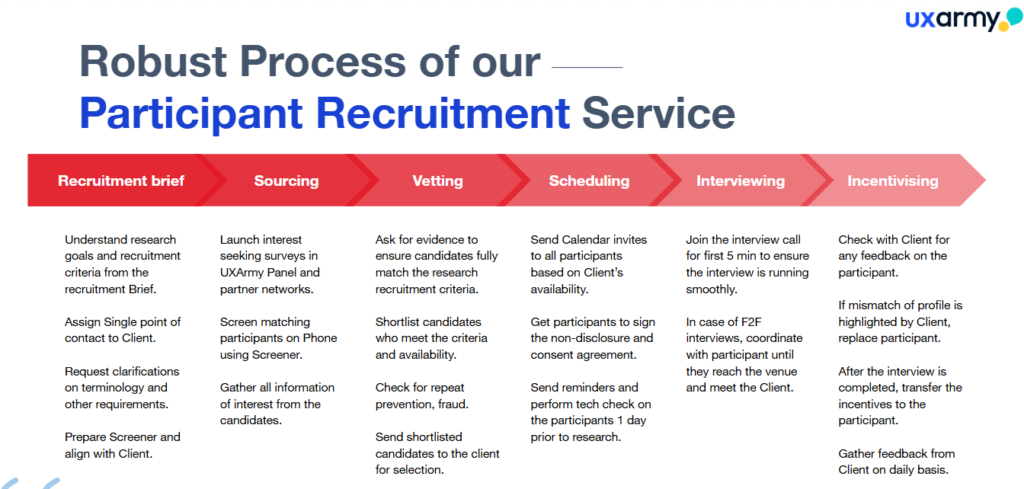
However, participant recruitment isn’t only about matching demographics. Experienced researchers often evaluate motivation, communication style, and domain expertise—areas where human judgment still matters.
For niche audiences or sensitive studies, always review AI recommendations before inviting participants.
Key takeaway
- Use AI to automate participant screening.
- Let researchers make the final recruitment decisions.
- Human judgment remains essential for specialized audiences.
For methods where structure helps, like tree testing or first click tasks, standardization works in AI’s favor instead of against it. UXArmy’s Tree Testing tool strips the interface down to text-based navigation. That removes the ambiguity that trips up AI-moderated sessions. You get clean, structured data that is easy for a human or an AI first pass to analyze afterward.
Step 3: Conduct Research: What AI Can and Cannot Moderate
This is the stage where many product teams overestimate AI’s capabilities.
AI moderators perform well when interviews follow a structured format. They can ask predefined questions, request clarification when responses are too brief, and maintain consistency across interviews.
However, qualitative research is rarely that predictable.
Experienced researchers can adapt the conversation as it unfolds. They know when to explore an unexpected insight, ask deeper follow-up questions, or change direction based on a participant’s response. They also notice hesitation, confusion, and emotional cues that AI still struggles to interpret.
As a rule of thumb:
- Use AI moderators for structured interviews, standardized research, and large-scale studies.
- Use human moderators for exploratory interviews, sensitive topics, and usability testing.
Where AI delivers the most value today is in note-taking.
Instead of splitting attention between the participant and documentation, researchers can use AI to:
- Generate interview transcripts
- Summarize key discussion points
- Identify recurring themes
- Create meeting notes automatically
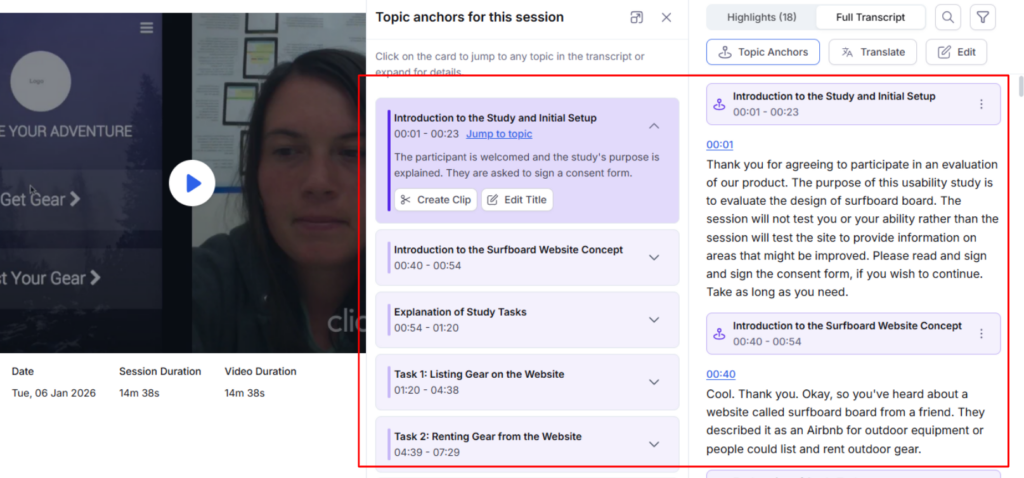
This allows researchers to stay focused on the conversation while reducing manual documentation.
That said, AI notetakers have one important limitation—they capture what participants say, not what they do.
During usability testing, users often hesitate before clicking a button, overlook important interface elements, or struggle to complete a task without saying anything. These behavioral signals are often the most valuable usability insights, yet AI cannot reliably detect them.
Key takeaway
- AI is effective for structured moderation and automated note-taking.
- Human moderators remain essential for exploratory research and usability testing.
- Use AI to support interviews—not to replace observation and researcher judgment.
How UXArmy Helps
UXArmy combines moderated research with AI-assisted workflows, including interview transcription and structured research support. Researchers stay in control of the session while AI handles repetitive tasks like documentation, making it easier to focus on participants and collect high-quality insights.
Good participants make clean data. UXArmy’s participant recruitment tools help you source a well-matched panel across Southeast Asia and Asia-Pacific markets, including multilingual participants. Your transcripts start from a stronger baseline, before AI or human coding ever touches them.
Step 4: Analyze Qualitative Data with AI
Analysis is where AI delivers the biggest productivity gains but it’s also where researchers need to be the most careful.
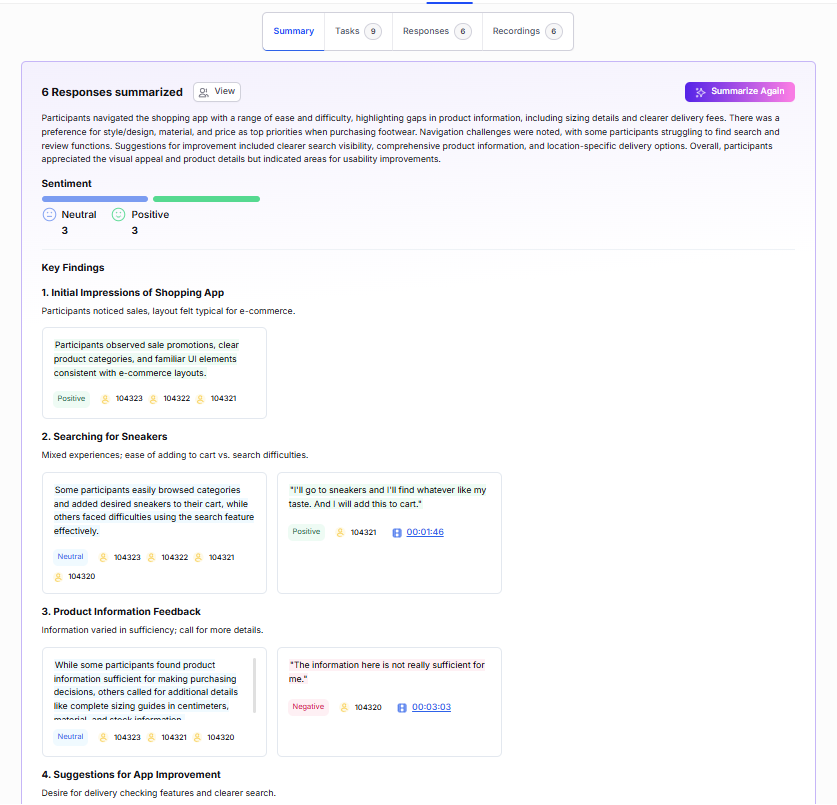
One of the most common mistakes is asking AI to analyze an entire set of interview transcripts in a single prompt. The result is often generic insights that miss important context.
Instead, break the process into smaller steps.
AI works well for:
- Transcribing interviews
- Cleaning up transcripts
- Suggesting first-pass codes
- Grouping similar responses into themes
Human researchers should then review those outputs, validate the themes, and look for contradictions or patterns that AI may have overlooked.
Remember, AI identifies patterns based on the data it sees. It doesn’t understand why participants behaved a certain way or whether external factors influenced their responses. That context still requires human judgment.
Key takeaway
- Let AI handle repetitive analysis tasks like transcription, coding, and clustering.
- Review every AI-generated theme against the original data.
- Human interpretation is what turns patterns into meaningful research insights.
High-quality analysis starts with high-quality research data. UXArmy helps teams recruit well-matched participants and conduct structured studies, giving AI cleaner transcripts and more reliable data to analyze.
Step 5: Report Findings with AI
By the time you reach the reporting stage, your findings should already be validated. That makes this one of the safest places to use AI.
Instead of writing every deliverable from scratch, use AI to transform your research into different formats for different audiences.
For example, AI can help you:
- Draft executive summaries
- Create personas and journey maps
- Generate presentation outlines
- Rewrite findings for technical or non-technical stakeholders
These tasks save time without changing the underlying research.
However, AI should never decide what the findings mean for the business. Prioritizing opportunities, making product recommendations, and communicating strategic implications still require human expertise.
Think of AI as your editor not your decision-maker.
Key takeaway
- Use AI to speed up documentation and stakeholder communication.
- Keep recommendations and business decisions human-led.
- Always review AI-generated reports before sharing them.
How UXArmy Helps
UXArmy helps teams collect, organize, and validate research findings in one place, making it easier to turn completed studies into stakeholder-ready reports with the support of AI-assisted documentation.
Final Verdict
AI is changing how UX research is conducted but it isn’t replacing researchers. Today’s AI tools are best suited for repetitive, text-heavy tasks such as drafting interview guides, transcribing sessions, organizing qualitative data, and preparing reports. They save time, reduce manual effort, and allow researchers to focus on higher-value work.
Where AI still falls short is understanding people. It cannot reliably interpret behavior, build rapport, or make the contextual judgments that turn observations into meaningful insights.
The most effective product teams don’t choose between AI and human researchers. They combine both. Let AI handle the repetitive work, and let researchers focus on the decisions that require experience, empathy, and critical thinking.
FAQs on How to Use AI for UX Research Methods
Can AI replace UX researchers?
No. AI speeds up specific, mostly text-based tasks. Think transcription, first-pass coding, and drafting. It cannot observe usability testing or read behavioral cues. It also cannot apply the contextual judgment that connects raw data to a trustworthy insight. Those stay a human researcher’s job.
What is the best AI tool for UX research?
There is no single best tool. AI in UX research spans several jobs: moderating interviews, transcribing sessions, coding data, and drafting reports. Most teams use a small stack. A common mix is a research platform for study execution, a transcription tool for recordings, and a general AI assistant for drafting support.
Is AI reliable for usability testing?
Not for observation. Current AI tools cannot reliably tell what a participant is looking at or where they hesitate on a screen. That is the core data a usability test is meant to capture. AI works better for structured, text-based methods like tree testing, where the interface itself is simplified.
How accurate is AI coding compared to human coding?
AI-generated codes are a useful starting point, but rarely accurate enough to use unreviewed. Expect surface-level groupings, some items forced into an unhelpful “other” category, and the odd missed nuance. Treat AI coding as a first pass. A human researcher should refine it from there.