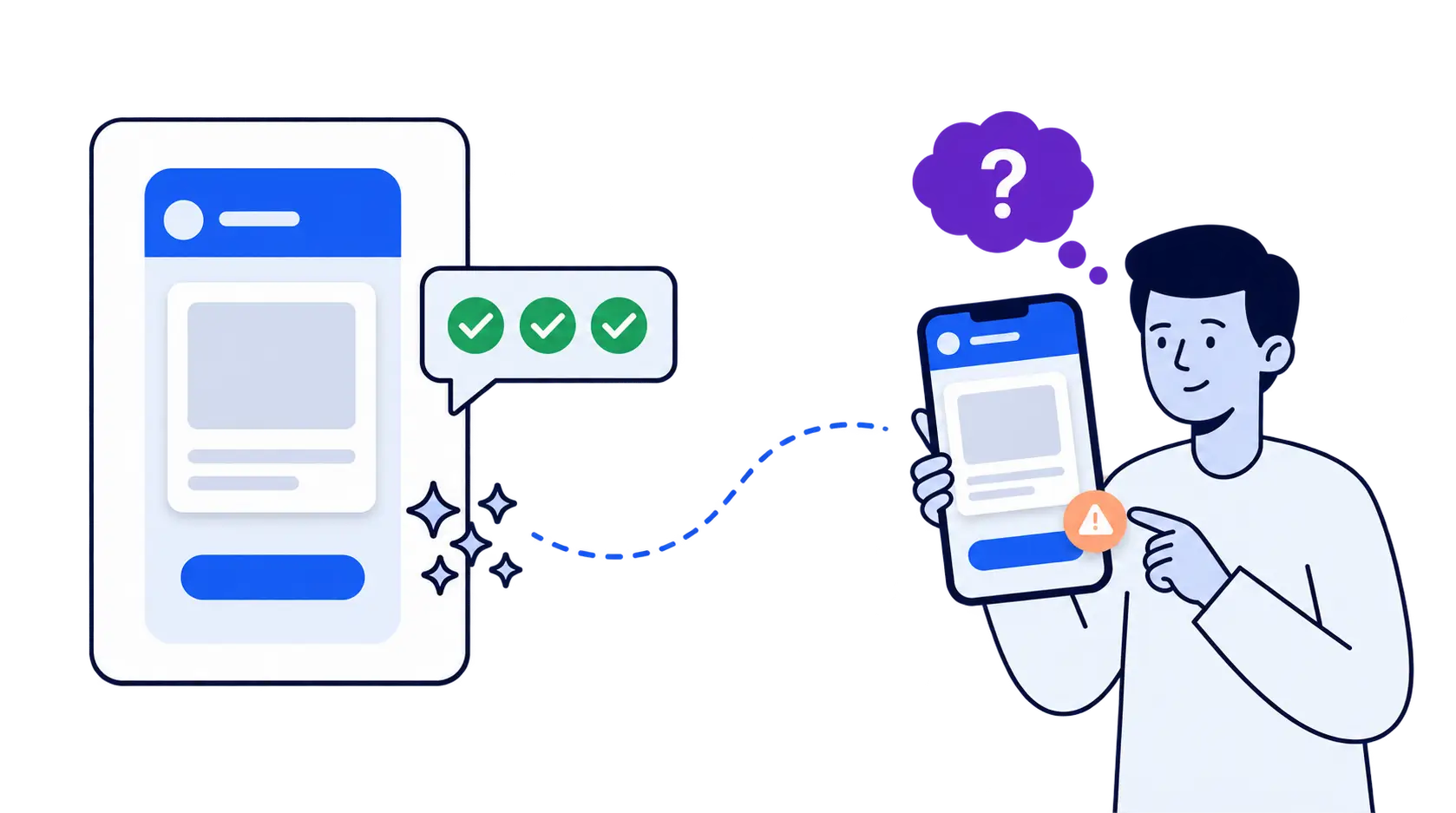
Short answer: No, AI can’t replace user testing. AI tools like Claude Design, Google Stitch and Claude Code can generate and critique a design in minutes, and they’re good at spotting visual, layout and accessibility problems. But an AI design critique only predicts how people might react. It can’t show you how real users behave, where they get confused, or what they misread in their own language and culture. AI speeds up the making. Only user testing tells you whether it works.
This article is about the act of testing: whether an AI review can stand in for watching real people use your product. If you’re asking whether AI will replace the people who do research, that’s a different question, covered in How AI-powered research platforms are displacing UX researchers.
- AI can’t replace user testing. It predicts how users might react. Testing shows how they actually behave.
- AI design critique is a good first pass, not a verdict. It’s strong on layout, visual consistency and accessibility, and weak on context and real behavior. In a 2025 study, GPT-4o caught only 21% of the usability issues that human experts found, and added false positives along the way (Guerino et al., INTERACT 2025).
- AI critique grades designs against the same patterns that AI used to make them. That’s a closed loop. Real users are the only check from outside it.
- Your users aren’t the average user. A supermarket app that tested with its own shoppers cut checkout drop-off by about 20% (UXArmy case study).
- Use both AI and real users in tandem. Let AI handle fast reviews and analysis, so you can afford to test with real users more often, not less.
What is AI design critique?
AI design critique means asking an AI model to review a design against usability, accessibility, visual and conversion criteria, the way a senior designer would in a critique session. You give it screenshots, a Figma link or source code, and it returns a list of issues, usually ranked by severity. It’s now built into tools designers already use: Claude Code runs it through critique skills, and Google Stitch’s design agent “can give you real-time design critiques” on request (Winbuzzer, Mar 2026).
Why are designers turning to AI critique now?
Because AI made building so fast that waiting for a human review became the slowest step. In UX Tools’ State of Prototyping survey of 1,478 designers and builders (spring 2026), five of the ten tools respondents used most each week were AI tools: 50.8% used Claude weekly, 38.4% used Claude Code and 34.8% used Figma Make (UX Tools, 2026).
The tools that generate designs have moved just as fast:
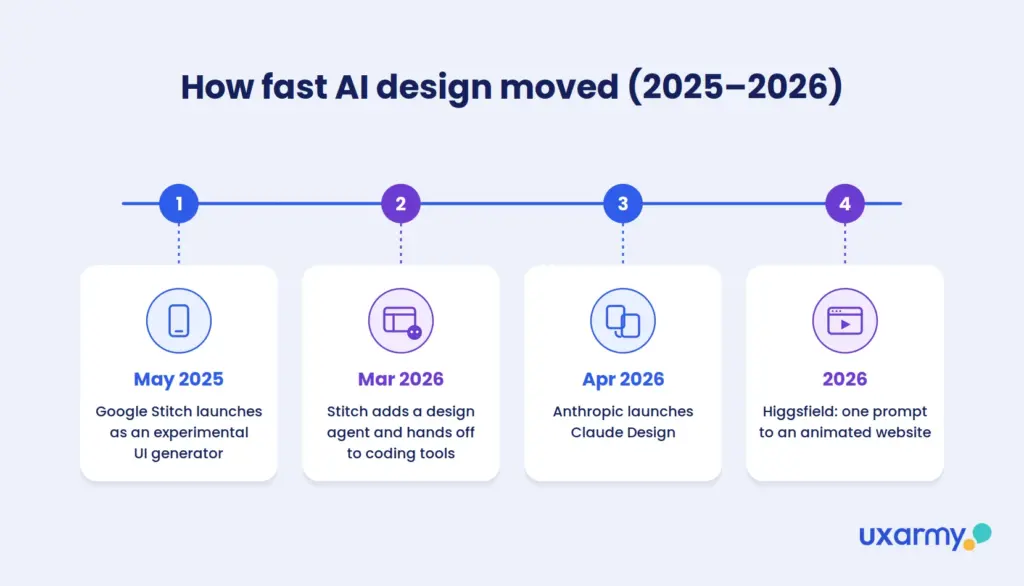
- Google Stitch went from an experimental UI generator (May 2025) to a design agent that works across a whole project and hands off to coding tools (March 2026).
- Claude Design (Anthropic, April 2026) turns a description into a prototype that follows your design system (TechCrunch).
- Higgsfield’s website skill turns “any product reference and prompt into a responsive, animated website” (Higgsfield).
Higgsfield has inspired a joke that’s going around. Connect Higgsfield to Claude. Find a local business on Google Maps with great reviews and no website. Paste in its reviews. Ask Claude for a professional site. Sell it to the owner for $200.
The joke works because it’s nearly true. A good-looking website now costs one prompt. But notice what’s missing: at no point did anyone ask a single customer whether they could find the opening hours or book a table.
A good-looking website now costs one prompt. Nobody asked a single customer whether they could use it.
When making something takes an afternoon, review is the bottleneck. That’s the gap AI critique is filling.
Are designers skipping wireframes and going straight to prototypes?
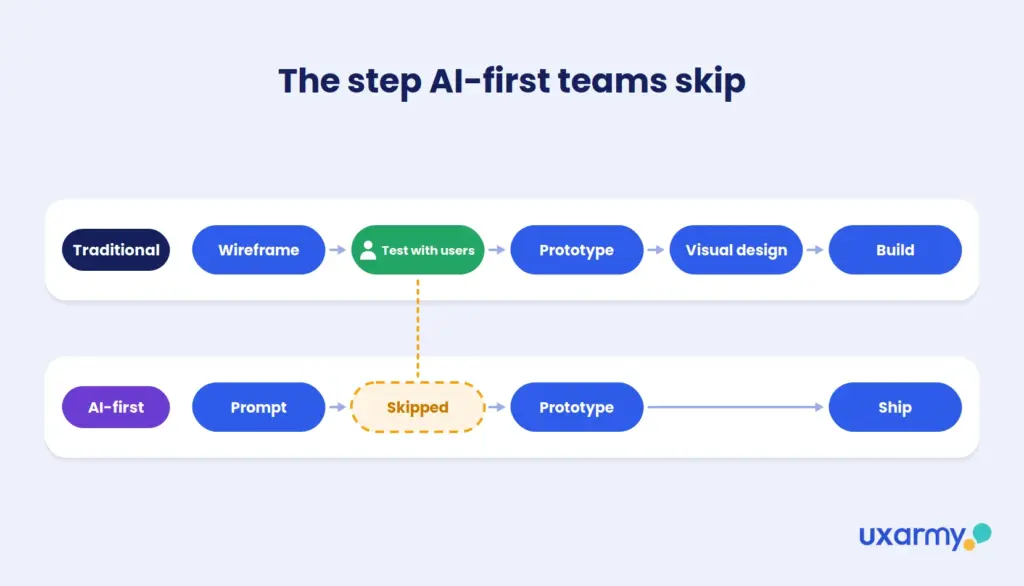
Increasingly, yes. The traditional sequence was wireframe → test → prototype → visual design → build. AI build tools make it possible to jump from an idea straight to a working product.
Tools like Lovable, Cursor, OpenAI Codex and Claude Code can produce a clickable, often deployable app in an afternoon. When a working prototype costs almost nothing, a low-fidelity wireframe can feel like a wasted step. The numbers show how far this has gone. In the same UX Tools survey, 43.8% of designers and builders spent at least half their building time on AI-generated code. Among design engineers it was 80.9%, and among individual-contributor designers 35.0%. Yet only 1.4% said they trust AI output without any oversight (UX Tools, 2026).
The risk is what disappears with it. The wireframe stage was where teams ran formative testing: checking the concept with users before investing in polish. Skip it and you get a well-built answer to a question nobody checked. Polished prototypes also make the problem worse: stakeholders, and sometimes test participants, give softer feedback on something that looks finished. Fast prototyping makes prototype testing more important, not less.
What are AI design agents?
AI design agents are AI systems given a design role (researcher, designer, prototyper, reviewer) that carry out design tasks with little human input. Teams increasingly run several together as a “swarm”: one agent drafts personas, another generates screens, another builds the prototype, and a critic agent reviews the output before a human sees it.
It’s a real productivity gain. But every agent gets its information from the same kind of source: patterns learned from existing products. None of them has watched your actual customer use your actual product. The “researcher” agent is predicting what users would say, not finding out.
How can I use AI to critique my design?
The most common approach in 2026 is to give an AI your screenshots, Figma links or source code and ask it for a structured AI design review against usability, accessibility and conversion criteria. A typical Claude Code design review looks like this:
- Give it context. Point Claude Code at your source code so it can run a local preview, or share screenshots and Figma links.
- Run a critique skill. Anthropic’s official Design plugin includes skills such as design-critique and accessibility-review for structured feedback on hierarchy, consistency and WCAG issues (Anthropic, GitHub).
- Ask for focused reviews. For example: “Find unclear interactions in the onboarding flow,” “Audit the visibility of the primary CTA on this pricing page,” or “Review the microcopy on this checkout page: flag vague button labels, jargon and any change in tone.”
- Compare against a reference. Share a reference screen and ask where your layout differs.
- Force it to prioritize. Ask: “What are the five most important issues to fix before this ships?” This stops it from listing 40 minor problems as if they mattered equally.
Used this way, AI critique replaces a lot of slow, shallow peer review. It’s a good first pass.
💡 Ask for the why: For every issue the AI flags, ask which UX principle it breaks. Findings it can’t explain are the ones to double-check.
How does AI design critique compare with human design critique?
AI critique wins on speed, cost and consistency. Human critique wins on context, judgment and seeing how screens connect. Most teams now use AI for the first pass and save senior designers’ time for the decisions that need product knowledge.
| Human design critique | AI design critique | |
|---|---|---|
| Speed | Hours to days, depending on reviewers’ calendars | Minutes, any time |
| Cost per review | Senior designers’ time | Close to zero |
| Consistency | Varies by reviewer | Applies the same checklist every time |
| Strongest at | Flows across screens, product context, business goals, systems thinking | Layout, visual consistency, accessibility rules, microcopy |
| Knows your users and business | Yes, if the reviewer does | Only what you tell it |
| Main risk | Shallow or political feedback, and the wait | Advice that sounds right but isn’t |
Designers do see the value. 54% say AI improves the quality of their work (Figma 2025 AI Report, 2,500 users). But they keep the final say: only 1.4% trust AI output without oversight, and 34.2% use it for first drafts they then edit heavily (UX Tools, 2026).
One difference matters most. A human reviewer looks at a screen and thinks about the whole product: does this match the settings page, the email, the checkout? An AI reviews what’s in front of it unless you ask it to look wider.
How accurate are AI UX audits and design critiques?
It depends heavily on the type of problem. AI is strong on visible, rule-based issues and weak on anything that depends on context, intent or real behavior.
| Evidence | What it found |
|---|---|
| Guerino et al., INTERACT 2025 (GPT-4o vs. human experts, heuristic evaluation) | GPT-4o found only 21.2% of the issues the experts found. It also raised 27 new issues, but produced several false positives from hallucinations. |
| Microsoft UX researchers, March 2025 (reported by Baymard, 2025) | Generative AI tools doing heuristic evaluations were 50% to 75% accurate. Baymard’s own tool, which is built on its usability research and doesn’t use generative AI for the analysis itself, reached 95%. |
| Synthetic heuristic evaluation study, 2025 (GPT-4 vs. 5 expert evaluators, 2 mobile apps) | Strong on layout, visual consistency and aesthetic issues. Weak on app-specific conventions and problems that span multiple screens. |
Newer models are better. A June 2026 benchmark of eight frontier models found GPT-5.4 and Claude Sonnet 4.6 wrote the most actionable UX reports, but its authors describe AI UX judging as “neither saturated nor one-dimensional” (UXBench, 2026). The pattern holds: AI is good at judging what a screen looks like, and unreliable at predicting how a person will use it. Baymard’s result points the same way: AI is most accurate when it checks against real user research rather than its own guesses.
Can you trust an AI design critique without UX training?
Not fully. AI critiques sound confident whether they’re right or wrong, so you need your own UX knowledge to tell the difference. AI learns what good design looks like from what’s common, and plenty of common design is bad. Without that knowledge, a founder or PM can easily act on advice that sounds right but isn’t.
UX designer Trevor Calabro (September 2026) describes the problem directly:
“If you don’t know much about UX yourself, how the hell do you know if what the AI gives you is correct?”
Trevor Calabro, UX designer, “UX Job Security” (2026)
He adds that LLMs “can also repeat common patterns without knowing whether those patterns are based in good UX principles.” In the same post, he describes reviewing a polished website where “Talk to a Representative,” “Get a Custom Plan” and “Learn More” all opened the same contact form. Mistakes like that are common on real websites, and real websites are what the models learned from.
This matters most for the people new tools like Claude Design are built for: founders and PMs without design training. The less UX experience you have, the more polished the critique feels, and the less able you are to check it.
What to do about it:
- Treat AI critique as a list of things to check, not a list of fixes to make.
- Ensure the AI critique is evaluating holistically, so you are not just stress testing what’s in front of you, but ensuring consistency across your product, website, or ecosystem.
- Have someone with UX experience review its top-priority items.
- Test the claims that matter most with real users.
Related reading: Wondering what AI means for the people who do this work? Read What does a UX researcher do? How AI is shaping the role.
Is AI making design worse over time?
It could, unless teams keep checking designs against real users. AI design tools learn from designs that already exist. More and more of those designs are now made by AI. The result is a loop: AI builds from common patterns, AI critiques against the same patterns, and those designs get published and become future training data. Bad patterns get repeated and look more “standard” each time.
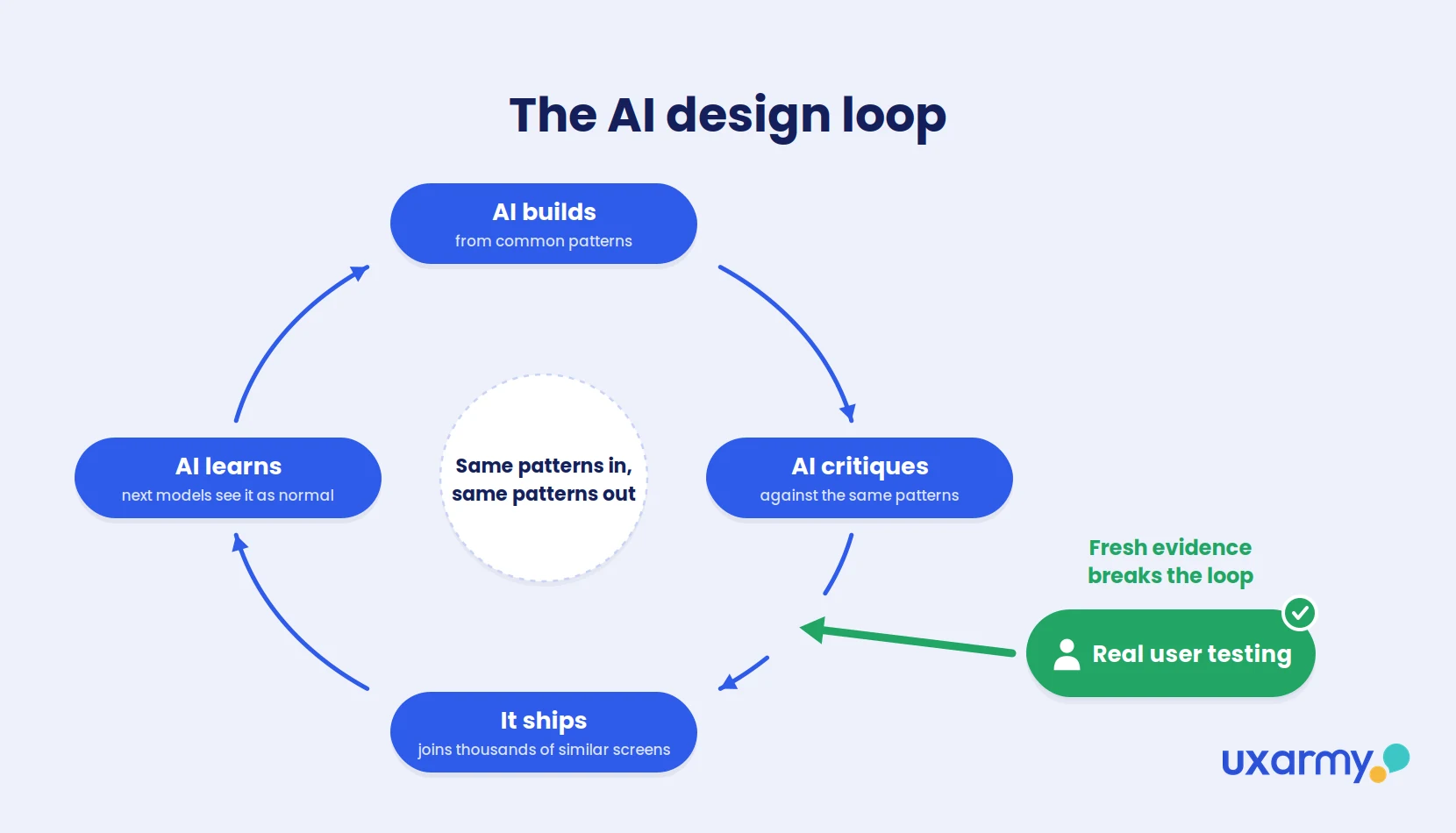
Here’s how the loop works:
- AI builds. A design tool generates a checkout flow from the most common patterns it has seen.
- AI critiques. A critic agent checks it against the same patterns and approves it.
- It ships. The flow goes live, joining thousands of similar AI-made screens.
- AI learns. Those screens become examples for the next generation of models, which now see the pattern as even more normal.
Nothing in this loop asks whether the pattern actually works for users.
Researchers have seen a similar effect in language models. A 2024 study in Nature found that models trained repeatedly on AI-generated content drift toward the average and lose the rarer cases (Shumailov et al., 2024). A follow-up study found the drift can be prevented by continually adding real-world data (arXiv, 2024). UI design hasn’t been studied the same way yet, but the logic carries over.
User testing breaks the loop. Each session with a real participant produces fresh user insight that didn’t come from a model. It shows what the pattern-matching misses: the confusing button everyone copies, or the flow that works in the US but fails in Jakarta. That’s also what makes your research hard for competitors to copy. Every team has access to the same AI. Not every team has watched real people use its product.
Every team has access to the same AI. Not every team has watched real people use its product.
Why is user testing still important when AI can critique designs?
Because AI critique is an opinion, and user testing is evidence. AI reviews your design against patterns it has learned. User experience testing shows you what real people actually do. The gaps come from three places:
- It can’t see behavior. AI can say a button might be unclear. Only a participant hesitating for eight seconds shows you it is.
- It agrees too easily. Models tend toward sycophancy. Ask whether a flow is intuitive and you’ll often get a confident yes. (More on this in The User Who Always Agrees With You.)
- It reflects the average user, not yours. AI’s sense of “good UX” is an average of millions of products. Your customers have their own habits, devices and expectations. When Singapore’s largest supermarket chain tested its app with shoppers across different age groups and fixed what they struggled with, checkout drop-off fell by about 20% (UXArmy case study).
How should AI critique and user testing work together?
Use AI to find the obvious problems quickly, and use real users to find the problems only they can reveal. Good UX design testing in 2026 uses both:
| Stage | Use AI for | Use real users for |
|---|---|---|
| Concept | Generating options fast | Checking the problem is real before building (5–8 interviews, or moderated usability testing) |
| Prototype | Heuristic, accessibility and visual critique | Remote usability testing: can people complete the core flow? |
| Pre-launch | Prioritizing fixes (“top 5 issues”) | Confirming fixes worked; website usability testing in each target market |
| Post-launch | Summarizing session recordings and feedback | Finding out why the metrics moved |
The best product teams in 2026 aren’t choosing between AI and research. They let AI remove the slow parts so that testing with real users happens more often, not less.
Real users also explain what the numbers can’t. In one UXArmy client study, qualitative insights from real participants lined up with 60% of the issues flagged in the client’s quantitative satisfaction data. As the team put it: “For the first time, the product team didn’t just know what customers were doing. They understood why” (UXArmy research services).
FAQ
Can AI replace usability testing?
No. AI can speed up heuristic review and help you prepare better tests, but it can’t observe real behavior. Evidence so far shows AI evaluators miss context-dependent problems and simulated users are unrealistically successful (Nielsen Norman Group).
Can AI usability testing find user pain points as well as real users?
Not on its own. AI reliably spots visual, layout and accessibility issues, but studies show it misses problems that depend on context or span several screens, and AI “participants” complete tasks far more easily than real people. Use AI to shortlist likely pain points, then confirm with real participants which ones actually hurt.
What are the benefits of using AI in usability testing?
Speed and scale. AI gives a first-pass critique in minutes and speeds up analysis of real sessions (transcription, tagging, summaries), so teams can afford to test more often. For how AI fits each stage of a study, from planning to reporting, see Generative AI in UX research. For specific tools, see our roundup of AI usability testing tools.
Is Claude Code good for design critique?
Yes, as a first pass. With skills like Anthropic’s design-critique and accessibility-review, it gives fast, structured feedback on hierarchy, consistency and accessibility. Confirm its priorities with real users before shipping.
Can a non-designer use AI to critique their own designs?
Yes, as a starting point. But AI critiques sound equally sure whether they’re right or wrong, so have someone with UX experience check the top findings, and confirm the important ones with real users before making changes.
Can AI-generated designs make future AI worse?
Possibly. Research on language models shows that training on AI-generated content makes models drift toward the average, unless fresh real-world data keeps being added. For design, real user testing is that fresh data.
What are synthetic users?
AI-generated personas that answer research questions as if they were real participants. See our guide: The User Who Always Agrees With You.
How many users do I need to test an AI-generated prototype?
For finding usability problems, five to eight participants per key user segment usually surfaces the main issues. If you’re launching in several countries, test each market separately.