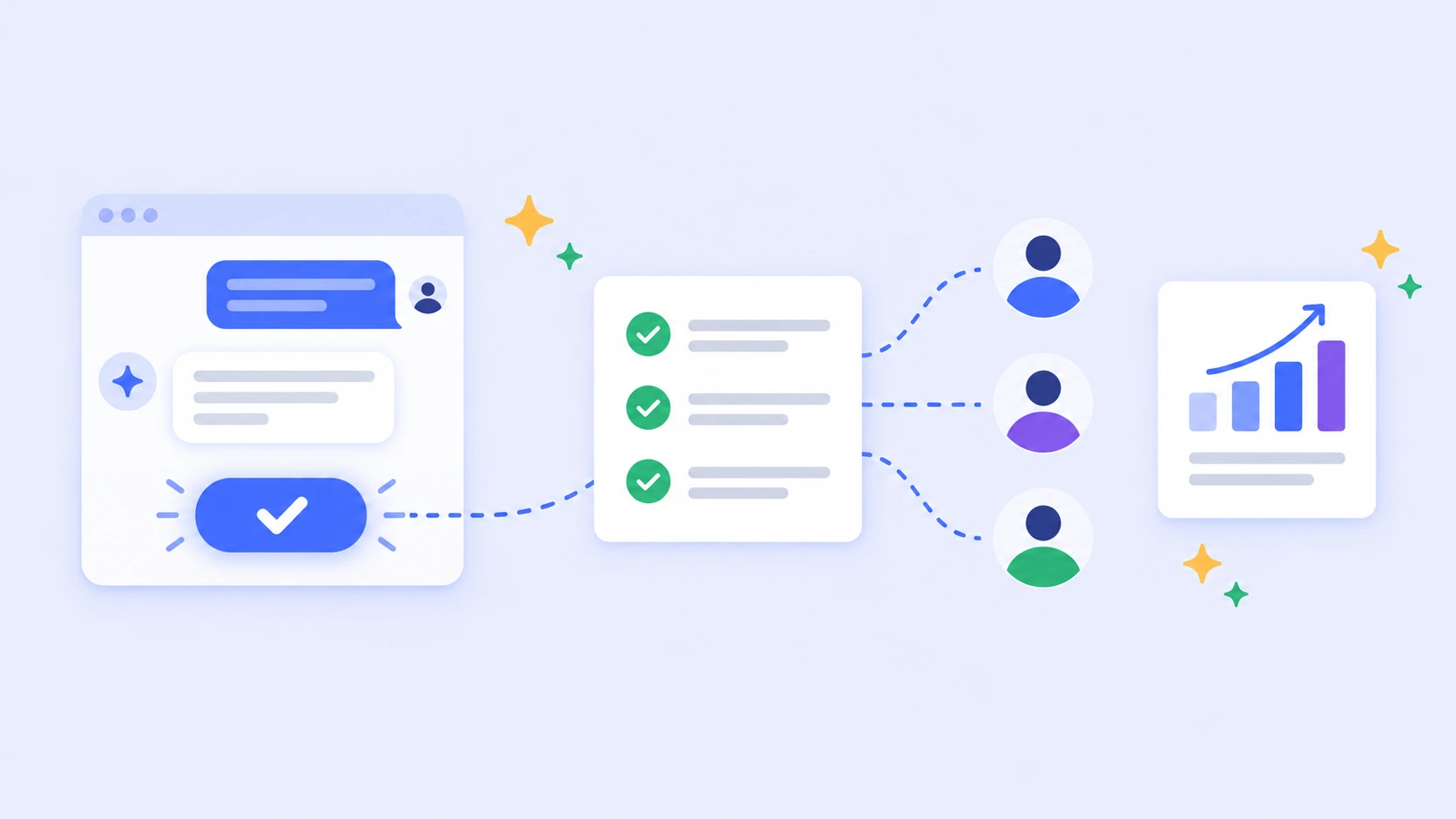
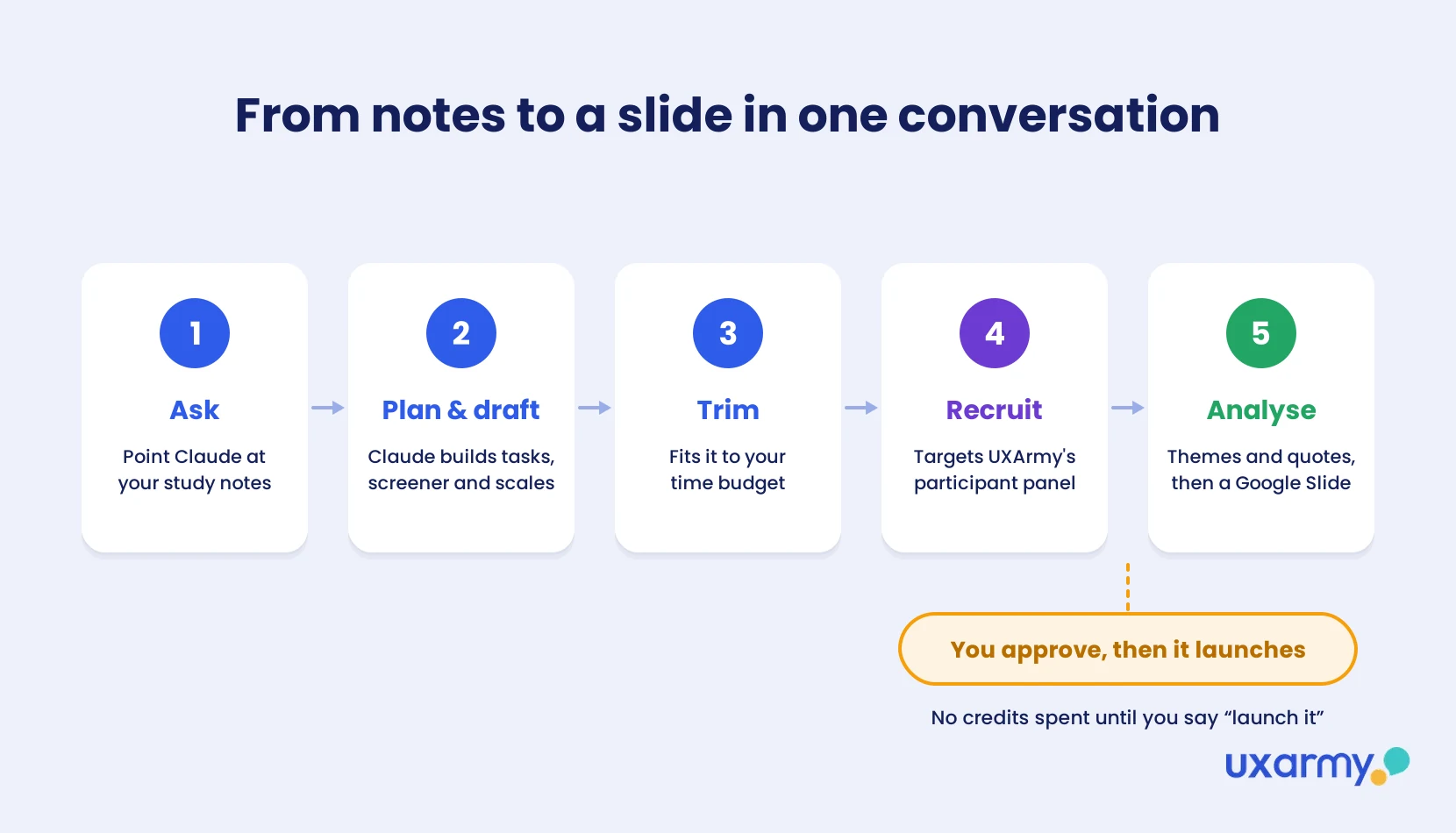
Yes, with a human in the loop. I tested Claude MCP with UXArmy for usability testing end to end. Connected through the UXArmy MCP server, Claude turned my study plan notes file into an unmoderated usability study, set up recruiting from UXArmy’s participant panel, waited for my “launch it”, and, on a finished study, turned the results into a one-slide executive summary. I made the research calls; Claude did the setup and the synthesis.
Tested by Nick Lim, Product Growth, UXArmy · October 2026
- Claude can build, recruit for and launch a UXArmy usability study from one conversation through the UXArmy MCP server. No study goes live or spends credits until you approve it.
- It takes feedback on research design: when I questioned the 54-item study built from my lengthy guide, it estimated 45–55 minutes and trimmed it to 22 items for a 25–30 minute session.
- On the analysis side it summarised an 8-participant study comparing five insurers’ websites, flagged what the data couldn’t show, and built a one-slide CEO summary in Google Slides.
- Two limits today: website and prototype studies need to be manually created in UXArmy first, and Claude edits via the UXArmy MCP connector (surveys can be created from chat), and a few settings, like voice recording, still need to be managed in the app.
- Many research MCPs only read past research. UXArmy’s MCP server also runs new research, recruiting from its own panel.
What is an MCP server for user research?
An MCP (Model Context Protocol) server lets an AI assistant such as Claude, ChatGPT, Gemini CLI or Cursor use another product on your behalf. For usability testing and other user research, that means the assistant can see your studies and results, and in UXArmy’s case create, recruit for and launch studies too, through your own account and permissions.
Many research tools that shipped an MCP server this year use it only to read: search past studies, pull quotes, summarise transcripts. That’s useful, but it stops at the research you already have. It isn’t AI usability testing yet. I wanted to know whether an assistant could run an end-to-end usability study from scratch, so I tried it on the UXArmy MCP server before we launched it. This post is the honest log, including the parts that didn’t work.
If you just want to connect it, the setup guide covers Claude, ChatGPT, Gemini CLI and Cursor. The UXArmy MCP server page has the overview.
How do you set up Claude MCP with UXArmy for usability testing?
I picked a task I’d just done myself: booking a rental car on a travel site. I wrote the study plan as a plain notes file on my laptop (goal, audience, tasks and follow-up questions) and connected two things to Claude:
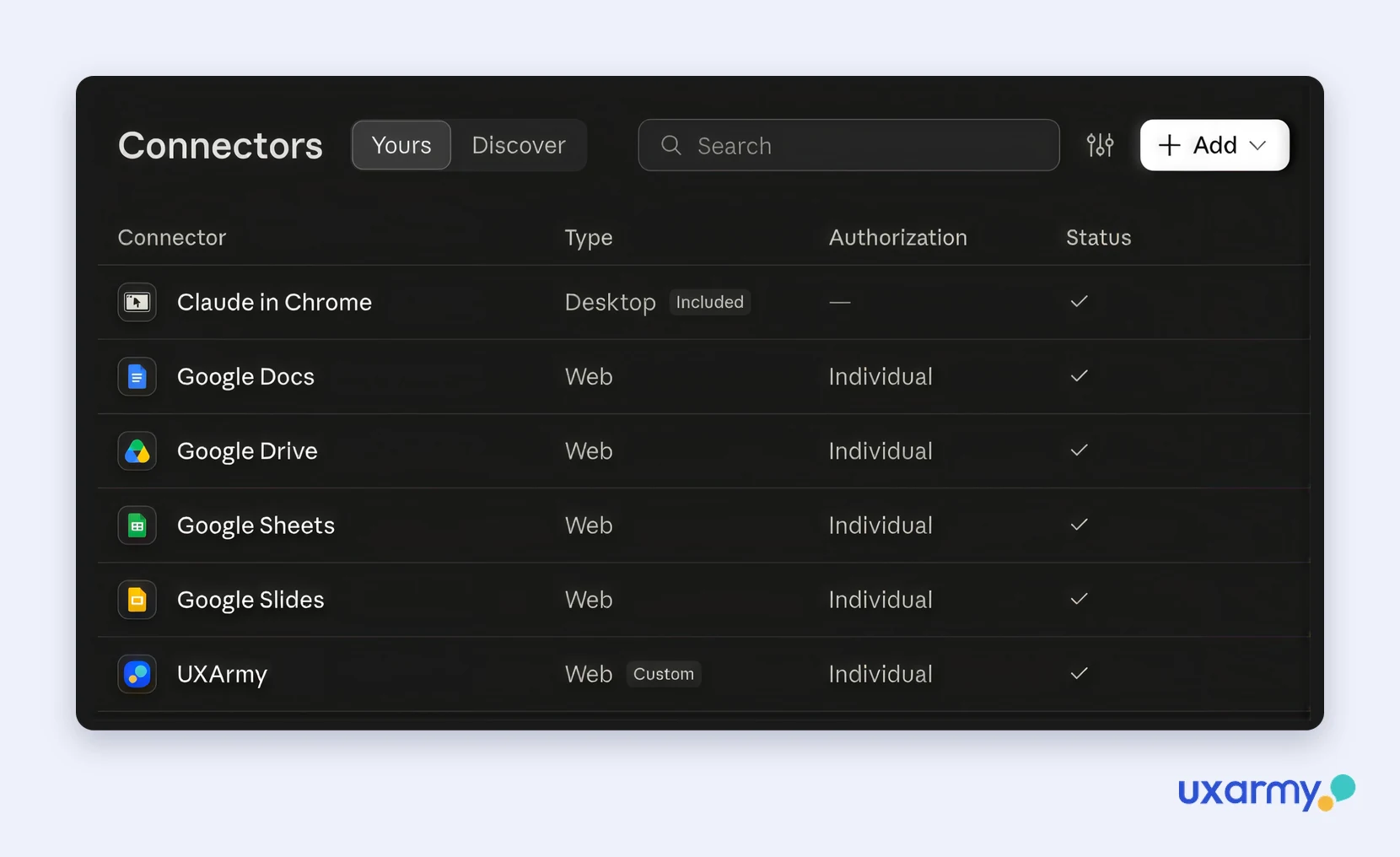
- UXArmy: in Claude, go to Settings > Connectors, search for “UXArmy” and add it. You sign in on UXArmy’s own authorisation page, so no password or token ever goes into the chat.
- Google Slides, through Claude’s own connector, for the hand-off at the end.
Then I asked: “Set up this study in UXArmy.”
A real example of Claude MCP with UXArmy: can Claude build a usability study from your notes?
Yes. Here’s what happened, step by step.
1. It reads the plan where it lives. Claude opened the notes file on my computer. No copy-pasting into the chat.
2. It told me what it couldn’t do, and what to do instead. Website usability studies can’t be created from chat yet (surveys can). Claude said so, and suggested I create an empty website study in UXArmy and let it fill it in.
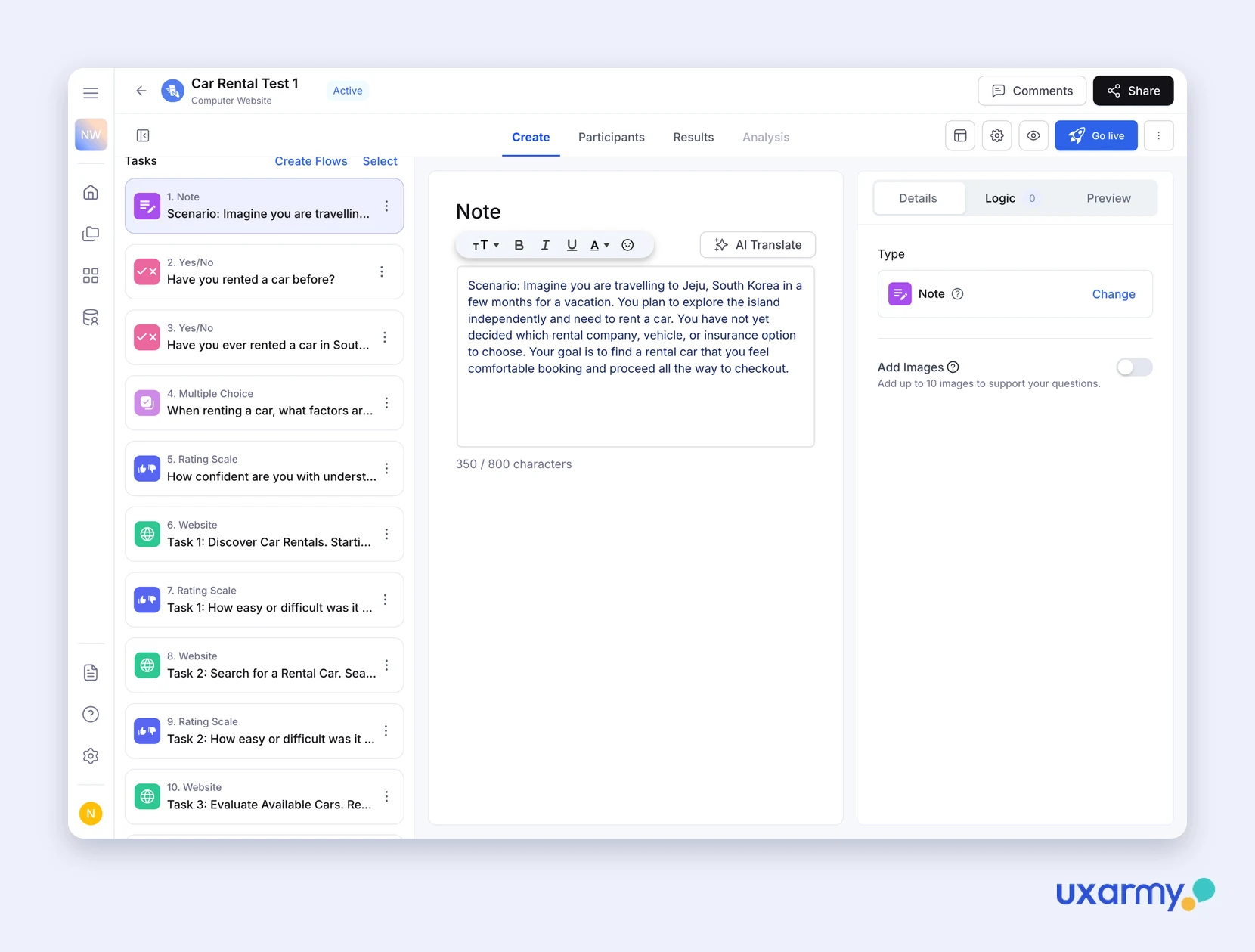
3. It filled in the whole study. Scenario, screening questions, 6 tasks with the start URL on each, labelled rating scales (“1 = Very difficult … 7 = Very easy”) and open questions. It used my wording, and it didn’t invent success criteria or URLs I hadn’t given it.
Does Claude fix a study that’s too long?
Yes, and it didn’t get defensive. This was the part that surprised me most.
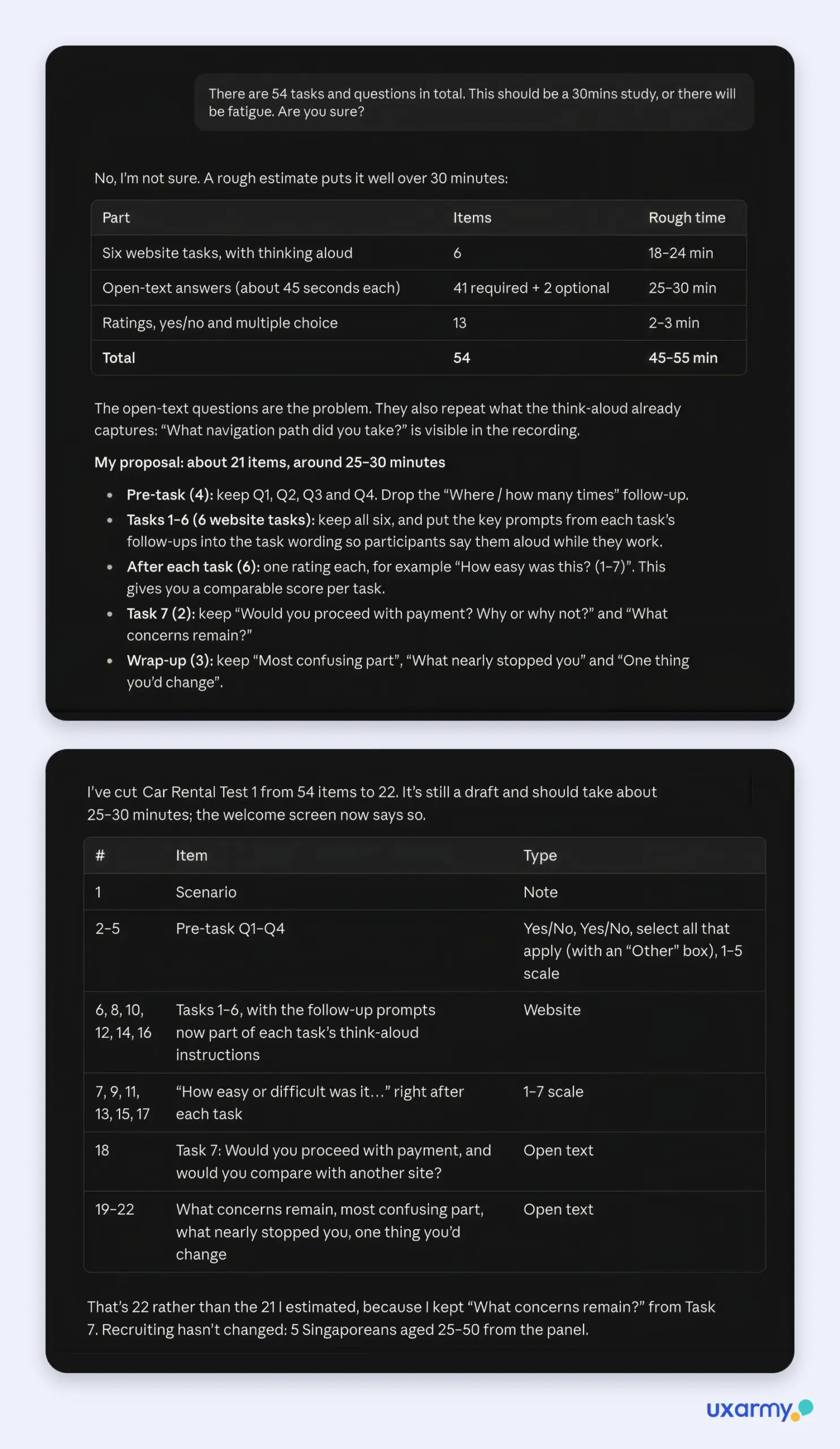
My study guide was too long. Claude had built every question in it, which came to 54 tasks and questions, so I asked whether that really fit a 30-minute session. Its answer started with “No, I’m not sure”, then broke the study down: 45–55 minutes in total, with 41 open-text answers as the main problem, since many repeated what the think-aloud already captures. I gave it a target of 25–30 minutes. It cut the study to 22 items by moving the follow-up questions into think-aloud prompts and adding a quick difficulty rating after each task.
It also flagged two setup risks before launch:
- Voice recording was off. That would have meant no think-aloud audio at all.
- Each task restarted on the homepage, which would have broken the booking flow between tasks.
💡 Give it a time budget: tell Claude how long the session should be (“fit this into 25–30 minutes”). It will trim the plan to fit and tell you what it moved or cut.
Can Claude recruit participants and launch the study?
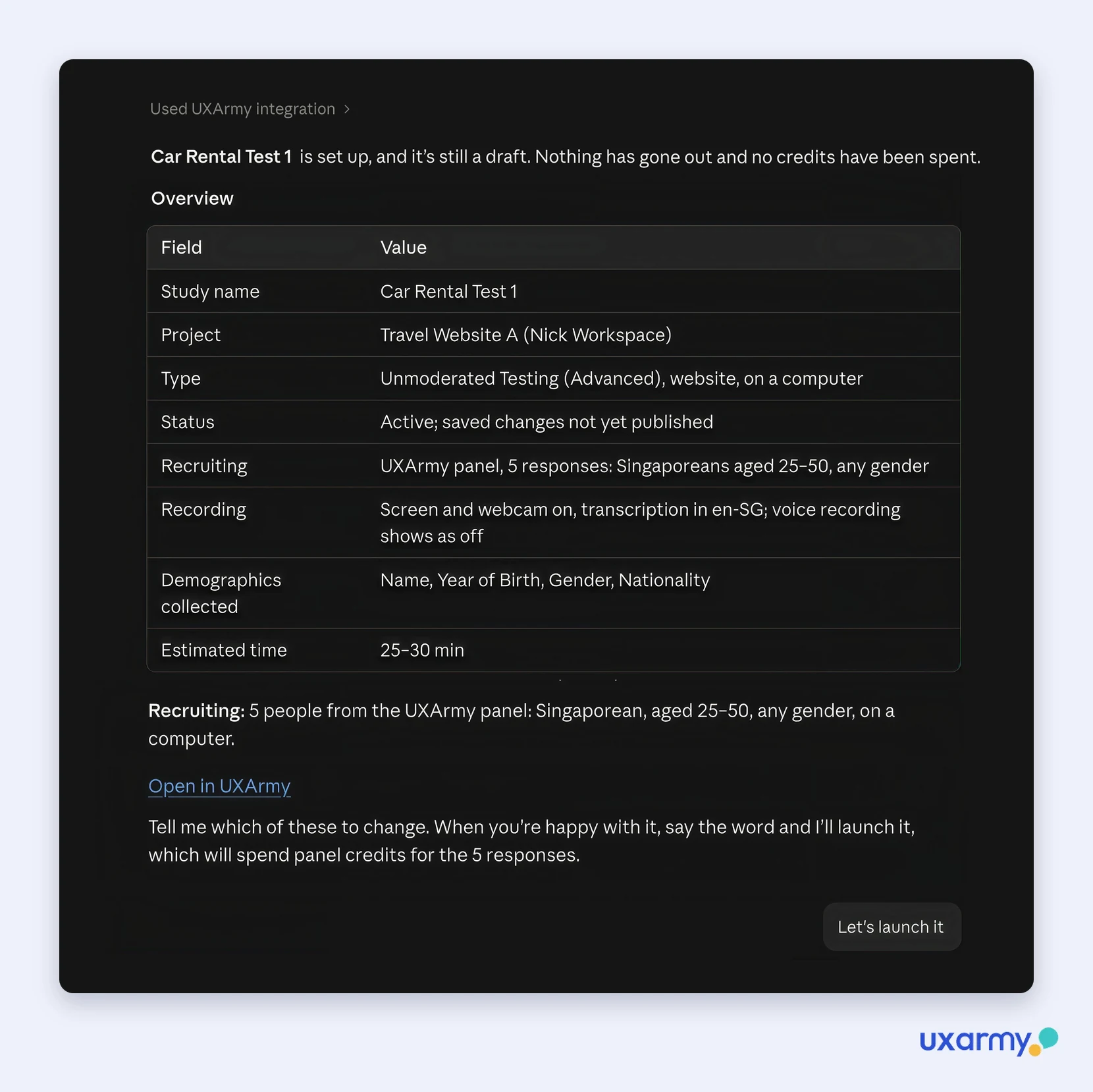
Yes, from UXArmy’s own participant panel. I asked for 5 participants in Singapore, aged 25–50, on a computer, and Claude set the panel targeting. When I asked for narrower criteria that the panel filters don’t cover, it drafted them as screener questions instead.
Then it stopped. Nothing launched, and no credits were spent, until I typed “launch it”.
That approval step is the design, not a workaround. An assistant that can spend your research budget should have to ask first.
How do you analyze usability test results with Claude?
Setting up and launching a study is half the job, and many AI user research examples stop there. The other half is making sense of results and getting them in front of the people who decide. The car-rental study was still collecting responses, so I pointed Claude at a finished one: a desktop study in which 8 participants compared five travel insurers’ websites and then bought a policy on a client’s site.
I asked three plain questions: which account is this, what was the last study published, and what did it find. Here’s what came back.
1. It checked whose account it was in. It confirmed the signed-in user and my role before touching anything, and pointed out that the email it was signed in with wasn’t the one I’d typed.
2. It found the right study without IDs. I asked for “the last study published”. It listed every study on the account, picked the only one that had gone live, and said it was going by creation date because the connector doesn’t return a launch date.
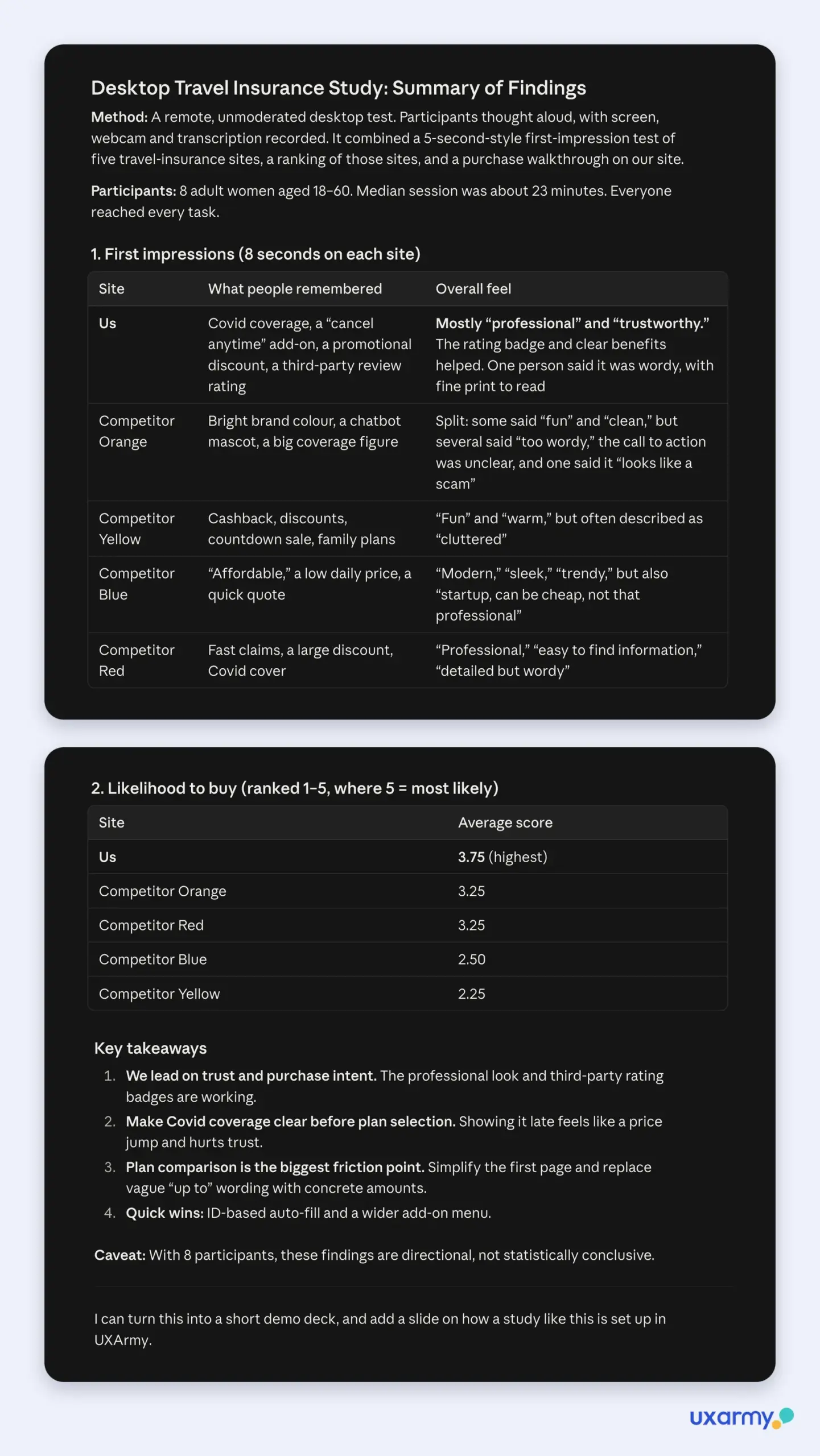
3. It summarised the whole study. 8 of 13 responses were in, the median session was about 23 minutes, and every participant reached every task. It covered first impressions of the five sites (8 seconds each), a 1–5 likelihood-to-buy ranking where a client’s site came top at 3.75, median task times, what people liked and disliked in the purchase flow in their own words, and device preference: 7 of 8 would rather buy insurance on a laptop than a phone.
4. It told me how far to trust the results. Alongside key takeaways and quick wins, it listed four caveats to raise before showing the data to stakeholders. The biggest finding suggested that with 8 participants that were all women, the findings are directional and not statistically conclusive.
5. It highlighted the finding that mattered. One participant only found out after choosing a plan that a key cover was a paid add-on, not part of the base plan, and it pushed her into a much pricier tier. Claude ranked that as the most serious finding, ahead of the slowest task: comparing plans took a median 3 min 41 s, and one person took over 10 minutes.
6. It checked what more research would cost. When I asked it to recruit more participants, it checked the balance first: 15 response credits and no panel credits. It worked out what the 5 missing panel responses would need (145 panel credits plus 10 more response credits), offered to invite my own participants instead, and warned that relaunching would also publish the unlaunched edits. It can’t buy credits, so it told me where to buy them in UXArmy.
Can Claude turn research findings into Google Slides?
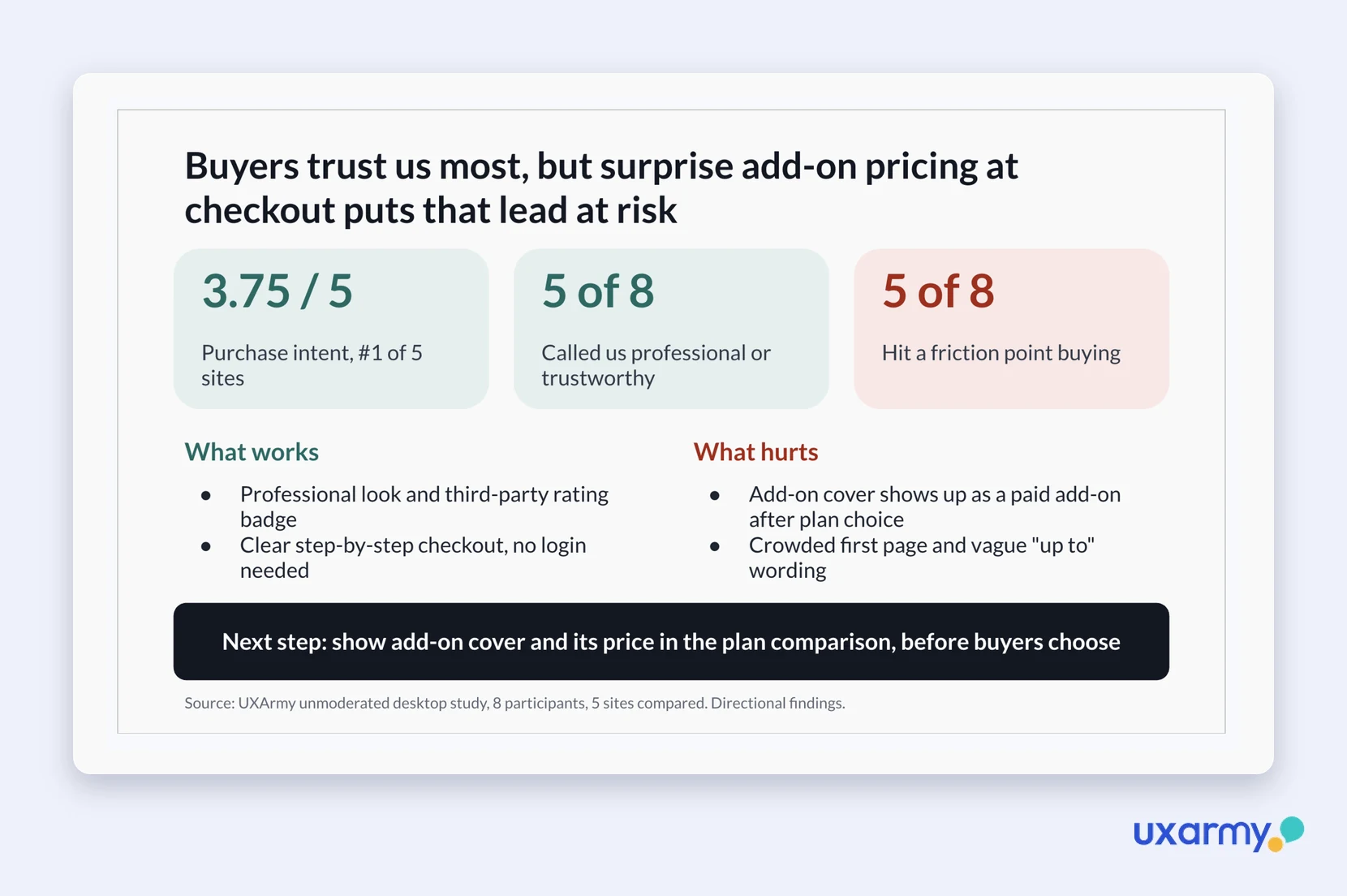
Yes, through Claude’s Google Slides connector. I asked for one slide for a CEO with a short attention span. It built it with a headline (buyers trust the site most, but surprise pricing at checkout puts that lead at risk), three numbers (3.75/5 purchase intent and #1 of 5 sites; 5 of 8 called the site professional or trustworthy; 5 of 8 hit a friction point while buying), what works vs what hurts, one next step and the source study. It sized the text so nothing overflowed, then said it couldn’t see the rendered slide and asked me to check it.
The same hand-off works with whatever else you’ve connected to Claude, such as Slack, Notion, Jira or Linear. UXArmy doesn’t touch those tools; Claude’s own connectors do. I only tested Slides.
What can’t it do yet?
Being straight about the limits, as of October 2026:
- Website and prototype studies start in UXArmy. Create an empty study first; Claude fills it in and launches it. Surveys can be created entirely from chat.
- Some settings stay in the app. Voice recording, for example, is switched on in UXArmy, and credits are bought there too: Claude can check your balance but can’t buy credits.
- ChatGPT write actions need a Business, Enterprise or Edu plan. On ChatGPT Pro the connection is read-only.
- AI summaries need enough speech. When a participant barely talked, the summary read more into the session than the transcript supports. Check the transcript for short sessions.
- You’re still the researcher. Claude drafts, trims and summarises fast, but the time limit, the audience and the decision to launch were mine.
What did I learn?
Two decisions from me (the time limit and “launch it”) and Claude did the rest of the setup. What it saved me wasn’t only time. It caught a missing voice setting I’d have found only after the first sessions came back silent, and it showed exactly why my study was too long, and how to fix it, before any participant had to sit through it.
If your team already lives in Claude or ChatGPT, research no longer has to be a separate tab. The study, the participants and the summary can all come out of the same conversation.
FAQ
Can Claude run a usability study on its own?
Not on its own, and that’s deliberate. Through the UXArmy MCP server Claude can build the study, set up recruiting and analyse results, but it only launches a study (and spends credits) after you approve it.
Can I use Claude MCP with UXArmy, and which other AI assistants work?
Claude, ChatGPT, Gemini CLI, Cursor or any AI assistants that can connect MCP servers. In ChatGPT, creating or launching studies needs a Business, Enterprise or Edu plan; Pro is read-only. The setup guide has the steps for each.
Can I create a usability study entirely from chat?
For website and prototype usability studies, create an empty unmoderated user study in UXArmy first, and Claude fills it in, recruits and launches it. Claude can create surveys via the UXArmy MCP connector directly from chat.
Where do the participants come from?
UXArmy’s own participant panel. You can target by country, age and device, and Claude drafts screener questions for anything narrower. Panel participants use panel credits, bought separately in UXArmy. You can also invite your own participants by contact list or a shared link.
Does the UXArmy MCP server cost extra?
No. It’s available on every UXArmy plan, including the free plan, at no extra cost. Launching a study uses credits, the same as launching it in the app. Claude checks your balance first: if it isn’t enough, it tells you what’s left and asks you to top up in UXArmy, and nothing launches until you do.
How is this different from other research MCP servers?
Many research MCP servers only read research you’ve already completed. UXArmy’s also runs new research: it builds the study, recruits from UXArmy’s own panel, launches on approval and analyses the results.
Is there a free AI connector for usability testing?
Yes. The UXArmy MCP server plugs UXArmy into Claude, ChatGPT, Gemini CLI, Cursor or any AI assistants that can connect MCP servers. Connecting it is free on every UXArmy plan, including the free plan. Running a study with panel participants uses UXArmy credits as usual.