

Short answer: design iPhone Duo apps to resize, not to fit two fixed screens. The iPhone Duo has a 5.4-inch outer display and a 7.6-inch inner display, a center fold and toolbars that move to the side. Apple’s guidance is to use size classes, safe areas and system components, keep functionality identical across displays, and keep important controls away from the fold. Then test with real people, because how they actually hold it is still unknown.
- Demand is real. The iPhone Duo’s pre-orders opened on October 16, 2026, and within minutes every configuration was backordered to late January 2027 (9to5Mac).
- Foldables are about to grow fast. Counterpoint forecasts the category will pass 100 million cumulative shipments by the end of 2026, with Apple taking about 25% of the market in its first year.
- The biggest UI change is vertical controls. Toolbars and tab bars move to the side of the screen in most poses, not the top and bottom (Apple HIG).
- Build to resize. A compact-width layout for the outer display and a regular-width layout for the inner one cover every pose, if you avoid fixed widths.
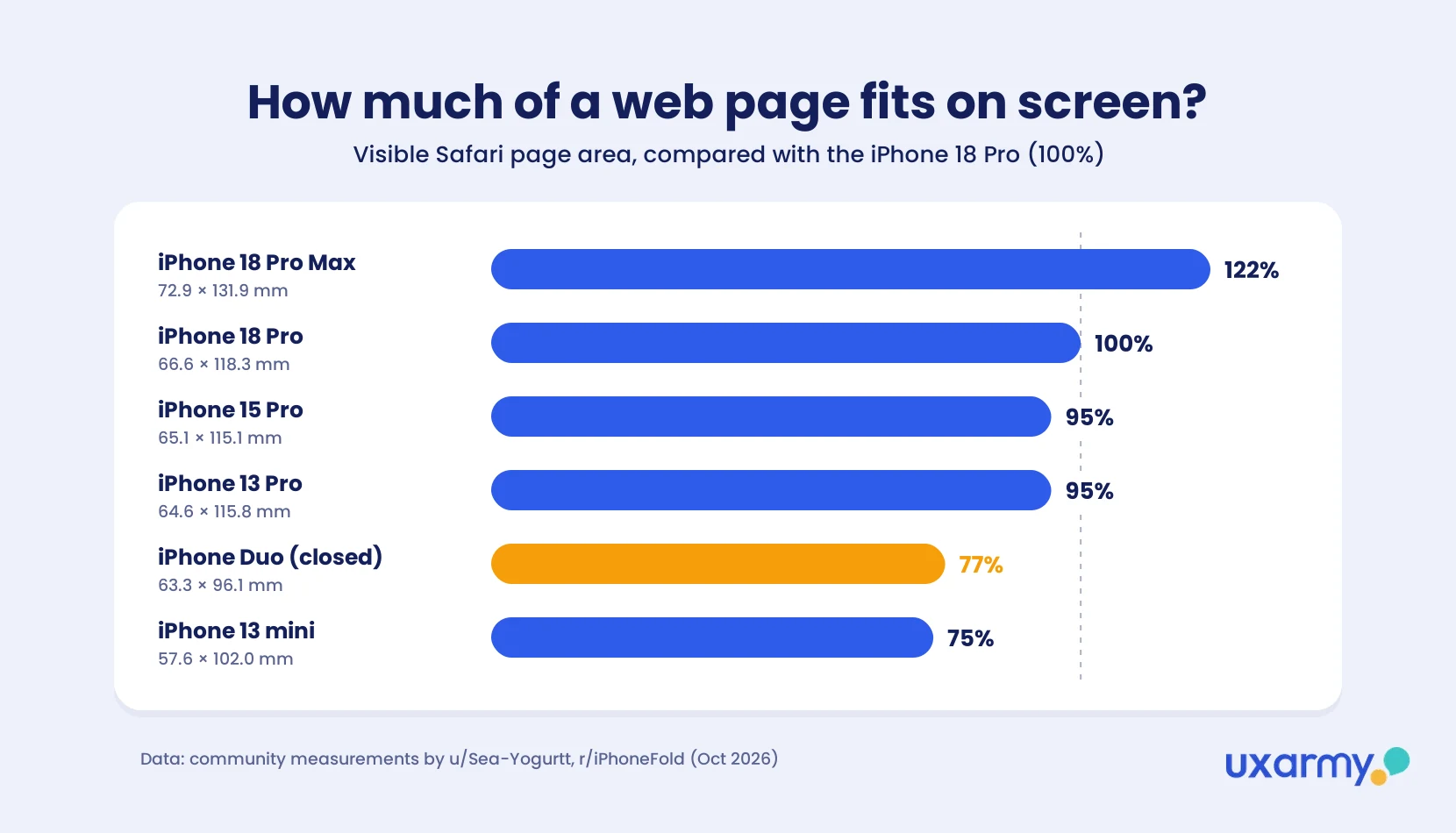
- Websites are affected too. On the closed phone, Safari’s side bars shrink the page; community measurements suggest the visible page area is noticeably smaller than on other iPhones.
- Samsung’s foldables already showed what breaks: lost state when the phone opens, controls on the crease, and layouts that don’t fill the screen.
- Guidelines describe intended behavior. Unmoderated user testing shows actual behavior. On the iPhone Duo, people open, close and half-fold the phone as they go. A study they take on their own device, wherever they are, captures those pose changes. A lab session or field observation can only stage or catch a few of them.
What is the iPhone Duo, and why is everyone talking about it?
The iPhone Duo is Apple’s first foldable phone, and it sold out almost immediately. A foldable is a smartphone with a flexible screen that folds in half like a book. Closed, it works like a normal (if smaller) phone, using a second screen on the outside. Open, it becomes one larger, almost tablet-sized screen. Foldables have been on sale since 2019, from Samsung, Huawei, Google and others. The iPhone Duo is Apple’s entry into the category: a 5.4-inch outer display and a 7.6-inch inner display joined by a hinge (Apple Newsroom).
What is a foldable phone? A foldable is a smartphone whose main screen bends at a hinge, so one device works as both a small tablet when opened, and a compact phone using a separate outer “cover” screen for use while closed.
Apple unveiled the iPhone Duo on September 9, 2026, at a starting price of US$1,999 (Apple Newsroom). Pre-orders opened on October 16. Delivery estimates started slipping within minutes, and by 8:30 a.m. ET every color and storage option showed a ship date of January 25 or later (9to5Mac). Forbes and AppleInsider reported the same sell-out (Forbes, AppleInsider).
For product teams, that matters more than the hype. Units will be scarce until early 2027, but the people who bought one are exactly the high-value, early-adopter users most apps want. They’ll open your app on day one, and they’ll notice if it looks like a stretched phone app.
It’s the same moment Android teams had when Samsung launched the Galaxy Fold in 2019: a whole new set of screen sizes, poses and transitions to design for, almost overnight.
Why should you pay attention to foldable app design now?
Because foldables are still a small part of the market, but Apple’s entry is likely to speed up their growth, and new App Store rules will soon require iPhone Duo screenshots. Foldables are still a small slice of the phone market, about 2% today. But the numbers have climbed every year since the first Galaxy Fold, and the apps have followed (Source):
| Year | What happened |
|---|---|
| 2019 | Samsung launches the first Galaxy Fold. Its launch is delayed after review units break (NPR). |
| 2022 | Google releases Android 12L, built for tablets and foldables. Foldable shipments reach a projected 16 million, up 73% year over year (Counterpoint, via Samsung Newsroom). |
| 2023 | Google announces redesigns of more than 50 of its own apps for foldables and tablets (SamMobile). Large-screen Android devices pass 270 million (Android Developers Blog). |
| 2026 | Apple opens App Store Connect to iPhone Duo apps on October 5 (Apple Developer). Large-screen Android devices pass 580 million (Android Developers). Counterpoint forecasts foldables will pass 100 million cumulative shipments by year end (MacDailyNews). |
| 2027 | From April, every new App Store submission must include iPhone Duo screenshots (Apple Developer). Counterpoint forecasts foldable shipments to grow 37%, with Apple’s share reaching 40% (MacDailyNews). |
Four things make the case for acting now:
- Apple has set a deadline. Starting April 2027, “any apps or games submitted will need to include screenshots for iPhone Duo” (Apple Developer). That applies whether or not you market Duo support (The Mac Observer). Existing apps already run on the iPhone Duo, but older builds may not use the large inner display properly (MSN). Apps that submit Duo screenshots get an “Made for iPhone Duo” badge on their App Store page.
- Apple could own a quarter of the foldable market in its first year. Counterpoint forecasts up to 6 million foldable iPhone shipments in 2026, about 25% of the market, behind Samsung (38%) and ahead of Huawei (22%).
- Big-screen users are worth more. Google says users on large-screen devices “spend 9x more in dollar value than users who have only a phone” (Android Developers).
- Large-screen use pays off. The drawing app Concepts, which is built for large screens, found that monthly users spent 70% more time in the app on tablets than on phones, and tablet users brought in 50% more revenue per user (Android Developers Blog).
On Android, Google announced redesigns of its own apps for foldables and tablets as the category grew. The iPhone Duo starts that cycle again on iOS.
How is the iPhone Duo different from a regular iPhone?
It has two displays of different sizes, a fold between them, and toolbars that sit on the side instead of the top and bottom, so layouts built for a tall phone need to resize rather than stretch. Here are the basics from Apple’s announcement and the Human Interface Guidelines (HIG):
| Outer display | Inner display | |
|---|---|---|
| Size | 5.4 inches | 7.6 inches |
| Used when | Closed | Open, or partly folded like a book |
| Layout width | Compact | Regular |
| Toolbars and tab bars | On the side | On the side in landscape; top and bottom in portrait |
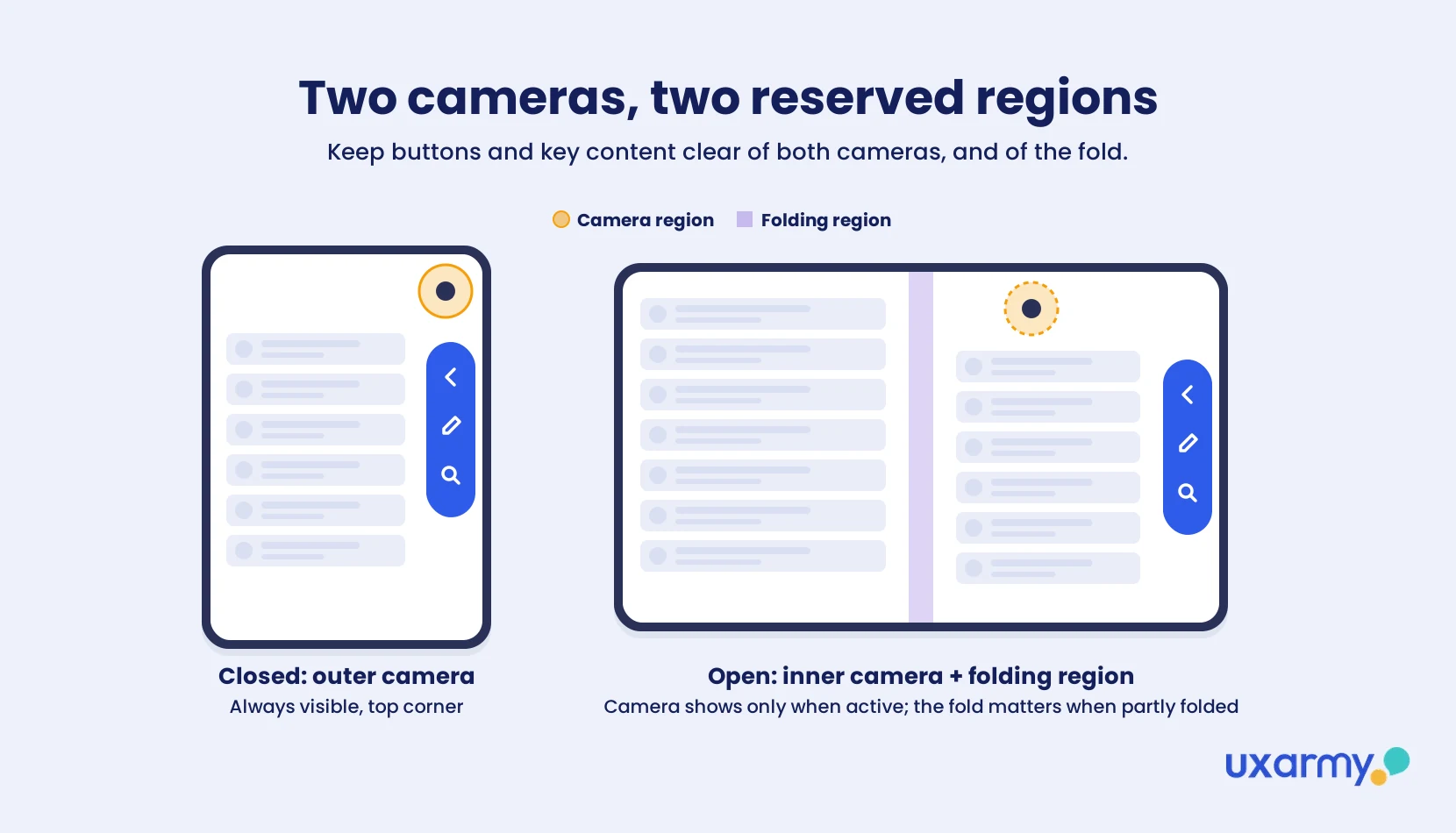
| Front camera | Corner, always visible | Behind the display, hidden until active |
Sources: Apple Newsroom, Apple HIG.
Apple notes that the outer display is “wider and shorter than the display on other iPhone devices.” Both displays are close to the same shape (roughly 1.4:1, based on reported pixel counts in The Mac Observer), which is much squarer than a standard iPhone. That’s the core design problem: layouts built for a tall, narrow phone now run on much squarer screens.
“Although iPhone Duo is a new form factor, keep in mind that you’re still designing for iPhone, and Designing for iOS patterns and best practices still apply.”
Apple Human Interface Guidelines
iOS 27.1 also brings Split View to iPhone for the first time, so two apps (or two windows of the same app) can share the inner display (Apple Newsroom). Your app can appear at many more sizes than before.
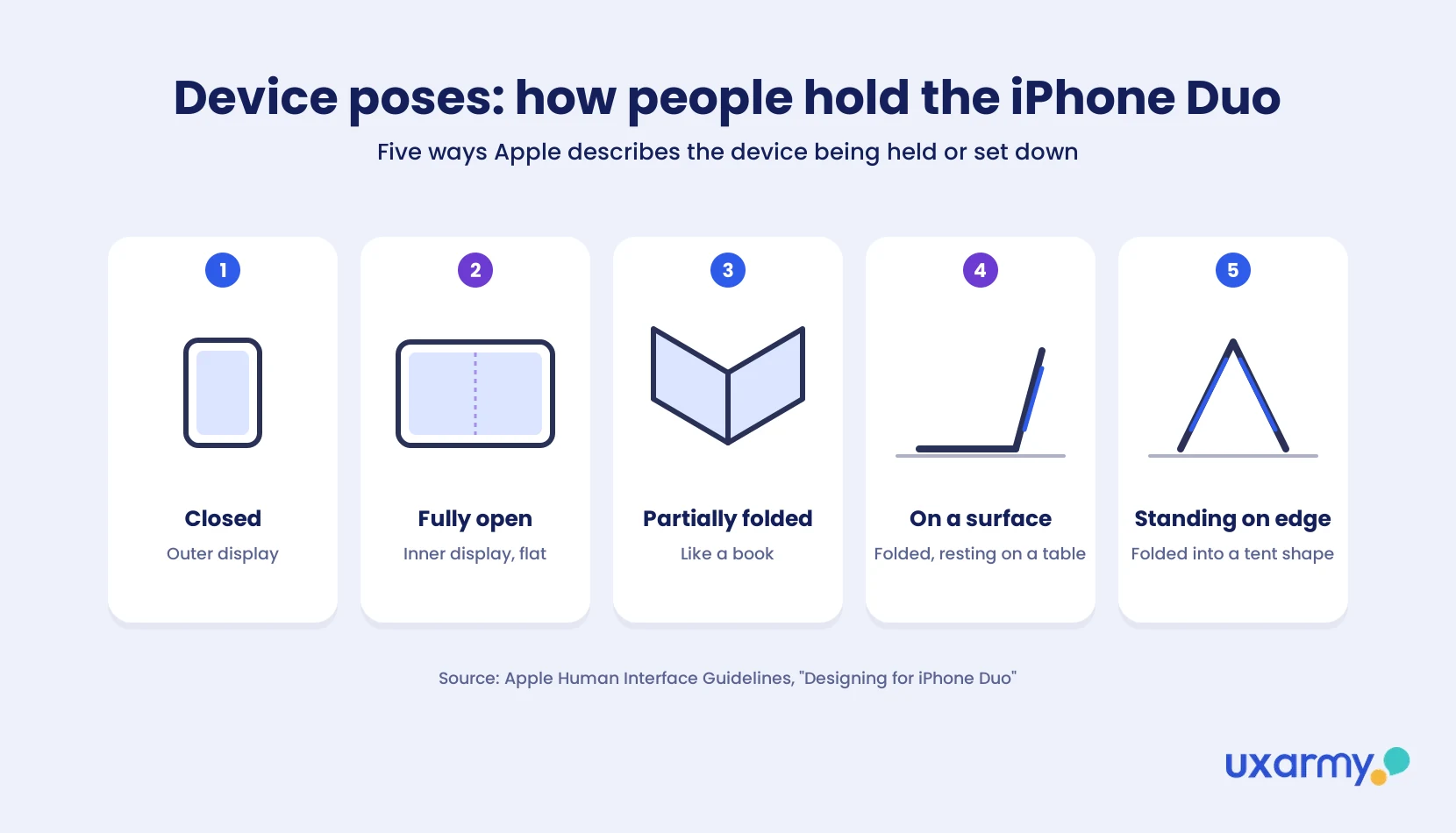
What are device poses? Apple uses the word “pose” for the different ways people hold the iPhone Duo or set it down. Besides being fully closed and fully open, Apple describes the device partially folded like a book, placed down on a surface, and standing on its edges (Apple HIG). Each pose can change the screen size, the orientation and where the fold sits. Apple’s advice is not to design a separate layout for every pose, but to use size classes so the app adapts as its size changes.
How is the iPhone Duo’s UI different from Samsung’s foldables?
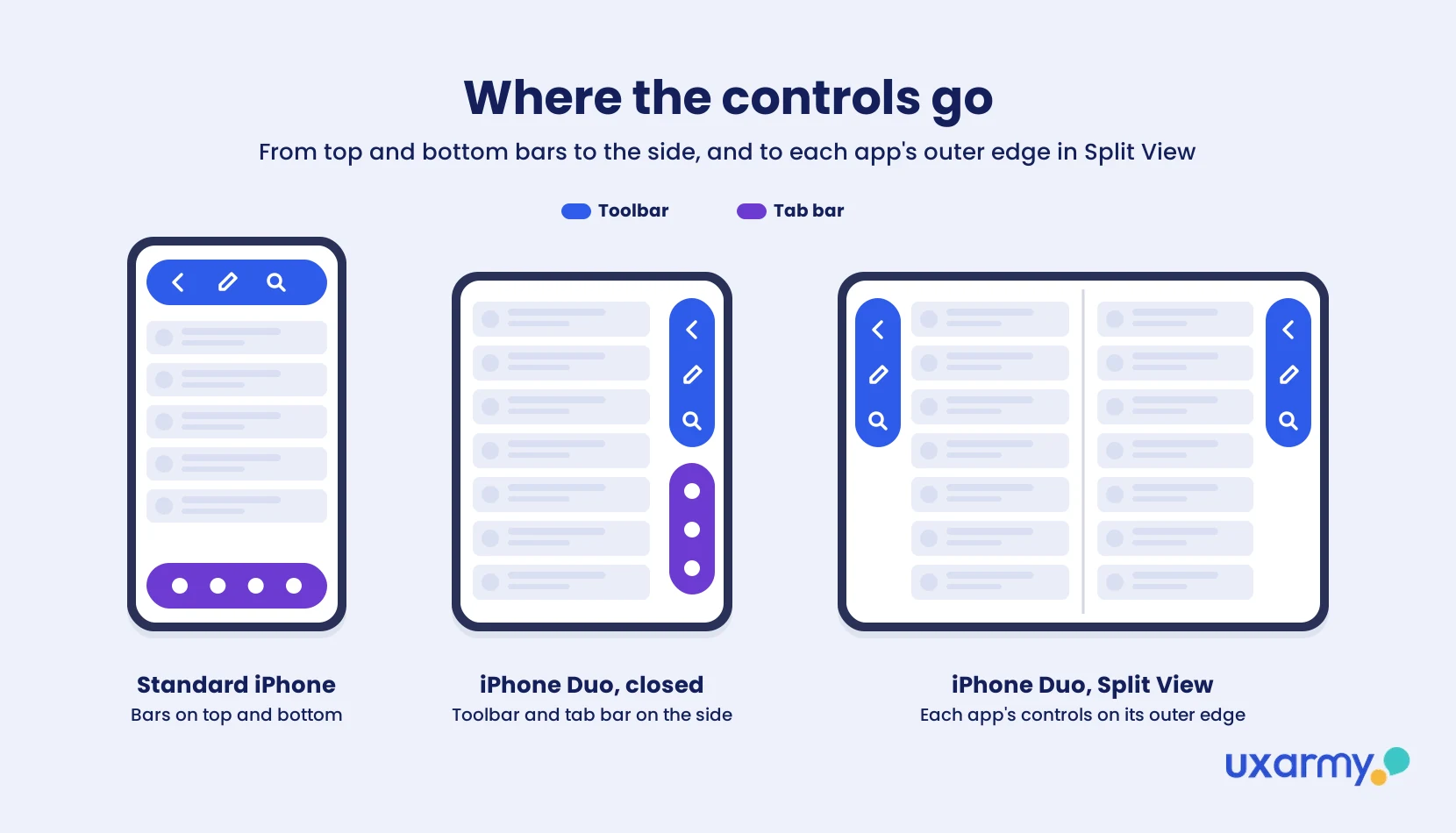
The biggest difference is where the controls go. On Samsung’s Galaxy Z Fold, apps keep their usual top and bottom bars. On the iPhone Duo, toolbars, tab bars, the status bar and even the Dynamic Island move to the side of the screen in most poses, to save vertical space on the wider display. Only the inner display in portrait keeps standard horizontal bars (Apple HIG).
| Samsung Galaxy foldables | iPhone Duo | |
|---|---|---|
| Closed screen | “Cover screen” | Outer display |
| Bar placement | Top and bottom | Side (vertical axis), except inner portrait |
| Half-folded pose | Flex Mode: content on the upper half, controls on the lower half | The fold becomes a “reserved region”; layouts split around it |
| Key layout tool | Resizable layouts, Flex Mode APIs | Size classes, ReservedRegion, arrangement views |
| Two apps at once | Multi-window | Split View (new to iPhone) |
Sources: Samsung Developers, Apple HIG.
The principles are the same, though. Samsung asks developers to keep the experience seamless when the phone opens, to fill the screen without letterboxing, and to “avoid positioning interactive elements near the crease in the middle of the screen” (Samsung Developers). Apple’s guidance points the same way.
What are the 10 things to consider when designing for the iPhone Duo?
Build to resize, keep everything consistent across displays, respect side controls and the fold, and test in real poses. Here’s each one in detail.
1. Build your app or website to resize, not to fit two screens
Don’t design one fixed layout for “closed” and another for “open”. Between two displays, the poses described above and Split View, your app can appear at many sizes. Apple’s advice is to use size classes, layout margins and safe area insets, and to avoid fixed widths and “display-specific dependencies” (Apple HIG). A compact-width layout for the outer display and a regular-width layout for the inner display cover every pose.
💡 Start with system components: If your app uses standard UIKit or SwiftUI components and already supports resizing, Apple says it adapts to the iPhone Duo “with little adjustment required.”
2. Keep state and functionality the same on both displays
Opening the phone should never lose the user’s place. This was one of the hardest-learned lessons on Android foldables. Samsung’s guidance tells developers to return users to where they left off, keep the scroll position, and preserve text entry and keyboard state when switching screens (Samsung Developers). Apple’s version: “Keep functionality and the state of elements the same between displays.”
3. Use the extra space for one more level of hierarchy
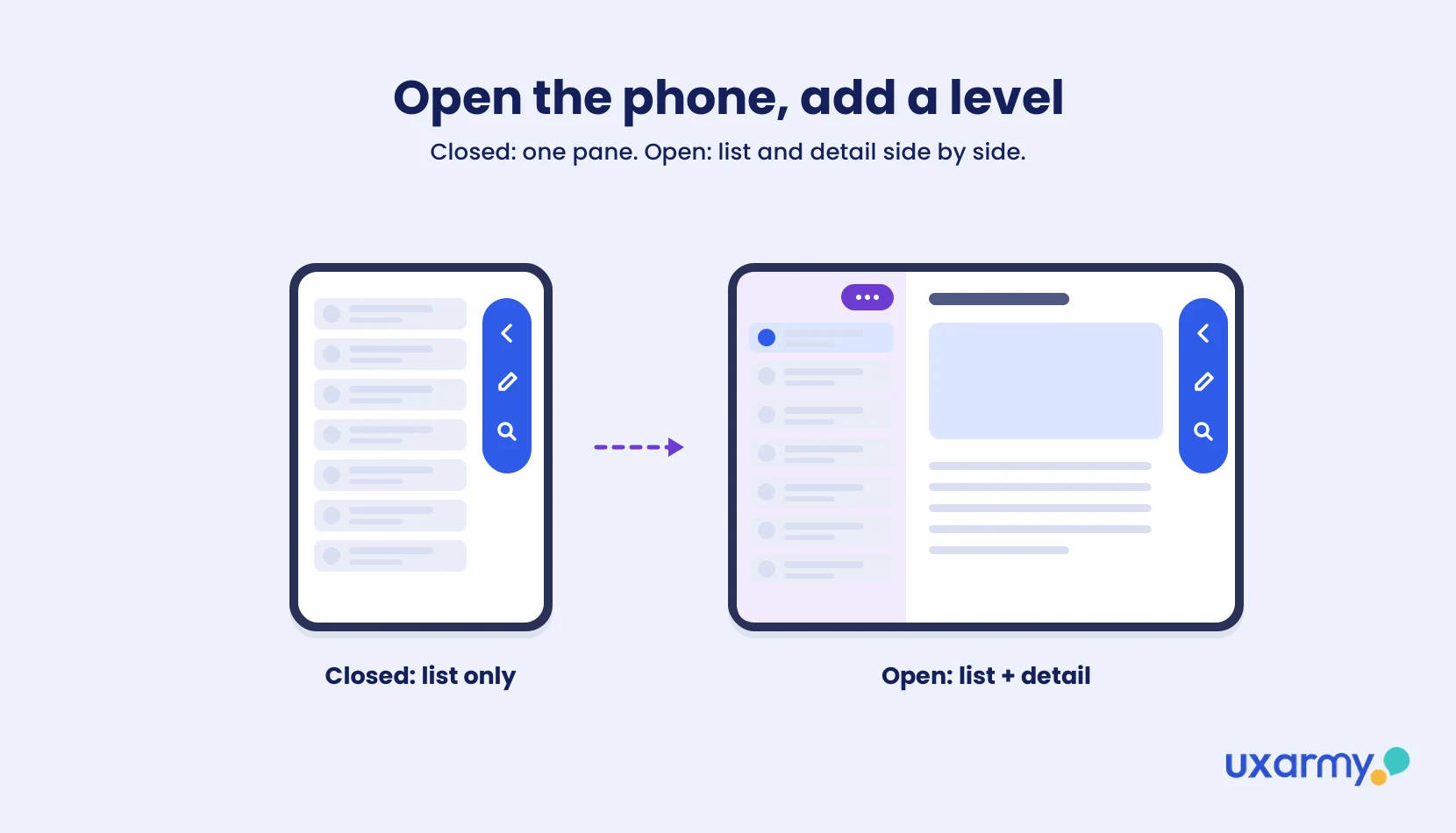
Don’t just make everything bigger on the inner display. Apple’s example is Mail: closed, it shows either the inbox or one email. Open, it shows both side by side. If your app has a list-and-detail structure, the inner display is where both should appear. If it doesn’t, let the existing layout expand rather than inventing a new one. By default, one app fills the whole inner display. Showing two apps side by side is something people choose with Split View (see point 8).
4. Design for vertical toolbars and tab bars
This is the change most iPhone apps aren’t ready for. On the outer display and in landscape, bars move to the side, and the space for content becomes asymmetrical. When multitasking on the inner display, tab bars render on either side of the screen — left for the app on the left, and right for the app on the right. This whole new interaction is something both designers and developers should take note of.
Apple’s rules for the vertical axis:
- Put primary navigation (Back, Close) at the top, then prominent actions like Done.
- Prefer symbols over text buttons. Text labels stay in horizontal bars.
- Give every toolbar item both a title and a symbol, so the system can choose.
- Set a visibility priority so your most-used actions (like Compose) don’t overflow first.
- Move your custom “more” menu into the system overflow menu.
- In general, don’t override the default bar placement.
Source: Apple HIG.
5. Keep controls in the same relative place across poses
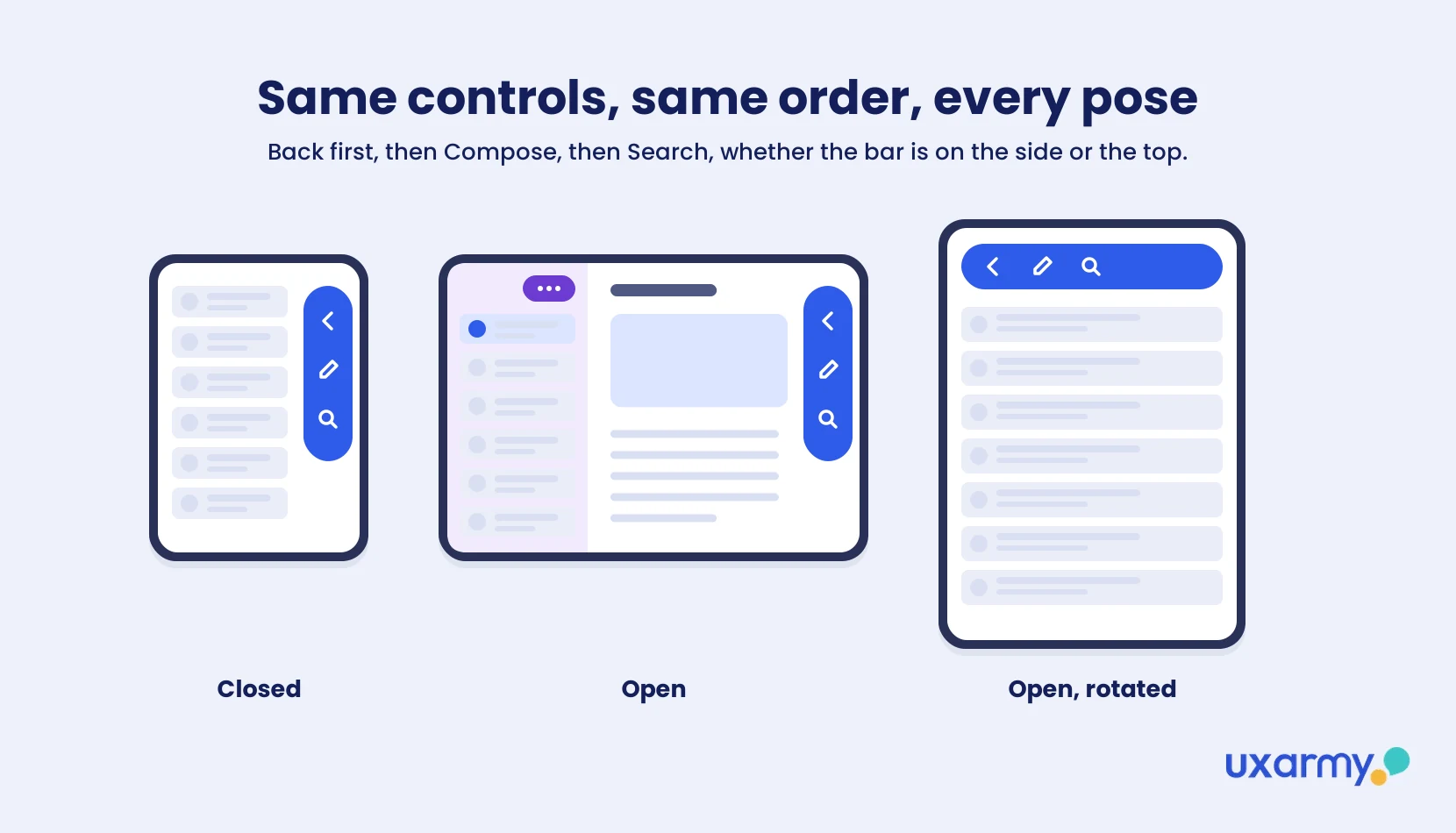
People shouldn’t have to relearn where things are each time they fold the phone. Not every pose puts controls on the side, and the space changes. Apple asks for small adjustments over rearrangement: “Controls that disappear or shift dramatically are harder to find and track.”
6. Keep important content and controls clear of the fold
When the phone is partly folded, the center of the inner display is a reserved region. Content should avoid it. Apple’s system components (alerts, sheets, menus, split views) move automatically. Custom components need the new ReservedRegion API. Two practical rules from the HIG:
- In grid layouts, use an even number of columns so content splits cleanly at the fold.
- Prefer containers that adapt automatically, like the split view in Notes, which evens out its two panes when the device folds.
Samsung learned the same lesson with Flex Mode: keep tappable elements off the crease.
7. Account for both front cameras
The outer camera is always visible in the corner. The inner camera is hidden until it’s on. Both are reserved regions. The outer one expands into the Dynamic Island for Live Activities. When the inner camera turns on, the interface moves aside to show it. Check that nothing important, like a video call’s mute button or a selfie frame guide, sits under either one.
8. Plan for Split View and two-app layouts
Your app may only get half the inner display. With Split View, each app places its controls along its outer edge, so the app on the left has controls on the left. Use safe areas so the other app’s controls never cover your content. If your app has two related views, Apple’s new arrangement views can split them side by side or overlay one on the other, depending on the space available.
9. Make games and full-screen experiences fill every pose
Avoid black bars. Apple says to prefer changing the aspect ratio over letterboxing or pillarboxing. If you can’t avoid it, add artwork to the padding so the game still feels full screen. Visual, non-scrolling interfaces can also use the full display width, as long as they don’t clash with the Dynamic Island or status bar. Apple’s Calculator, for example, switches from four columns of five buttons to five columns of four.
10. Don’t forget your mobile website
On the closed phone, Safari’s side bars take a real slice of the page width. One of the first viral iPhone Duo complaints was about websites, not apps. A Reddit user’s screenshots in r/webdev show apple.com in Safari on the outer display with the toolbar on the side, and the caption: “websites will use only 70% of the screen!” Another user measured Safari’s visible page area on the closed Duo at 77% of an iPhone 18 Pro’s (community measurements, not Apple figures).
For web teams, that means:
- Use fluid, percentage-based layouts. Check pages at the narrower content width, not just “phone” and “tablet” breakpoints.
- Move floating elements like chat widgets and “back to top” buttons. Bottom-right is exactly where Safari’s side controls sit.
- Check vertical video. A 9:16 clip on a near-square screen will be letterboxed or cropped.

What are developers and early users saying about the iPhone Duo?
Mostly that the screen shape is the hard part: the closed display feels cramped for content made for tall phones, and nobody yet knows how people will hold the device. On Reddit, the reactions fall into four themes.
1. The closed display feels cramped for content made for tall phones. The most-upvoted reply under the “websites look horrible” post (782 upvotes) pointed at video:
“Any kind of vertical video content like YouTube shorts with a 9:16 ratio will look like that or have a large part of the content cut off.”
u/C3lloman, r/webdev
2. The cover screen still matters most. Another commenter argued that “most people use foldables closed up 75% or more of the time so the experience on the cover screen has to be at least tolerable.” That’s one person’s estimate, not data. But it’s the right question to test: if most sessions start on the outer display, that layout is your main layout, not the fallback.
3. It’s wider than people expected. One widely shared post in r/iPhone13Mini compares the closed Duo (117.8 × 84.1 mm, matching Apple’s published specs as reported by TidBITS) with the iPhone 18 Pro (71.9 mm wide), and questions Apple’s claim that it’s “comfortable to use with one hand.” It points to a press shot where the hand can’t reach the far side of the screen. If people really can’t reach the far edge one-handed, controls on the side could be easier or harder to reach, depending on which hand they use. Only testing will tell.
4. Nobody knows yet how people will hold it. Developers are already listing poses to design for. A post in r/iPhoneDuo names seven (it promotes a video SDK, but the list is useful): closed, partially folded, fully open (flat), opened portrait, handheld, tent (standing) and tabletop. Apple’s own guidelines illustrate six. And one commenter summed up the uncertainty well:
“They have all these guidelines which feels like a safety belt — realistically they don’t yet know how people will use it or the feedback they’ll get when it’s in the hands of millions of people.”
u/klawUK, r/iPhoneFold
Not everyone is worried. Other commenters pointed out that “it’s a small phone on the outside and small tablet (or big phone) on the inside,” and that websites will adapt as passport-shaped foldables from Apple, Samsung and Xiaomi become common.
How do I adapt my existing iPhone app to the iPhone Duo?
Audit your layouts for fixed sizes, check your bars and fold, then preview every pose. A practical order:
- Find fixed widths and device checks. Anything that assumes a tall, narrow screen (fixed frames, hard-coded aspect ratios, “if iPhone” branches) will break first on the near-square displays.
- Switch to size classes and safe areas if you haven’t already.
- Review every toolbar and tab bar against the vertical-control rules above: symbols, titles, priorities and the overflow menu.
- Decide what the inner display adds. Usually a second pane, using a split view or arrangement view.
- Check the fold and cameras with the ReservedRegion API for any custom components.
- Preview in Xcode. Apple’s Device Hub lets you preview your app on the iPhone Duo in its different poses.
- Recompile and submit. Rebuild with Xcode 27.1, which adds iPhone Duo support. Beta-test through TestFlight. Then add iPhone Duo screenshots in App Store Connect, which earns the “Made for iPhone Duo” badge now and will be required from April 2027 (Apple Developer).
- Update your design files. Start with Apple’s official iOS and iPadOS 27 UI Kit for Figma and the new iPhone Duo product bezels on Apple Design Resources. For ready-made outer, inner and folded frames, the community-made iPhone Duo Adaptive Design Starter Kit is a useful shortcut. It isn’t from Apple, so check it against the HIG.
You’re not the only team working this out. Developers are comparing notes in r/iOSProgramming’s Prepare your apps for launch on iPhone Duo thread, and designers in r/UXDesign are asking How are we supposed to design for iPhone Duo?
Why should I test my app on the iPhone Duo?
Because Apple designed for how people are supposed to hold it, not how they will. Apple’s guidelines are thorough. But they describe intended behavior on a device that most people have never held. History says real behavior will be different.
The first Galaxy Fold is the clearest example. Samsung delayed its 2019 launch after review units broke. One reviewer peeled off what looked like a removable screen protector, as people do on other phones, and damaged the display (NPR, 2019). Samsung’s designers didn’t expect that. Users acted on habits from every phone they’d owned before.
Behavioral economists call this being “predictably irrational”: people don’t follow the path a designer intends, but their deviations are often predictable once you watch them. On the iPhone Duo, that could mean:
- users who never open the phone in your app, so they never see your inner-display layout
- users hunting for a tab bar at the bottom, where iPhone users have long found it
- people half-folding the phone in ways that put your key button on the fold
- people opening the phone mid-task and losing what they typed
- people using it one-handed on a wider-than-usual phone, and missing controls on the far edge
Guidelines tell you how a device is meant to be used. Usability testing shows you how it’s actually used.
How do I test an app for the iPhone Duo?
Run a mobile app usability test with participants who own an iPhone Duo, and watch them complete real tasks. Simulators and Xcode previews show whether your layout renders. They don’t show whether people can find your controls.
- Recruit iPhone Duo owners. Screen for the device. Early on, owners will be scarce, so start recruiting early.
- Test the transitions, not just the screens. Include tasks that start closed and finish open, so you see whether state carries over.
- Ask people to hold it naturally. Note which poses they actually use, and whether they open the phone at all for your app. With two displays, several poses and Split View, Q3 Technologies estimates teams “may need to test 10+ meaningful layout combinations” (Q3 Technologies). Real usage tells you which ones matter most.
- Watch for side-control misses. Count how often people look for bars at the top or bottom.
- Compare with your current iPhone users. Run the same tasks on a standard iPhone to separate Duo-specific problems from general ones.
You can run these tests on a mobile app usability testing platform like UXArmy. UXArmy runs unmoderated and moderated mobile app tests on participants’ own phones, with people from a fully self-curated panel of 78K+ people across 20+ countries, in 20+ languages, so you can see how iPhone Duo users behave in different markets, not just one. For a full method guide, see Mobile App Usability Testing: What It Is, Why It Matters and our tips for effective app UI usability testing.
💡 Test before your users arrive: Because later pre-orders are backordered to late January, you have a short window to fix problems before many owners first open your app.
FAQ
What is the iPhone Duo?
The iPhone Duo is Apple’s first foldable iPhone. It has a 5.4-inch outer display and a 7.6-inch inner display that folds in the middle like a book. It launched with iOS 27.1, starting at US$1,999, with pre-orders from October 16, 2026 (Apple Newsroom).
Do existing iPhone apps work on the iPhone Duo?
Yes. Apple says apps that use standard system components and support resizing adapt automatically “with little adjustment required.” Apps with fixed widths or custom bars will need more work.
What is the aspect ratio of the iPhone Duo?
Apple hasn’t published one. Apple says both displays share the same aspect ratio, and reported pixel counts put both at roughly 1.4:1, much squarer than a standard iPhone. Design with size classes rather than a fixed ratio.
Why are the toolbars on the side of the iPhone Duo?
Because the outer display is wider and shorter than other iPhones. Moving toolbars, tab bars and the status bar to the side saves vertical space for content. The inner display in portrait keeps standard top and bottom bars.
Is designing for the iPhone Duo the same as for Galaxy Z Fold?
The principles are the same: resize, keep state between screens, and keep controls off the crease. The biggest difference is that the iPhone Duo moves bars to the side, and it uses Apple’s own APIs like ReservedRegion and arrangement views.
Where can I find iPhone Duo design resources?
Apple’s Human Interface Guidelines page for iPhone Duo, the official iOS and iPadOS 27 UI Kit for Figma, the iPhone Duo bezels on Apple Design Resources, and the “Design for iPhone Duo” video. The unofficial iPhone Duo Adaptive Design Starter Kit on Figma Community is a good starting point too.