

The goal of scaling UX research isn’t to run more sessions. It’s to learn from more users without losing the quality of the evidence.
When you need usability feedback from a broader more diverse audience, or enough participants for the numbers to carry real weight, scheduling and moderating every session can quickly become a bottleneck. Unmoderated usability testing removes the need for a researcher to be present during each session, allowing participants to complete predefined tasks independently, in their natural environment and at a time that suits them.
That makes unmoderated testing well suited to research that needs to scale. You can run the same study with larger participant groups, reach participants in different locations and time zones, and repeat studies as your product evolves. But scaling is not simply a matter of recruiting more participants. As research volume increases, so do the efforts related to study design, participant quality, technical setup, quality control, analysis and reporting.
In this guide, we’ll look at when unmoderated usability testing is a good fit, how to design and run studies that can scale, and how to maintain research quality as participant volume, studies, and markets grow.
- Unmoderated usability testing is well suited to scaling research. Since participants complete predefined tasks independently while a research platform delivers instructions and captures their interactions, teams can test larger and more diverse participant groups, reach users across locations and time zones, and repeat studies without scheduling a live session for every participant.
- Scaling research requires more than increasing sample size. As study volume grows, more elements have to hold up: clear tasks, with translation and localization where relevant; appropriate participant criteria; checks for device, browser, and recording differences; time for analysis; and quality controls.
- More data does not automatically mean better insights. Large studies need a structured approach to metrics, qualitative evidence, segmentation, analysis, and reporting, and tooling that supports participant recruitment and AI-assisted design and analysis can help teams manage that volume, with researchers still responsible for interpretation.
- The key to scaling is repeatability. Standardized study structures, reusable research patterns, and consistent analysis and reporting practices can help teams increase research volume without sacrificing quality.
What is Unmoderated Usability Testing?
Unmoderated usability testing is a method in which participants complete predefined tasks independently on a website, app, or prototype, without a researcher or facilitator present during the session. A testing platform delivers the instructions, records what participants do and say, and can ask predetermined follow-up questions. The researcher designs the study in advance and reviews the results afterward instead of guiding each session live.
Because it runs asynchronously, participants can complete a study at a time and place that works for them, with no scheduled session to join. That is what makes the method so useful when research needs to scale. A researcher can set up a study once and collect sessions from many participants without coordinating individual meetings, and a single study can reach people across different locations and time zones. Nielsen Norman Group notes that unmoderated studies can collect feedback from dozens or even hundreds of users simultaneously and work particularly well for live websites, apps, and highly functional prototypes. For how the method compares with moderated testing and when to use each, see moderated vs. unmoderated usability testing.
💡For the full step-by-step process, see our guide to usability testing.
Before You Scale: Is Unmoderated Usability Testing The Right Fit?
Scaling only pays off if unmoderated testing suits the study in the first place. It works best when participants can complete the whole thing on their own, without anyone stepping in to explain, reassure, or redirect them. The clearer and more self-contained the task, the better the method holds up as you add participants.
It fits three situations especially well as volume grows:
| Use unmoderated usability testing when… | Why it works at scale |
|---|---|
| You are testing live websites, apps, or high-fidelity prototypes that behave like the real thing | Participants can complete real tasks without help, so the platform can capture their behavior without a live facilitator. |
| You are evaluating a defined user flow with a clear success criterion | The same task runs consistently across many participants, which keeps results comparable as the sample grows. |
| You need feedback from large or cross-market samples | Sessions run asynchronously, so you can collect responses at volume across locations and time zones without scheduling. |
Nielsen Norman Group notes that unmoderated studies are a weaker fit for early prototypes or tasks that lean on imagination and emotion, where participants may need to ask questions or be guided.
What can you test with an unmoderated study?
You can test almost any digital experience a participant can reach on their own, usually from a shared link and sometimes through a testing app or browser extension. The most common examples are:
- Live websites and web apps
- Mobile apps on iOS and Android
- Interactive prototypes from Figma and similar prototyping tools
- First impressions, through five-second tests
- First-click behavior, through first-click tests
- Design preferences, through preference tests
- Findability, through tree testing and card sorting
The last four are most valuable early, when you are choosing between directions rather than validating a finished flow. See making design decisions with unmoderated user testing for how to act on them.
What Makes Scaling Unmoderated Testing Difficult?
Unmoderated testing is easy to scale in one narrow sense. Once a study is designed, the same structure can run for many participants without a researcher facilitating each session. The harder part is everything that volume puts under strain. As a study grows, five things get more difficult at once:
- Participant quality. The more people you recruit, the easier it is to let the wrong ones in, so screening and quotas have to work harder.
- Study consistency. Running the same study across many participants, markets, or releases only produces comparable results if the design stays consistent.
- Quality control without a moderator. No one is in the session to catch a broken task or a confused participant, so a problem that would be fixed live instead repeats across every session.
- Localization. Testing across markets adds translation, cultural adaptation, and interpretation that a single-market study never needed.
- Analysis and reporting. Ten times the sessions means ten times the data to sift, tag, and turn into findings stakeholders can act on.
How to Scale Unmoderated Usability Testing Without Sacrificing Quality
At scale, consistency matters as much as speed. A scalable process should make it easier to run more research while still producing consistent, trustworthy evidence that teams can act on. The five areas below are where that holds up or breaks down.
1. Scale participant recruitment
Scaling recruitment is not just about finding more participants. It is about making sure the people entering your study still match the research criteria as volume increases.
- Define clear participant criteria. Start with the characteristics that matter to the research question, such as experience level, product usage, job role, or location. Avoid adding criteria that do not affect the study, since overly narrow requirements can make recruitment harder without improving the quality of the sample.
- Use screening questions and quotas. Screening can filter out participants who do not meet the study requirements, while quotas help maintain the mix of participants you need. For example, if you are testing a product used by both new and experienced customers, you can set quotas for each group rather than allowing one segment to dominate the sample.
- Consider over-recruiting. Not every completed session will necessarily produce usable data. Participants may fail eligibility checks, encounter technical problems, misunderstand instructions, or provide responses that do not meet your quality criteria. Recruiting additional participants can help ensure you reach your intended number of usable sessions.
The larger the study, the more important it is to define these rules before recruitment begins. Otherwise, decisions about who counts as a useful participant can become inconsistent as the study progresses.
Where you recruit from matters as much as how many you recruit:
| Recruit from a provider panel | Recruit your own participants |
|---|---|
| Fast and cost-effective for broad consumer audiences | Necessary for narrow B2B, expert, or niche audiences a panel cannot reach |
| Participants already know how the test software works | You control exactly who takes part and how they are screened |
| Watch for frequent “professional testers” who over-critique, and over-recruit to offset them | Slower to fill, but higher relevance for specialized studies |
2. Scale your study design
When the same research process needs to work across dozens or hundreds of participants, the study itself needs to be easy to understand and repeat.
- Create repeatable study structures. Build a consistent structure for your studies, including an introduction, participant instructions, tasks, follow-up questions, and completion criteria. Templates can reduce setup time while making studies more consistent.
- Standardize task formats and success criteria. Each task should make it clear what participants need to do without telling them how to do it. Where possible, define in advance what successful completion looks like. This makes results easier to compare across participants and repeated studies. For the mechanics of getting tasks right, see writing tasks for unmoderated usability testing.
- Reuse validated research patterns. Once you have tested and refined a task structure, reuse it where the research question is similar rather than rewriting every study from scratch. This does not mean using identical tasks regardless of context. Adapt the content to the product and research objective while keeping the underlying structure consistent.
- Keep sessions focused. Adding more participants does not compensate for a study that asks too much of each participant. Long or repetitive sessions can increase fatigue and reduce the quality of responses. Focus each study on the questions you actually need to answer.
- Consider emerging automation for repeatable setup. AI assistants can now connect directly to research tools through open standards such as the Model Context Protocol (MCP), which can speed up repeatable study creation by generating or configuring studies programmatically. A researcher still reviews and adjusts what is produced.
3. Scale quality control
Without a moderator present, quality checks need to happen before and during data collection rather than relying on a researcher to catch problems in real time.
- Pilot before significant studies. Run the study yourself or with a small number of test participants before launching it at scale. Check whether the tasks are understandable, the prototype or website works as expected, recording permissions function correctly, and the success criteria can actually be measured. An early pilot test can reveal problems before they affect a much larger dataset.
- Define eligibility and exclusion criteria upfront. Decide what makes a session usable before reviewing the results. This could include participant eligibility, task completion, recording quality, or minimum response requirements. Applying the same criteria across sessions makes quality control more consistent.
- Check technical requirements. Device compatibility, browser behavior, recording permissions, prototype configuration, and network conditions can all affect an unmoderated session. Test the study in the environments participants are expected to use, particularly when research spans devices or markets.
- Monitor incoming responses for quality. Watch for signals that participants are not engaging as intended, such as very short sessions, incomplete tasks, straight-line or contradictory responses, or answers that do not address the task. The larger the study, the harder it becomes to review every session by hand.
- Use AI to help monitor quality at scale. AI can flag sessions showing those signals automatically, so a researcher reviews the flagged ones rather than watching all of them. This keeps quality control practical as volume grows.
4. Scale research across products and markets
Running the same study across different products, countries, or devices creates another challenge: keeping results comparable without assuming that every context is identical.
- Keep the research framework consistent. Use the same core research questions, task structure, success criteria, and metrics where comparison is important. This gives you a common basis for identifying patterns across studies.
- Adapt where the context requires it. When scaling into markets your team does not know well, translation alone is not enough. Panels or research partners with genuine local-language and cultural expertise help ensure tasks read naturally, participants match the local audience, and results are interpreted in context rather than machine-translated.
- Segment results instead of averaging everything together. A high overall success rate can hide meaningful differences between user groups. When relevant, analyze results by market, device, experience level, or other predefined participant characteristics.
- Repeat studies to track change. A standardized unmoderated study can be rerun after a redesign, product release, or other significant change. Using comparable tasks and measures makes it easier to identify whether the experience has improved, stayed consistent, or introduced new problems.
5. Scale analysis, not just data collection
Collecting hundreds of sessions only creates value if your team can turn that data into findings efficiently. At larger volumes, a consistent analysis process becomes essential.
- Establish consistent metrics and categorization. Decide which measures matter for the research question before the study begins. Depending on the study, these might include task completion, time on task, errors, confidence ratings, or other predefined measures. Consistent categorization also makes it easier to compare findings across studies.
- Combine quantitative and qualitative evidence. Metrics can show what happened, but participant comments, recordings, and other qualitative evidence can help explain why. Looking at both prevents a single metric from being treated as the complete story.
- Use filtering and segmentation. Large datasets become more useful when you can isolate relevant groups or behaviors. For example, you might compare task performance between new and experienced users or examine whether a usability issue occurs primarily on mobile devices.
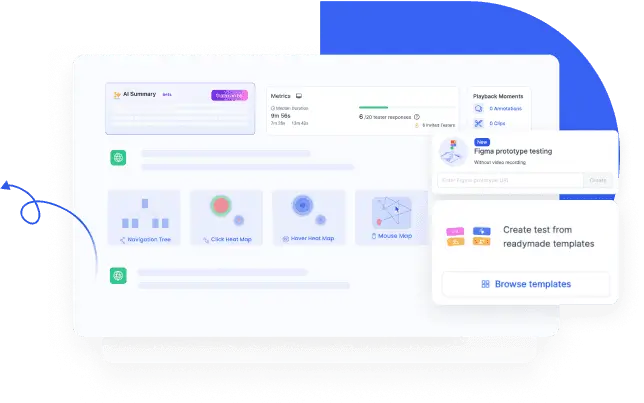
- Surface patterns visually. Visual summaries such as heatmaps and click maps can surface patterns across many sessions at a glance, which helps when there are far too many recordings to watch end to end. Use them to decide where to look more closely, then confirm what you find in the underlying sessions.
- Use AI to accelerate analysis, not replace researcher judgment. This is where AI earns its place at scale. It can take on the heavy lifting of transcription, summarization, tagging, and surfacing potential themes across a large set of responses, work that becomes impractical to do by hand as volume grows. Researchers still review the underlying evidence, validate the themes, and interpret what the findings mean in context. AI helps a team process more data, but it does not remove the need for human interpretation.
Make reporting repeatable. A consistent reporting structure makes it easier for teams to communicate findings and compare studies over time. A scalable report can include:
- Research objectives and questions
- Participant profile and sample
- Key metrics and task results
- Major findings with supporting evidence
- Differences between relevant segments
- Severity or priority of usability issues
- Recommendations and next steps
A repeatable reporting process also makes research easier to consume outside the research team. Stakeholders can quickly understand what was tested, what happened, which findings matter, and what action the evidence supports.
Is scaling actually improving your evidence?
As volume grows, it becomes easy to mistake more data for better data. These checks help you tell whether scaling is strengthening your evidence or simply enlarging it.
| As you scale, ask… | Scaling is working when… |
|---|---|
| Are the same patterns holding across segments and markets? | Findings repeat across groups, not just in the overall average. |
| Is participant quality holding as numbers grow? | Screening and session-quality checks keep pace, so the added volume is usable. |
| Is the extra data still answering the original question? | More sessions sharpen the answer rather than piling on unrelated detail. |
| Can the team still act on the findings? | Analysis keeps up with volume, so results become decisions, not backlog. |
If a study fails these checks, the answer is rarely to collect more sessions. It usually points back to something upstream: unclear tasks, loose screening, or an analysis process that hasn’t scaled with the data. A larger sample size is not a substitute for good study design. When the tasks are ambiguous or the wrong people take part, more data only makes a flawed result look more convincing.
How do you choose a research platform to scale usability testing?
When research volume increases, the testing platform becomes part of the research workflow. The right platform should make it easier to manage larger studies without adding complexity or weakening quality controls.
Look for capabilities that support the full research process, from recruitment and study setup to data collection and analysis.
| Scaling requirement | Platform capabilities to look for |
|---|---|
| Recruit larger or more specific participant groups | Participant screening, quotas, panel access, and support for different geographic or demographic segments |
| Run consistent studies | Reusable study templates, task structures, and standardized settings |
| Maintain data quality | Eligibility controls, response-quality checks, technical compatibility, and session review tools |
| Test across devices and markets | Support for relevant browsers, mobile devices, languages, and geographic locations |
| Handle larger datasets | Search, filtering, segmentation, tagging, and tools for organizing participant responses |
| Analyze results efficiently | Task-level metrics, recordings, transcripts, qualitative responses, and AI-assisted transcription, summarization, tagging, or theme identification |
| Share findings with stakeholders | Clear reporting, exports, collaboration features, and ways to organize evidence alongside findings |
The right mix of capabilities depends on the scale and type of research you run. AI-assisted analysis can be particularly useful as the volume of sessions grows, helping researchers process and organize large amounts of data.
When comparing platforms, evaluate the end-to-end workflow, not just the number of testing methods available. A platform that supports recruitment but makes analysis difficult, for example, may simply move the bottleneck to another stage of the research process.
For a broader comparison of usability testing platforms and the capabilities to evaluate, see our guide to How to Choose a Usability Testing Platform.
Common mistakes to avoid when scaling unmoderated usability testing
Scaling can amplify problems that might go unnoticed in a smaller study. Watch out for these common mistakes:
- Using unmoderated testing for questions that require active probing. Some research needs a live conversation, and forcing it into an unmoderated format wastes the study.
- Writing unclear or overly complicated tasks. Without a moderator to clarify, an ambiguous task produces ambiguous data at scale.
- Scaling participant numbers before validating the study. Adding people to a study that has not been piloted just multiplies the same flaw across every session.
- Recruiting quantity instead of the right participants. A large sample of the wrong users is less useful than a smaller sample of the right ones.
- Ignoring device, browser, or technical differences. Untested combinations can cause broken recordings and lost sessions.
- Collecting more data than the team can meaningfully analyze. Data you never review is not insight, it is overhead.
- Relying on metrics without qualitative context. Completion rates tell you what happened, but not why. Participant comments and recordings can help explain where the actionable findings are.
The Bottom Line
Unmoderated usability testing scales because participants work on their own, removing scheduling and facilitation as limits on how much research you can run. But volume alone does not produce better insight. Teams that scale it well grow recruitment, study design, quality control, cross-market research, and analysis together, so that more studies produce stronger evidence rather than more noise.
Match your platform to the dimensions you need to grow, keep quality controls in place as volume increases, and let each study earn its scale by proving the design works before you add participants.
Frequently asked questions
Can unmoderated usability testing be used for qualitative research?
Yes, depending on the study design. Unmoderated studies can collect open-ended responses, participant comments, recordings, and other qualitative evidence. However, they do not provide the same opportunity for real-time probing and follow-up as moderated research, so they are less suitable when deep exploration of participant reasoning is central to the research question.
Can you run unmoderated usability tests across different markets and languages?
Yes. Use a consistent research framework across markets while adapting the tasks and language to each local context. Have a native speaker review the tasks and messages, and involve someone fluent in the language to interpret the results rather than only translate them.
How do you ensure data quality in unmoderated usability testing?
Start by piloting the study, defining participant and session-quality criteria, and checking the technical setup before launch. During analysis, review sessions for eligibility, incomplete tasks, technical issues, and low-quality responses. Consistent quality checks become increasingly important as participant volume grows.
Can AI analyze unmoderated usability testing results at scale?
AI can speed up transcription, tagging, summarization, and theme spotting, which makes larger studies manageable. Interpreting the results and deciding what to act on remains the researcher’s responsibility, so AI supports the analysis rather than replacing it.